3GS Technical Manual
Issue 4.5 August 2005
Programming Menus 8-29
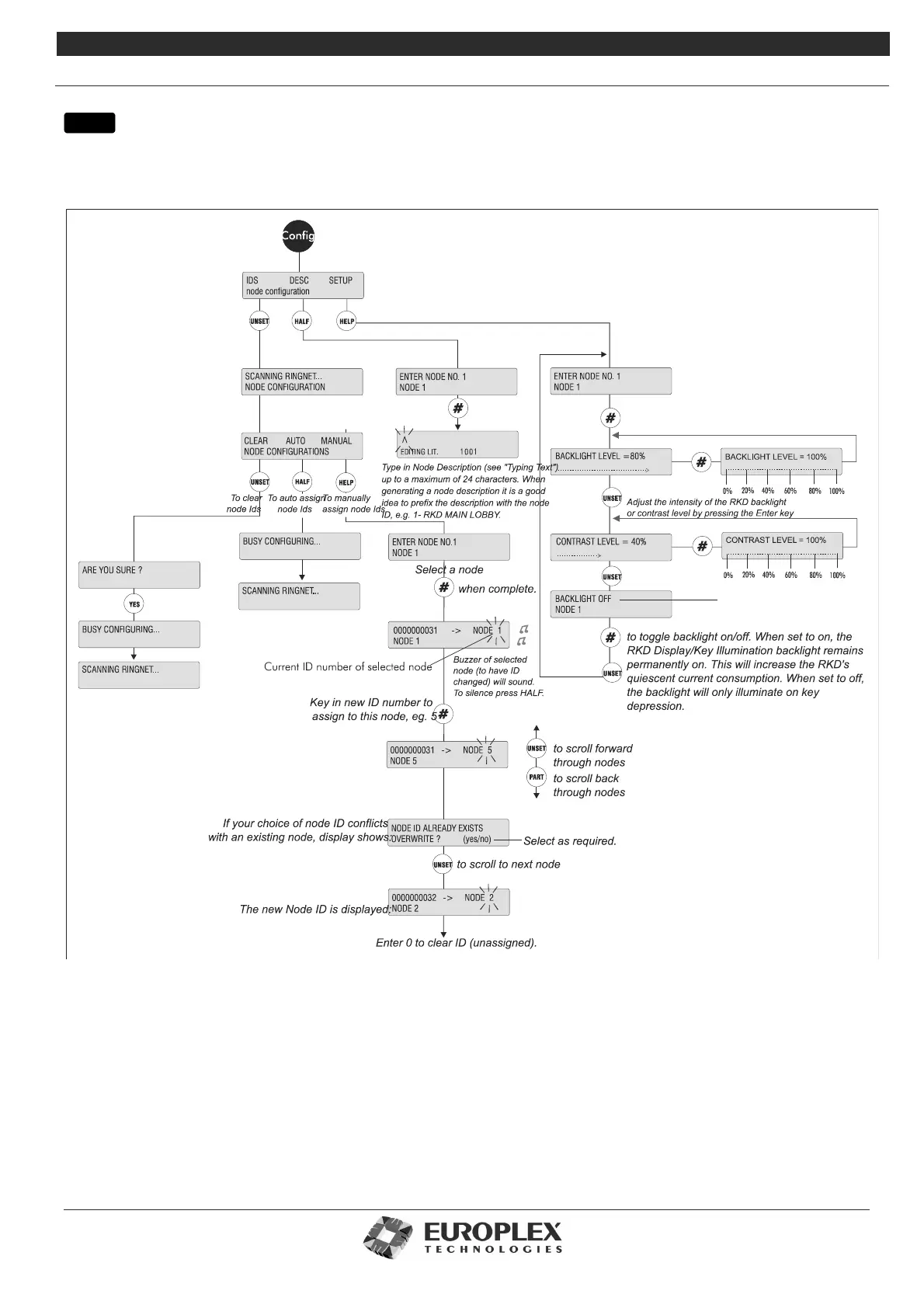
NODE CONFIGURE - NODES - CONFIGURE
Function: The Configure submenu allows you to manually or automatically assign or view a node ID, give nodes a text
description, and adjust the RKD settings.
The three options on the display are:
• IDS: Allows you to manually or automatically assign or view node IDs. This option has three submenus:
Clear - Clears input’s zone assignments from one or more nodes. The buzzer sounds continuously and an alert message is
generated to indicate the inputs are disconnected and the node is lost. The system provides the option to clear zone assign-
ments from an individual node or from all nodes at once.
Auto - Automatically re-assign zone assignments.
Manual - Manually re-assign zone assignments to a new node or input.
•Description: Allows you to enter a node description.
•Setup: Allows you to adjust the node settings.
menu



 To Next Page