3GS Technical Manual
Programming Menus 8-55
Issue 05 April 2005
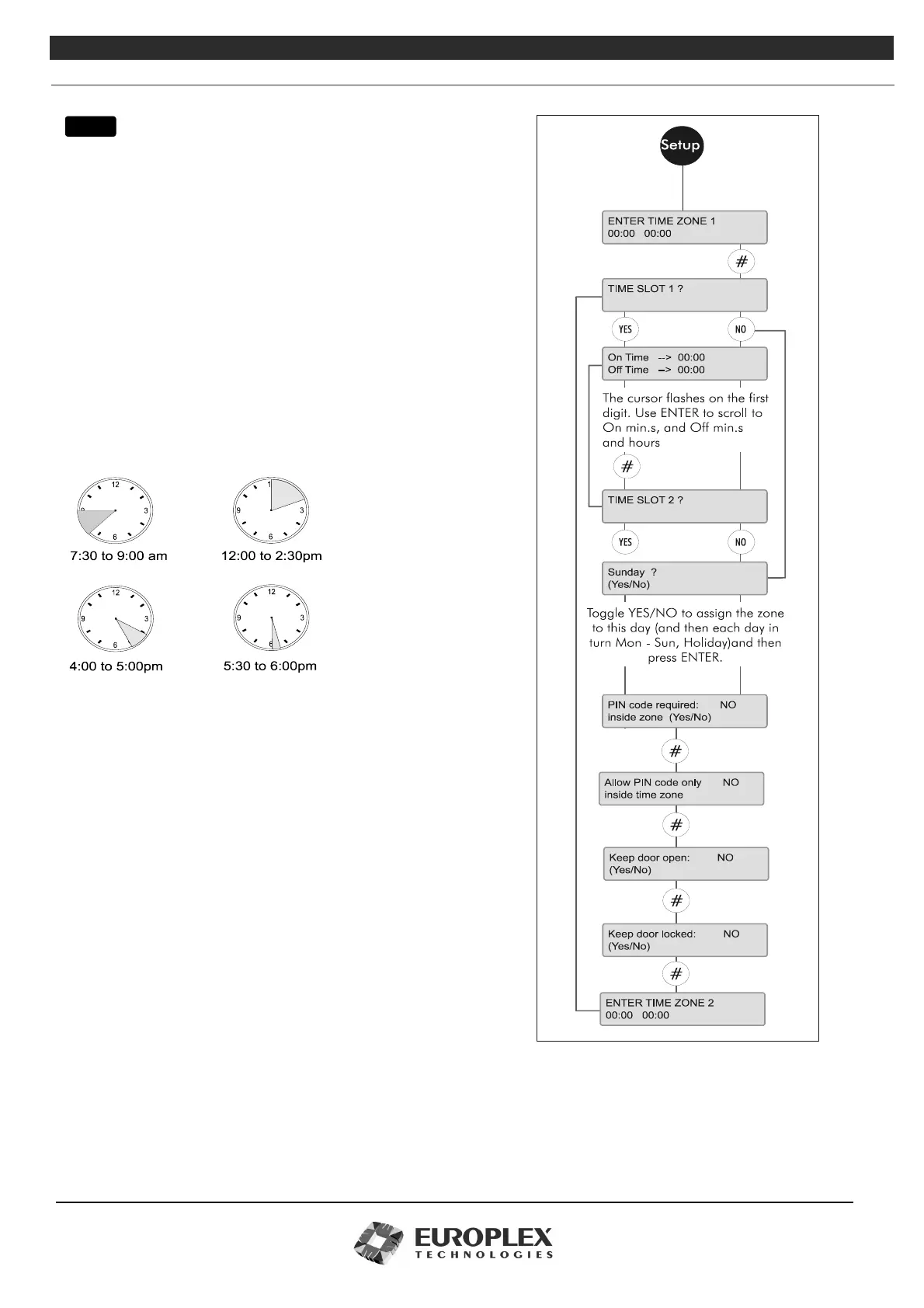
TIME ZONES - SETUP
Function: This menu allows you to setup the time zones on the
3GS access system by specifying the on/off times, the
days of the week, and the conditions to be applied
during the time zone.
Additional Information
Time Zone Setup
Access to a secure area is controlled by means of time zones. A time
zone is that period of time when the door to the area is unlocked,
and access is granted. Each time zone is made up of four separate
on/off slots, which means that the zone can be customised to grant
access for busy periods only, and deny access for the rest of the
time.
Time zones and time slots
A time zone is broken down into four on/off programmable time
slots. For example, access to an area on a typical Monday might be
busiest from 7:30-9am, 12-2:30pm, 4-5pm, and 5:30-6pm. Access
to the area is granted during these slots, and denied for the rest of
the 24 hour period. Alternatively, you may have only 2 busy periods
during the 24 hour day and will need to program slots 1 and 2 only,
leaving slots 3 and 4 blank.
Time zones and days
Time zones can be assigned to any day of the week, or to a holiday.
The above four slot configuration might be suitable for Monday,
Tuesday, Wednesday, and Thursday of the week, whereas Friday,
Saturday/Sunday, and holidays might need a different configuration.
In this way, a time zone is customised to allow for the particular
requirements of a day and then assigned.
Time zones and cards
If no time zone is assigned to a card, the card will have 24 hour access to the door. If a time zone is attached, then the card must
be presented to the door when that time zone is active. Further control is provided by assigning a PIN code to the time zone,
which must be co-coordinated with the setup of the card.
If a PIN code requirement has been assigned to a zone, cards with PIN code assignments will be prompted for the PIN code when
menu



 To Next Page