3GS Technical Manual
Issue 4.5 August 2005
Programming Menus 8-58
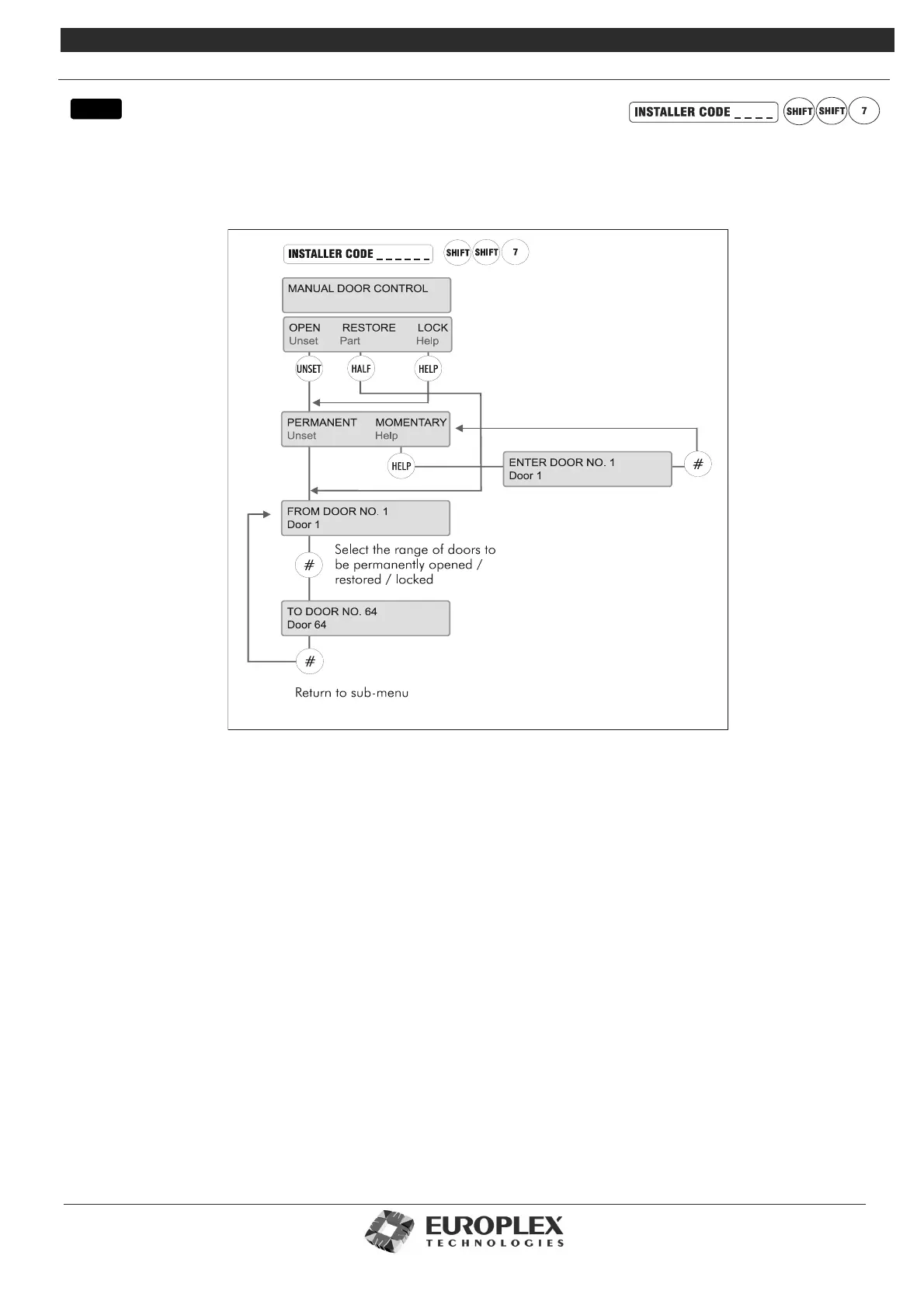
MANUAL DOOR CONTROL
Function:
This menu allows you to permanently open or lock a door or range of doors and to momentarily open a door.
Additional Information
This option provides a manual override on all door, time zone, and card settings. At any stage, you can access this menu to open/
lock a door or series of doors. Once you have selected your doors, the system will check for Lock/Open Inhibits operating on
these doors. See “Door Configure” on page 8-49. If none have been set, the doors can be opened/locked.
The Open menu allows you to open a range of doors permanently (that is, the door will remain open until you manually restore
the original door settings), or momentarily (that is, you can open one door for the number of seconds for which the door lock
would normally remain open once access has been granted). See “Door Configure” on page 8-49 for further information.
When you select Permanent, you are prompted to enter the range of door numbers you wish to open. Enter the From and To
ranges. When the Permanent condition is set on a door, the green LED (access granted) on the node will flash. This allows free
access through the doors selected until restored or locked.
The Momentary sub-menu will ask you for the number of the door you wish to open. Again, enter the number. The green LED
will light steadily while access is granted.
Restore restores all door settings to their defaults. Enter the range of doors to be restored and # to accept and quit. Once defaults
have been restored, the system is in normal operation and no LEDs are lit.
The Lock menu works similarly to Open. When the Lock is manually set on a door, the card reader attached to the door will not
read or accept any cards. When the door is locked in this way, the red LED flashes to indicate access denied.
menu



 To Next Page