DM1200 Digital Communicator/Modem 12-12
#
#
#
#
#
#
#
#
#
#
#
#
###
#
#
#
#
#
#
HELP
HEL P
NO
NO
YES
YES
YES
P 2.2 CS 3655
ENGINEER CODE - - - - - -
TELEPHONE NUMBERS ?
TELEPHONE NUMBERS ?
DIALLING OPTIONS ?
CHANNEL OPTIONS ?
CHANNEL NUMBER 01
CHANNEL NUMBER 02
RES POS DELAY=003
RES POS DELAY=000
OUTPUT 03 PHONES 1R2
OUTPUT 10 PHONES 1R2
CHANNEL NUMBER 03
CHANNEL OPTIONS ?
ARE YOU SURE ?
END
CENT. STAT. NUMBERS ?
CENT. STAT. NUMBERS ?
CENT. STAT. NO 1
CENT. STAT. NO 3
CENT. STAT. NO 2
W 87654321
W 12345678
PHONE 1 ACC 9999
PHONE 2 ACC 8888
1 2 3 4 5 6
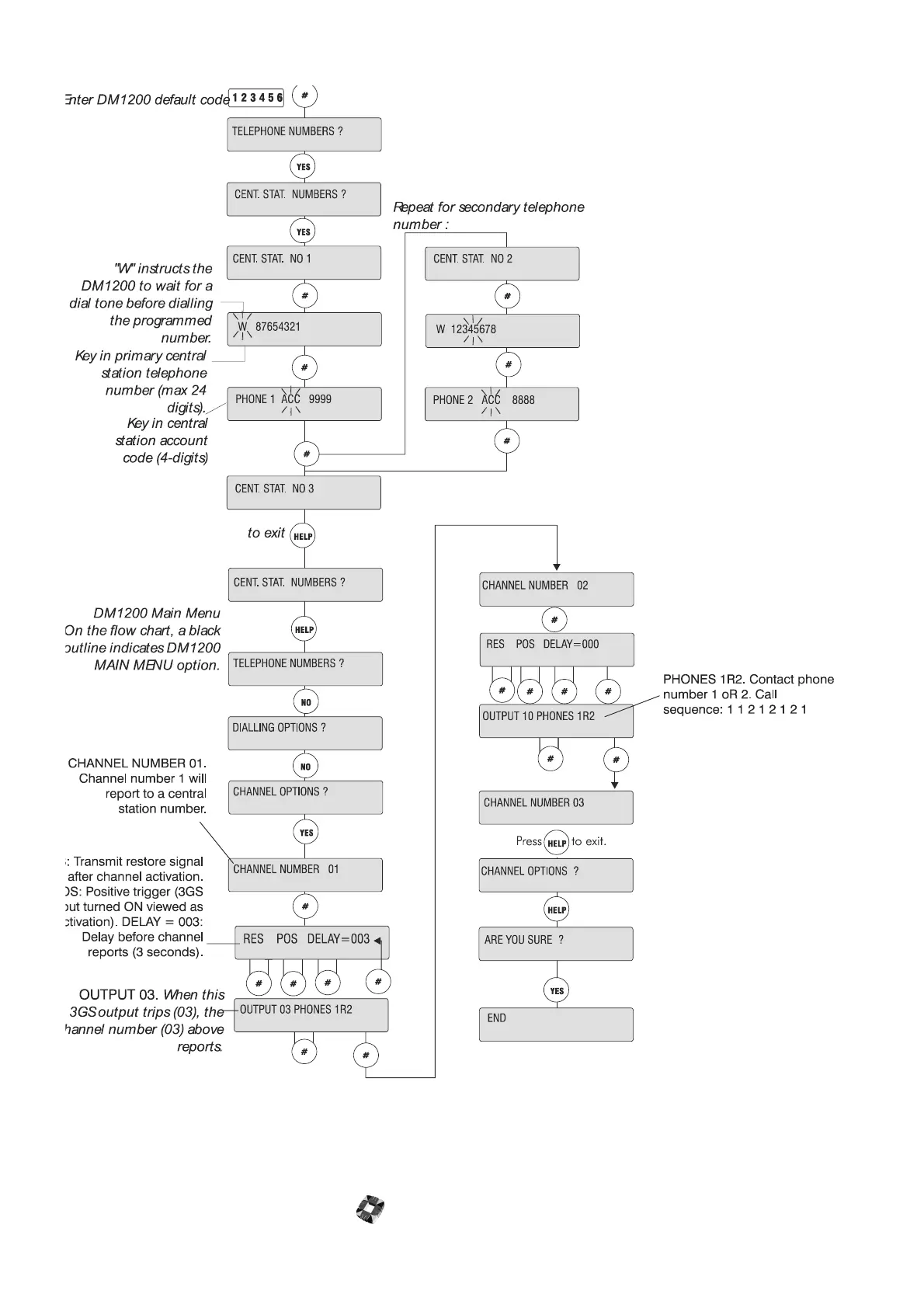
Enter DM1200 default code
DM1200 Mai n Menu
On t h e f l ow char t , a bl ack
out line indicates DM1200
MAIN MENU option.
RES: Transmit restore signal
after channel activation.
POS: Positive trigger (3GS
output turned ON viewed as
activation). DELAY = 003:
Delay before channel
reports (3 seconds).
CHANNEL NUMBER 01.
Channel number 1 will
report to a central
station number.
OUTPUT 03.
Wh en t h i s
3GS output trips (03), the
channel number (03) above
reports.
PHONES 1R2. Contact phone
number 1 oR 2. Call
sequence: 1 1 2 1 2 1 2 1
"W" i nst ruct s the
DM1200 to wait for a
dial tone before diall ing
the programmed
number.
Key in pri mary cent ral
station telephone
number (max 24
digits).
Repeat for secondary telephone
number :
Press to exit.
Key i n c e n t r al
station account
code (4-digits)
HEL P
HEL P
YES
to exit
DM 1200



 To Next Page