Issue 4.5 Aug 2005 Network Router 13-3
NETWORK ROUTER OVERVIEW
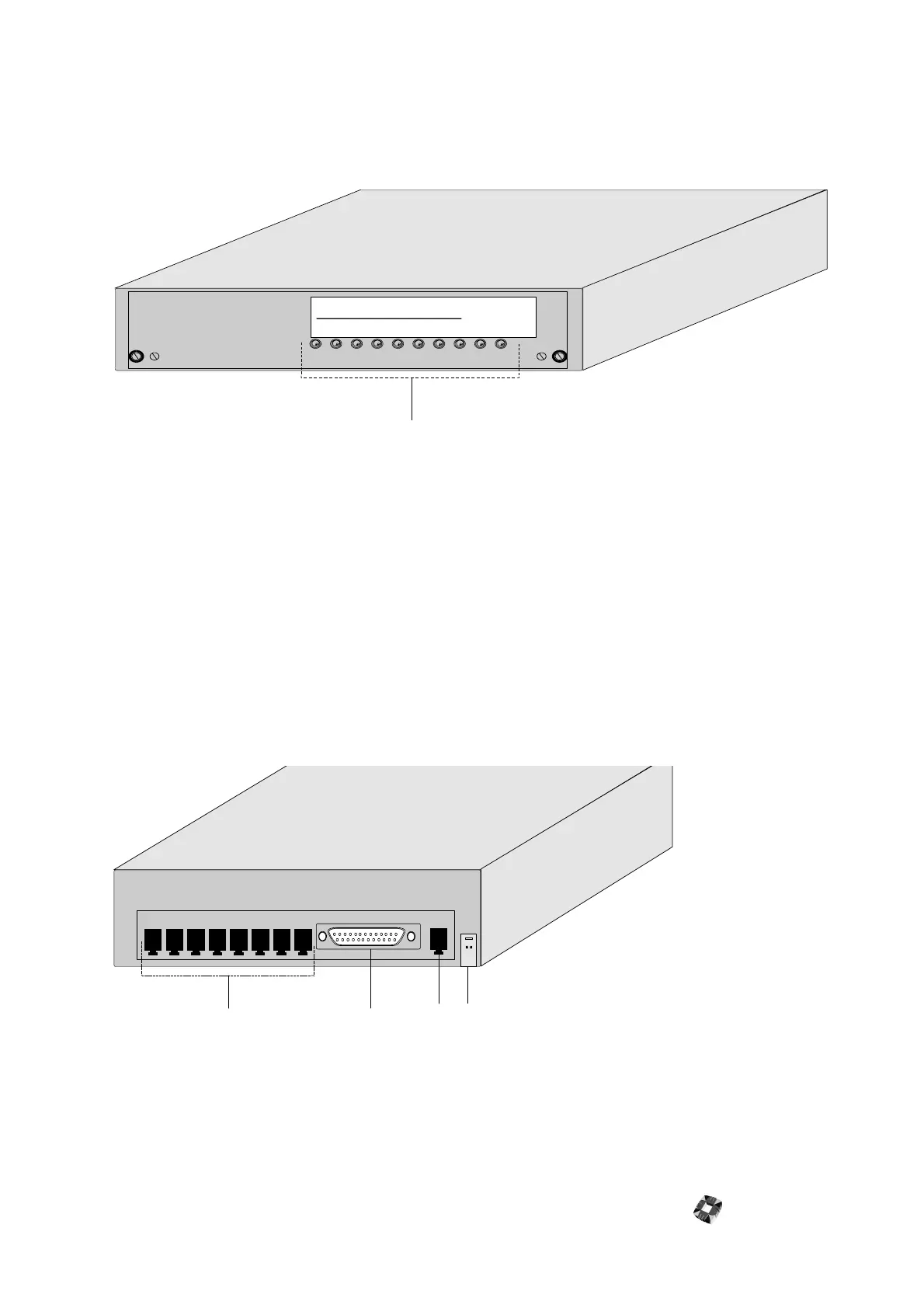
The Europlex RS232/422 Network Router is used to connect up to 8 3GS Panels (or any other addressable RS232/
RS422 device) via RJ45 Slave Output connections. A PC serial port cable and 8 RJ45 to 25 pin D-Type Slave Output
Cables are provided.
Each RJ45 connection and cable has all the signals necessary to enable a 3GS to be accessed by either RS232 or
RS422. Both RS232 and RS422 devices can be connected to different ports on the same network router.
LEDs
● LED8 - Communications indicator channel 8
● LED7 - Communications indicator channel 7
● LED6 - Communications indicator channel 6
● LED5 - Communications indicator channel 5
● LED4 - Communications indicator channel 4
● LED3 - Communications indicator channel 3
● LED2 - Communications indicator channel 2
● LED1 - Communications indicator channel 1
● Power LED (red)
● Status LED (green)
햲
RS232/RS422 Slave outputs 1-8
햳
RS232 Master (PC serial port)
햴
RS422 Master
햵
Power connection 12V
1
1
2
43
Backplate
Frontplate



 To Next Page