DMP 128 FlexPlus • Dante Controller 117
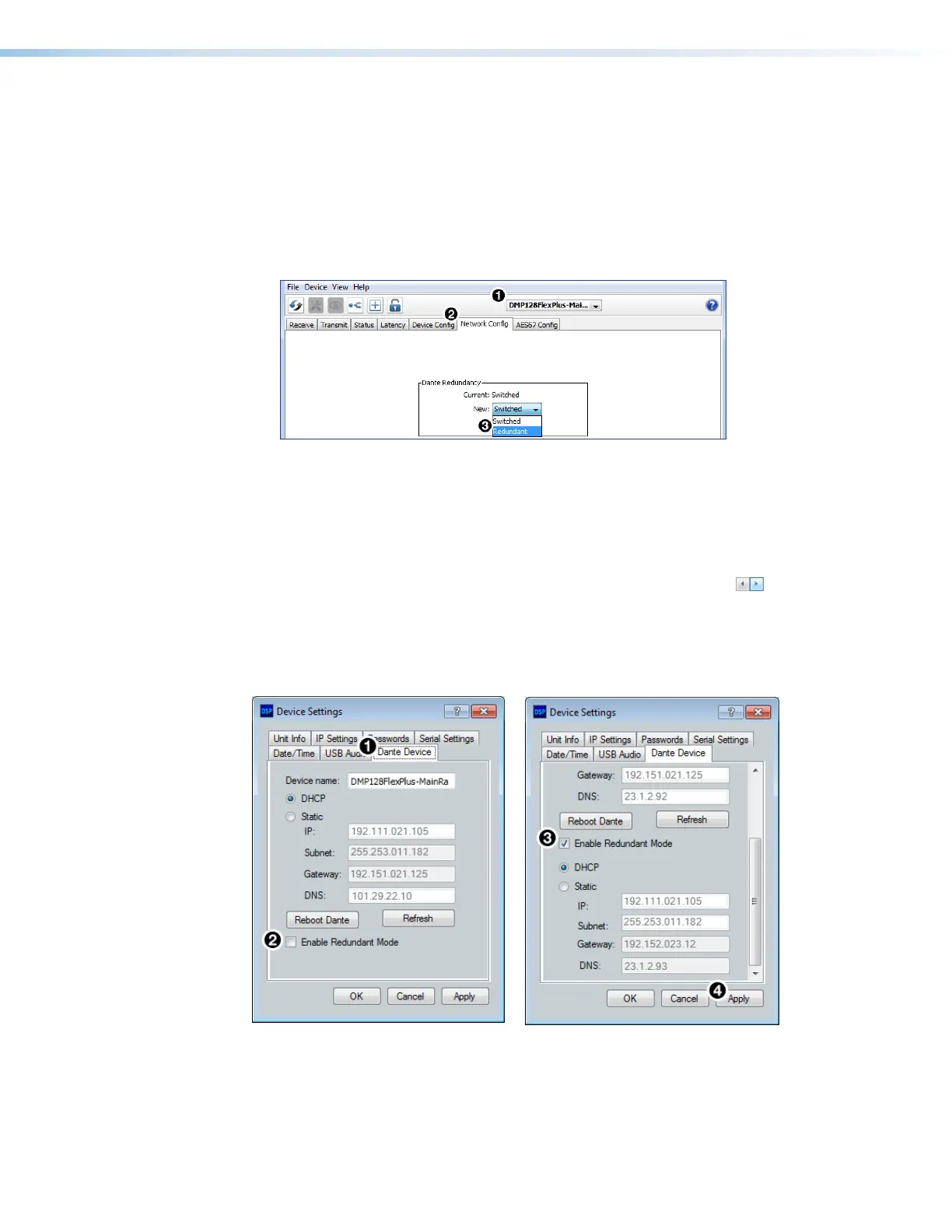
To configure the DMP 128 FlexPlus in redundant mode using Dante Controller:
1. Open Dante Controller.
2. Press <Ctrl+D> on the keyboard to access the Device View dialog box.
3. Select the desired DMP 128 FlexPlus from the (Choose a Dante Device...)
drop-down menu (see figure 182,
1
below).
4. Select the Network Config tab (
2
).
5. From the Dante Redundancy panel, use the drop-down to select Redundant (
3
).
Figure 182. Redundant Mode Configuration in Dante Controller
To configure the DMP 128 FlexPlus in redundant mode using DSP Configurator:
1. Use DSP Configurator to connect to the DMP 128 FlexPlus in Live mode (see Live and
Emulate Panel on page17).
2. Select Tools > Device Settings.
3. In the Device Settings dialog box, use the right navigation arrow ( ) to navigate to
and select the Dante Device tab (see figure 183,
1
below).
4. Select Enable Redundant Mode (
2
).
5. Select DHCP or Static IP and enter a valid redundancy network configuration (
3
).
6. Click Apply (
4
).
Figure 183. Redundant Mode Configuration in DSP Configurator
172 Redundant config in Dante Cont
173 Redundant Mode DSPC



 To Next Page