FARO Edge
September 2012
101
Chapter 7: Software
Chapter 7: Software
This chapter covers the Edge software. Open the Fold-Down Touch Screen
Controller to access the MAIN menu. If it is already open when you apply power
to the Edge, you will see a “FARO” screen as the system loads, and then an
“Edge” screen as the software loads.
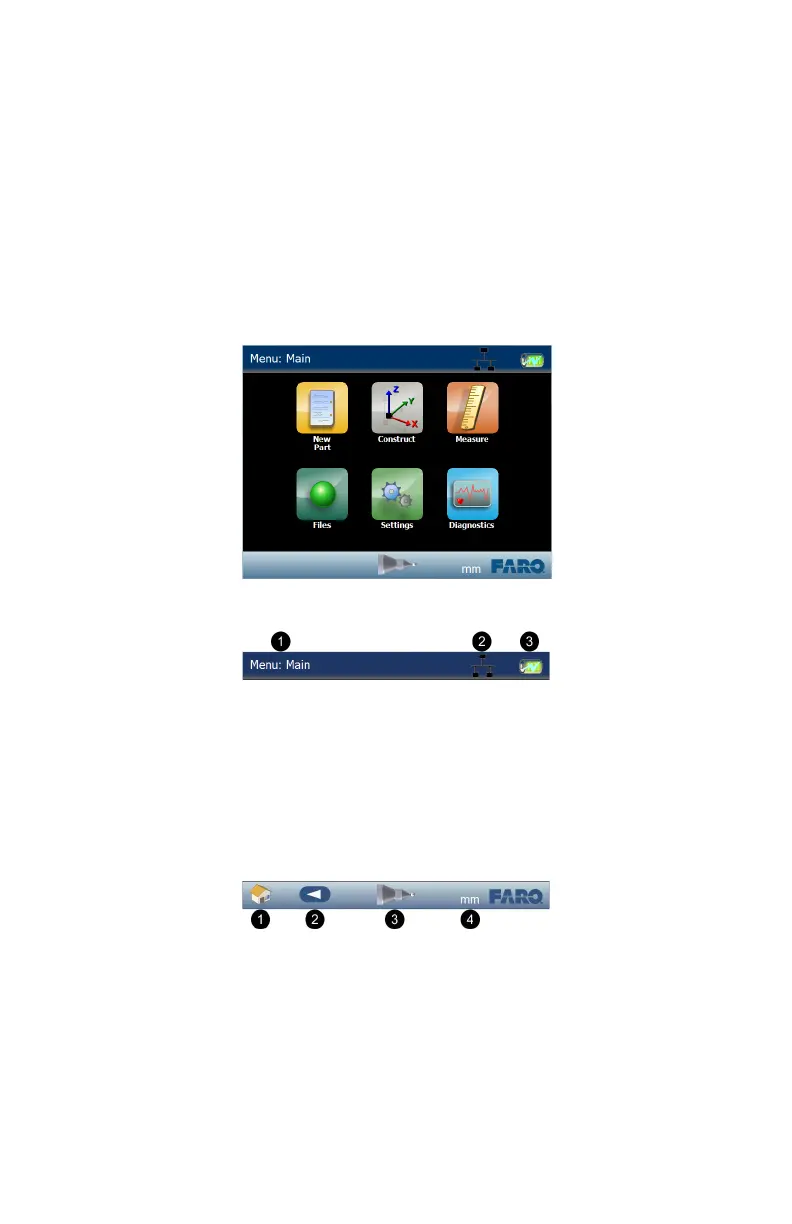
Screen Layout
Across the top of the screen are:
Menu: Indicator - displays the name of the current menu screen.
Wireless Indicator - displays any wireless interface that is currently active.
Battery Pack Indicator - displays the current charge level of the Edge
battery pack, that it is not currently installed, or that the Edge is connected to
the power supply.
Across the bottom of the screen are:
HOME icon - touch to return to the MAIN menu.
BACK icon - touch to return to the previous menu.
COMPENSATION icon - touch to enter the COMPENSATION menu. See
“Compensation” on page 160.
UNITS icon - touch to switch the current measurement units.
Figure 7-1 Edge Screen
Figure 7-2 Edge Screen Indicators
Figure 7-3 Edge Screen Indicators
08M52E00_FaroArm_Edge.book Page 101 Thursday, October 4, 2012 9:31 AM



 To Next Page