FARO Edge
September 2012
185
Chapter 10: Configuring the FARO Edge in CAM2 Measure
Hole Compensation Method
Perform the Hole Compensation using the
FARO probe compensation cone or a 5mm
diameter machine drilled hole. The hole does
not have to be exactly 5mm, but it must be
smaller than the probe’s diameter and have a
smooth seat.
Collect all of the points in this method by
holding down the GREEN button. The Edge
will collect points as fast as possible
(“scanning”) until you release the GREEN
button.
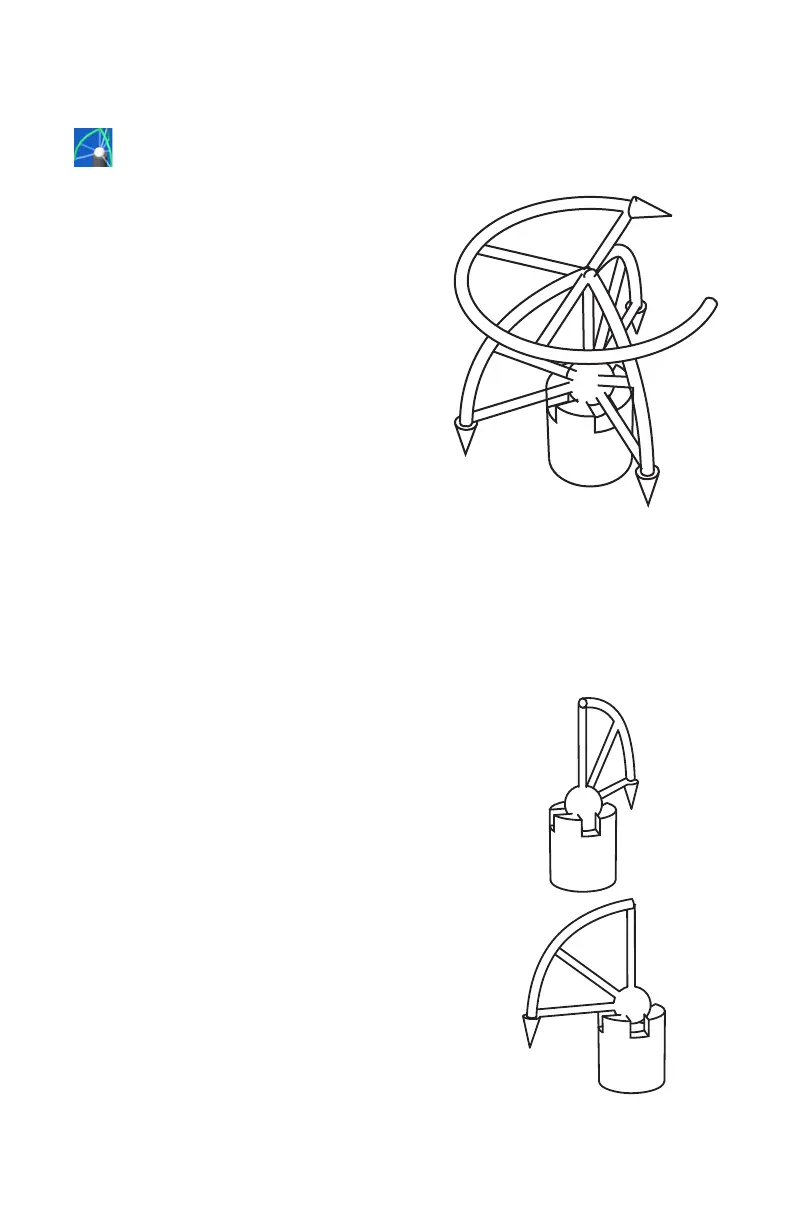
1 Place the ball probe in the hole. Start in a
vertical position.
2 Press and hold the GREEN button. Sweep the handle down to one of the
horizontal positions. Be sure that the ball probe remains firmly seated in the
hole.
3 Release the GREEN button to move to the next position.
N
OTE: To remove any unwanted points, press and hold the RED button.
4 Repeat for each position.
• Digitize points in the hole and sweep to
position #1.
• Digitize points in the hole and sweep to
position #2.
Position #1
Position #4
Position #2
Position #3
08M52E00_FaroArm_Edge.book Page 185 Thursday, October 4, 2012 9:31 AM



 To Next Page