FARO Edge
September 2012
49
Chapter 3: Operation
The Wireless Zero Configuration can also be started and stopped from a
command prompt. To start the Wireless Zero Configuration, run the following
command:
net start wzcsvc
To stop the Wireless Zero Configuration, run the following command:
net stop wzcsvc
FARO Ethernet Setup
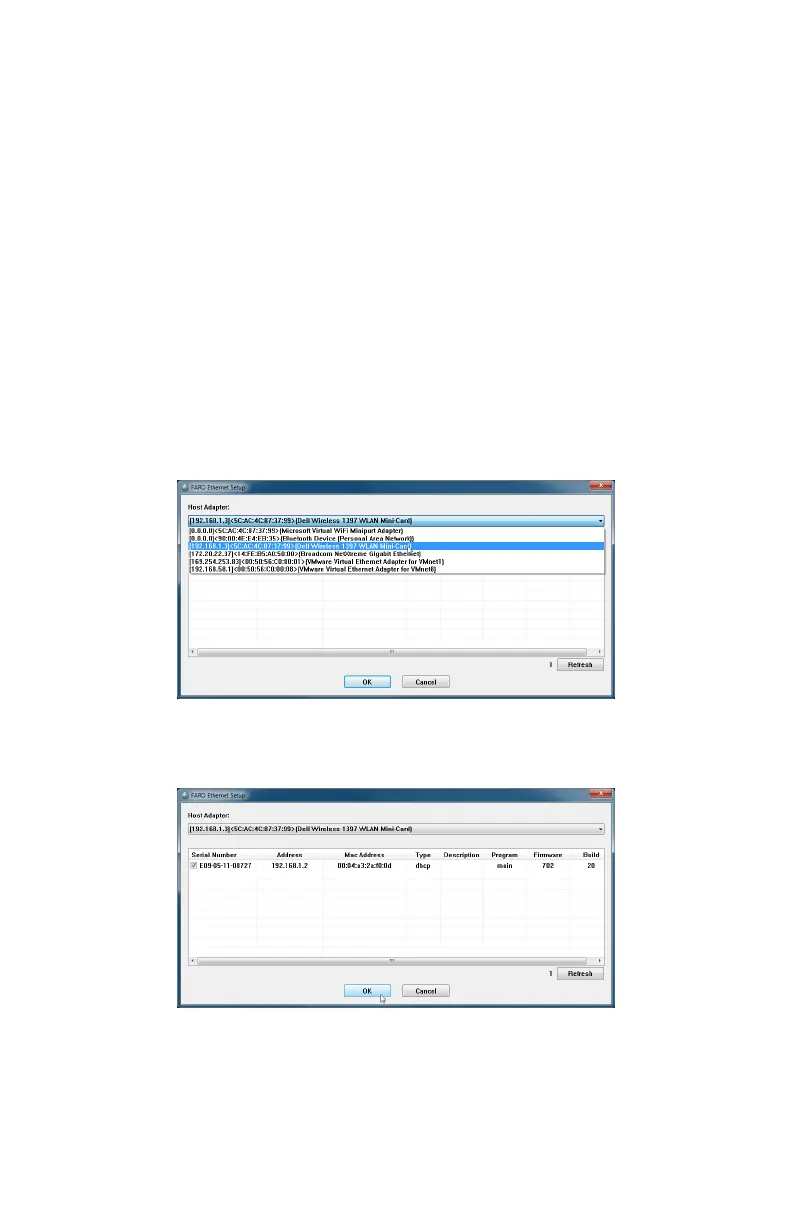
The FARO Ethernet set up program connects the Edge on the network to the
FaroArm driver. To complete this connection:
1 Click START < ALL PROGRAMS < FARO < FARO ETHERNET SETUP.
2 In the FARO E
THERNET SETUP dialog box, choose the correct Host Adapter
from the H
OST ADAPTER drop-down list.
3 Select your Edge from the list. Click the Refresh button to search the adapter
again if you do not see your Edge.
4 Click OK.
Figure 3-14 Connecting the Edge to the Computer
Figure 3-15 Connecting the Edge to the Computer
08M52E00_FaroArm_Edge.book Page 49 Thursday, October 4, 2012 9:31 AM



 To Next Page