FARO Edge
September 2012
190
Chapter 10: Configuring the FARO Edge in CAM2 Measure
Diagnostics
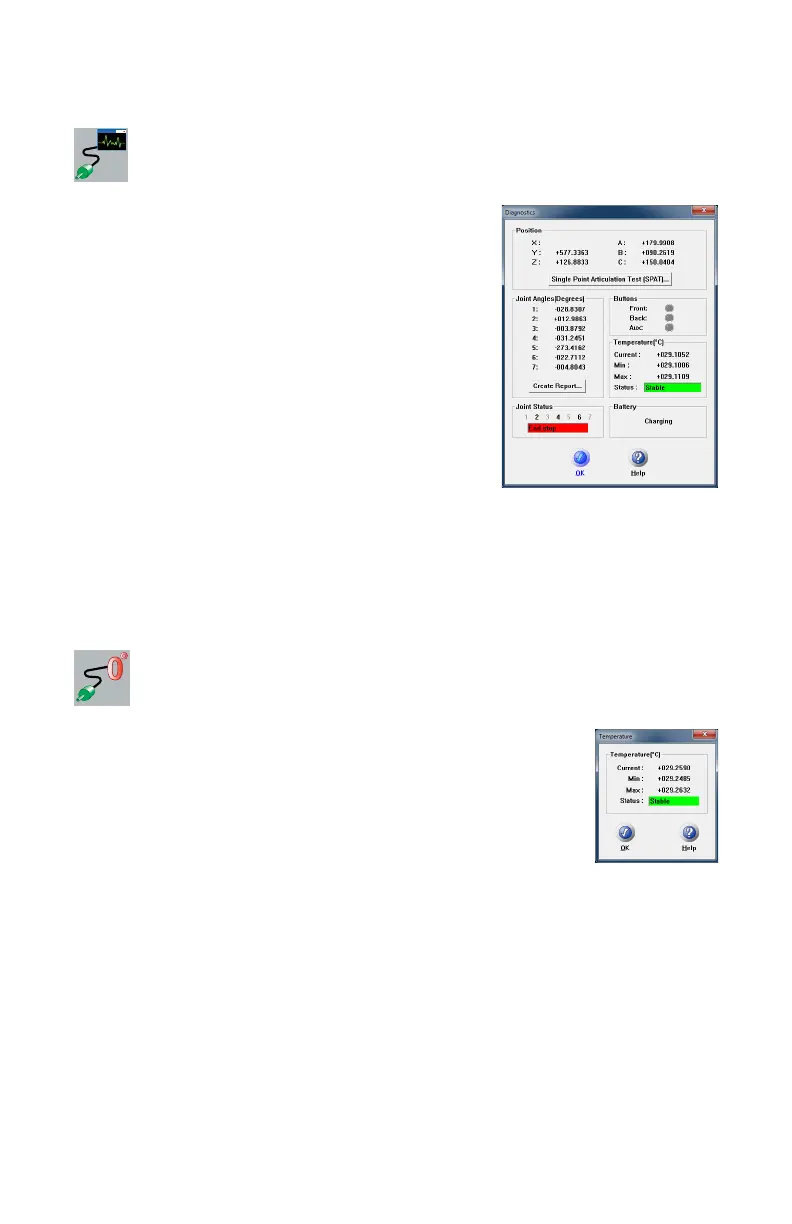
Select DEVICES < DIAGNOSTICS from the
DEVICES menu. The D
IAGNOSTICS dialog box
displays:
• X, Y, Z Machine Coordinates.
• Encoder angles for each joint of the Edge.
• FRONT (Green) and BACK (Red) button, and
Auxiliary Port operations.
• The Temperature of the Edge’s internal sensor.
• The Joint Status of each joint of the Edge which
also includes the encoder end stop warnings.
• The status of the Edge battery pack.
Click the PERFORM SINGLE POINT ARTICULATION TEST (SPAT) button
to run a Single Point Articulation Test (SPAT) with your Edge. You can save this
report to a file which you can send to FARO’s Customer Service Department.
For more information, see “Single Point Articulation Test (SPAT)” on page 94.
Temperature
-Select DEVICES < TEMPERATURE from the DEVICES
menu. This command displays the current temperature of the
Edge and the elapsed time of the temperature sampling.
Because different components heat up or cool down at different
rates, the Edge must be at a steady state temperature (within ±3°
Celsius for five minutes) before measuring with the device.
08M52E00_FaroArm_Edge.book Page 190 Thursday, October 4, 2012 9:31 AM



 To Next Page