FARO Edge
September 2012
30
Chapter 2: Setup
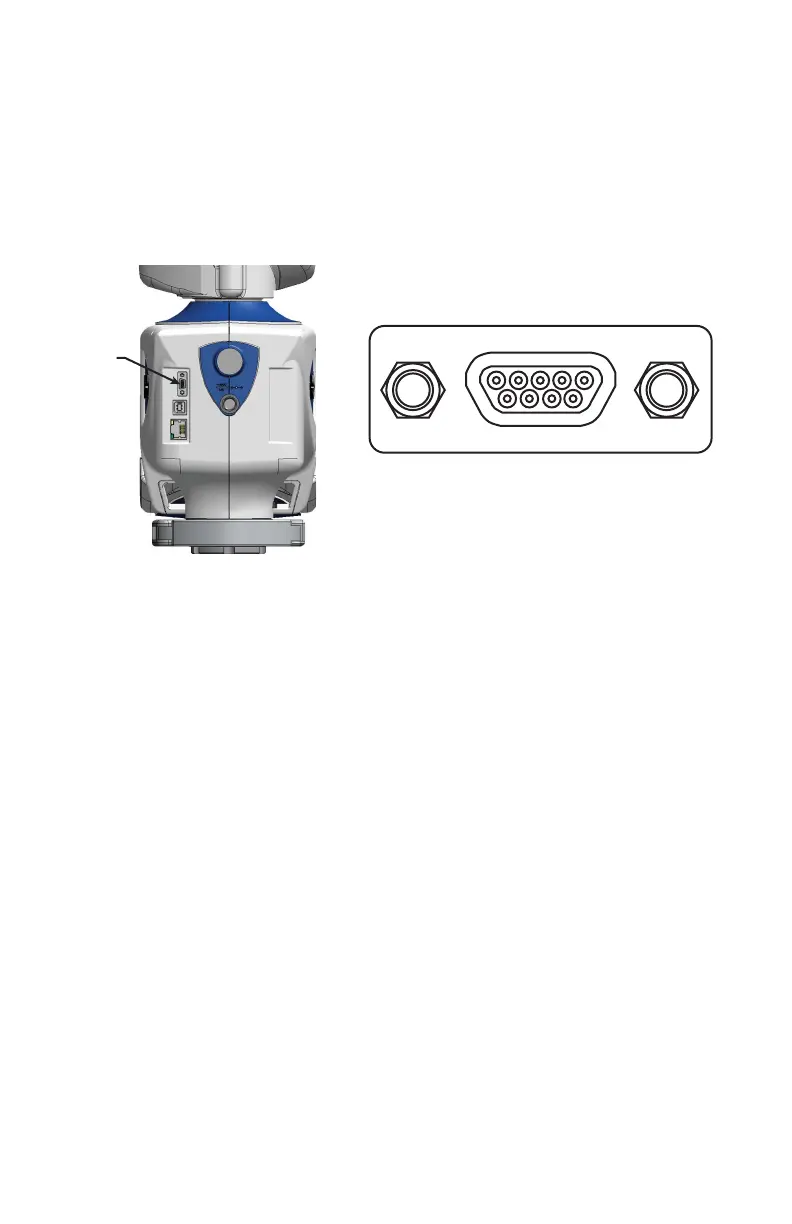
Auxiliary Port
On the front side of the Edge base, an optional 9-pin communications port is
available to connect external equipment. To get a list of approved FARO devices,
contact your Customer Service Representative by Phone, Fax or E-Mail. See
“Technical Support” on page 191.
WARNING: Only use FARO approved devices in this port. For more
information about approved FARO devices, contact FARO’s Customer
Service. Using other devices could damage your system and will void your
maintenance/warranty service plan.
Packing the Edge
The Edge should be packed very carefully to prevent shipping damage. These
instructions are also located in the shipping case pouch.
1 Turn off the Edge, remove the battery pack, disconnect all cables, and unlock
the handle so it is hanging down.
N
OTE: Remove the 7-Axis Handle from the Edge before packing. See “7-
Axis Handle” on page 23.
Figure 2-20 Edge Auxiliary port
08M52E00_FaroArm_Edge.book Page 30 Thursday, October 4, 2012 9:31 AM



 To Next Page