FARO Edge
September 2012
35
Chapter 3: Operation
Chapter 3: Operation
This chapter describes the controls, visual indicators, and advanced connection
options for the Edge. Make sure that you have read the setup instructions and set
up your Edge properly. For more information, see “Setup” on page 13.
Numerical and Signal Processing
The Edge has a complete electronics system located within the body of the Edge.
Signals from each joint are processed and positional data is sent out to the fold-
down touch screen controller, or the host computer.
N
OTE: The Edge electronics go into sleep mode, or turn off, after two hours of
no encoder movement. Move the Edge joints to exit sleep mode and reference
the encoders to continue measuring. See “Referencing the Encoders” on
page 38. Sleep mode is an option. See “Hardware Configuration” on
page 178.
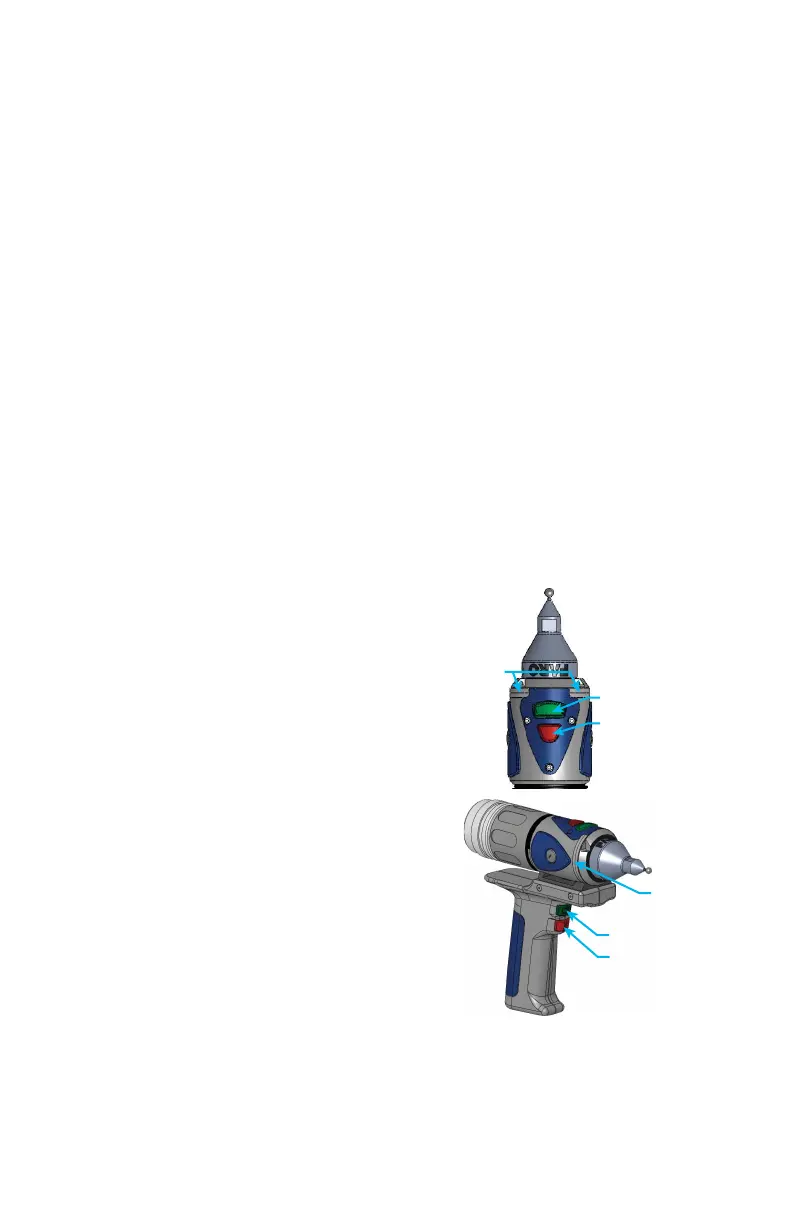
Handle LED
After applying power to the Edge, the Handle
LED is SOLID YELLOW while an internal
startup check runs. After this is complete, the
LED indicates the following:
• FLASHING BLUE - if the Edge successfully
communicates with the computer, and the
encoders are not referenced. See “Referencing
the Encoders” on page 38.
• SOLID BLUE - if the Edge successfully
communicates with the computer, and the
encoders are referenced. See “Referencing the
Encoders” on page 38.
• SOLID GREEN - if the Edge successfully
communicates with the computer, and the
encoders are referenced - Renishaw Probe
only. See “Renishaw TP-20 Probe
Installation and Operation” on page 69.
• SOLID RED - if there is an error in the Edge.
The LED will also indicate that a button is pressed. See “Edge Handle Buttons”
on page 36.
LED
BACK BUTTON
FRONT BUTTON
LED
BACK BUTTON
FRONT BUTTON
08M52E00_FaroArm_Edge.book Page 35 Thursday, October 4, 2012 9:31 AM



 To Next Page