FARO Edge
September 2012
178
Chapter 10: Configuring the FARO Edge in CAM2 Measure
Hardware Configuration
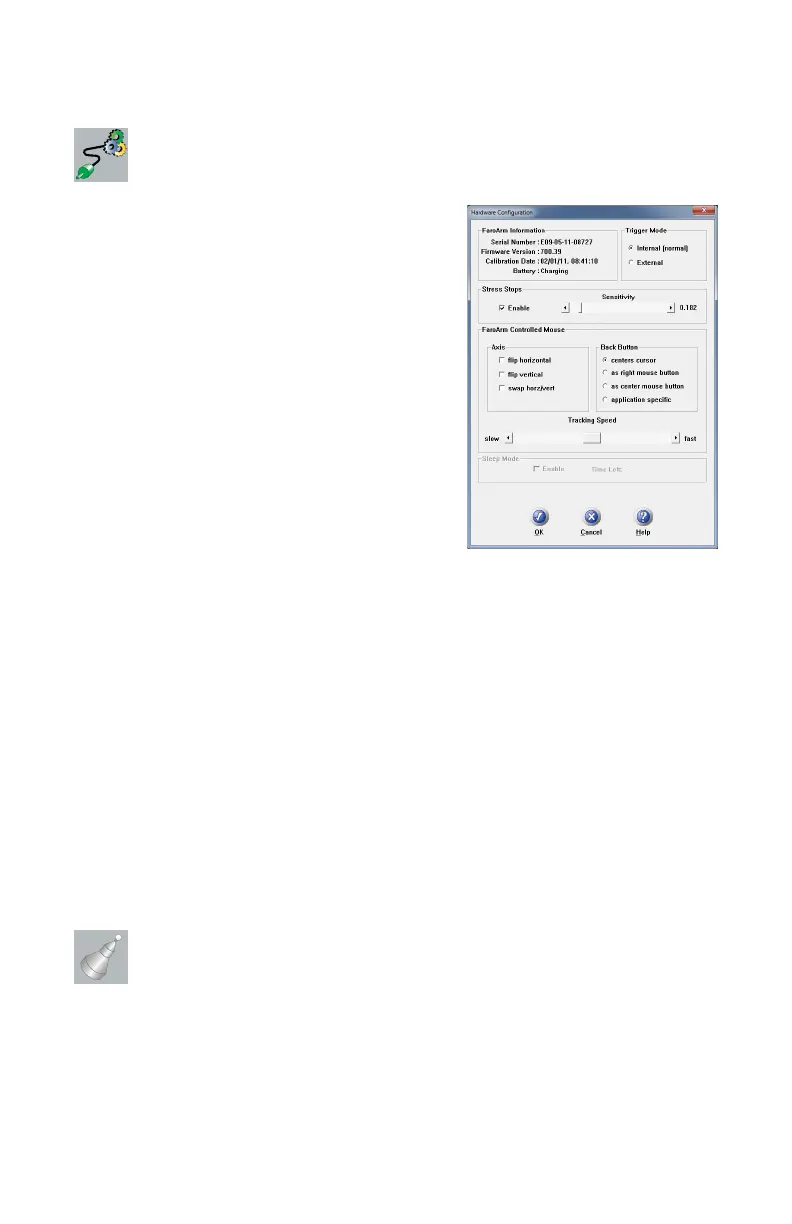
Select DEVICES < HARDWARE CONFIG
from the DEVICES menu. In the H
ARDWARE
C
ONFIGURATION dialog box you can:
• View the current information about the Edge.
• Set the Trigger mode.
• Enable/disable Stress Stops and adjust the
sensitivity. See “Error and Status Indicators”
on page 36.
• Set the arm controlled mouse settings.
• Enable/disable Sleep Mode.
Click OK to accept the changes. Click the
CANCEL button to discard any changes and exit
the command.
Stress Stops: The default value is 0.182 and should rarely be set any lower.
FaroArm Controlled Mouse: The movement of the mouse cursor can be
switched as it relates to the movement of the probe.
Set an option for the device’s BACK (Red) button. These options are ignored
during any measurement command.
• Application Specific - sends a special signal to the application software. The
software can use this special signal to launch any command. For example, this
repeats the last command in FARO’s CAM2 Measure X.
Tracking Speed: Adjust the speed of the cursor is adjusted using the Tracking
Speed slider.
Sleep Mode: The Edge shuts down with no activity after two hours. T
IME LEFT is
the remaining time before the Edge shuts down.
Probes
Select DEVICES < PROBES from the DEVICES menu. In the COMPENSATION
dialog box you can:
• Select the current probe and view the C
OMPENSATION STATUS.
• Create, Edit or Delete a probe.
08M52E00_FaroArm_Edge.book Page 178 Thursday, October 4, 2012 9:31 AM



 To Next Page