FARO Edge
September 2012
39
Chapter 3: Operation
CAUTION: Complete all cable connections before applying power to the
computer and the Edge.
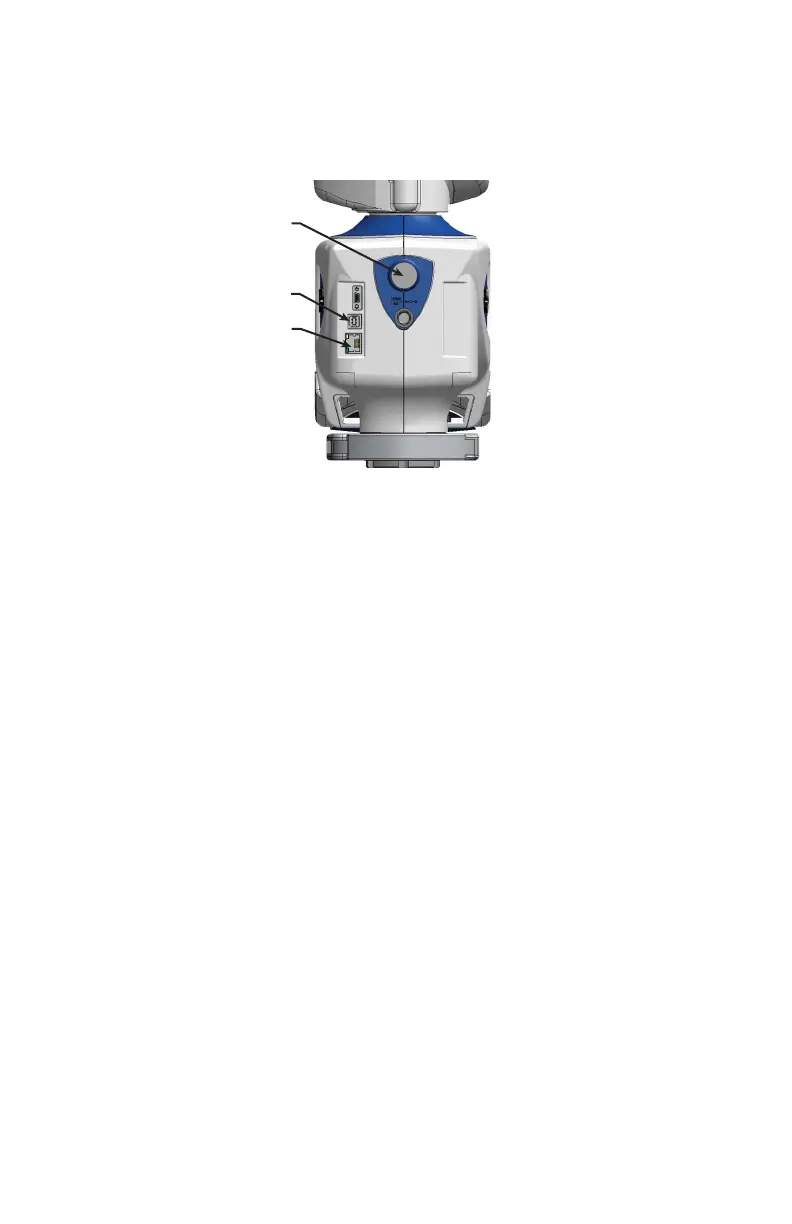
USB
USB communication connects from the Edge to the computer using a standard
USB cable. High speed operation is supported.
The USB connector is located on the back side of the base.
Ethernet
Ethernet communication connects from the Edge to the computer using a regular
or crossover twisted-pair Ethernet cable (Cat 5, Cat5e or Cat 6) with RJ-45
connectors. When Ethernet is used the Edge is configured as a DHCP (Dynamic
Host Configuration Protocol) client.
The Ethernet connector is located on the back side of the base.
N
OTE: In a multiple computer networking environment, you should consult
your Information Technology (IT) department for assistance with installing the
Edge.
After connecting the Ethernet cable, use the Fold-Down Touch Screen Controller
to set up the Ethernet communication. For more information, see “Ethernet” on
page 152.
On/Off Switch
USB Port
Ethernet Port
Figure 3-7 Edge wired communication ports
08M52E00_FaroArm_Edge.book Page 39 Thursday, October 4, 2012 9:31 AM



 To Next Page