FARO Edge
September 2012
20
Chapter 2: Setup
Installing Probes
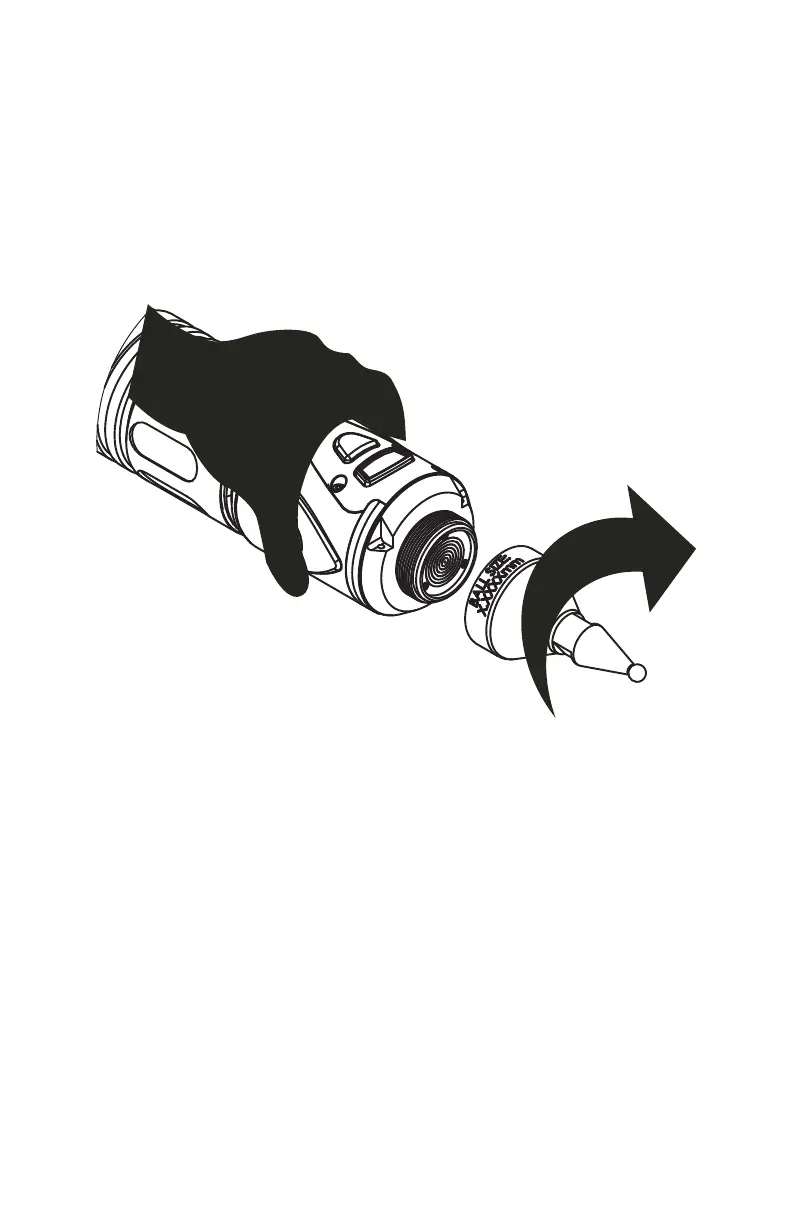
The probe attaches to the handle at the end of the Edge. Use the 12mm wrench in
the Probe Case to install the probe.
N
OTE: Use the FARO Probe Torque Wrench to tighten the FARO i-Probe. The
probe wrench will break free when you apply the proper amount of torque.
1 Hold the button area near the end of the Edge with one hand.
CAUTION: Do not hold the Edge except in the button area when installing a
probe. Holding the Edge at the last joint may stress the tube and damage the
system.
2 Rotate the probe clockwise and thread the probe into the Edge.
3 Use the 12mm wrench to hand-tighten the probe.
CAUTION: Only hand-tighten the probe with the 12mm wrench. Do not
over-tighten the probe.
Before measuring with the Edge the probe must be compensated. Use the
PROBES command on the controller, or your measuring software, to set up and
compensate the probe.
For more information, see “Probes” on page 178.
Figure 2-10 Installing a Probe
08M52E00_FaroArm_Edge.book Page 20 Thursday, October 4, 2012 9:31 AM



 To Next Page