FARO Edge
September 2012
36
Chapter 3: Operation
Edge Handle Buttons
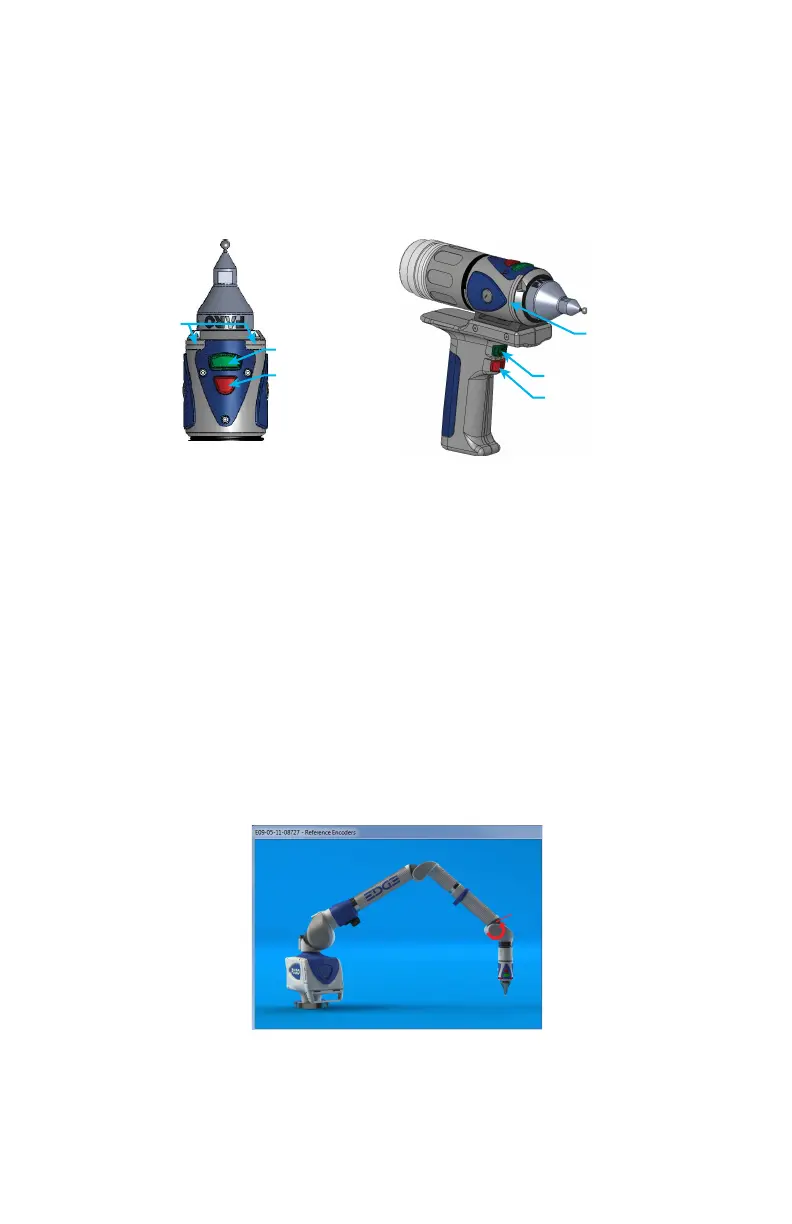
The Edge Handle has two buttons and an LED. When a button is pressed, the
LED light turns on (green or red) and the fold-down touch screen controller or
host computer sounds. See “Handle LED” on page 35.
Use the FRONT button to collect readings and accept a measurement.
• The FRONT button is green and nearest the probe.
Use the BACK button to record probe compensation or reject a measurement.
• The BACK button is red and is nearest the handle.
Error and Status Indicators
Visible on the controller and through the FaroArm driver interface to the
measuring software, the Edge generates and displays errors in the E
ND STOP/
S
TRESS WARNING dialog box, and the Handle LED turns SOLID RED.
N
OTE: The Edge does not output data until the error has been cleared.
• The encoder end stop warnings - This warning appears when an encoder
reaches one end of its rotation.
• The tube stress stop warnings - This warning appears when there is stress on
one of the tubes or encoder joints. The stress stop warnings may be disabled.
Figure 3-1 Edge Handle Buttons
Figure 3-2 Edge end stop warning
LED
BACK BUTTON
FRONT BUTTON
LED
BACK BUTTON
FRONT BUTTON
08M52E00_FaroArm_Edge.book Page 36 Thursday, October 4, 2012 9:31 AM



 To Next Page