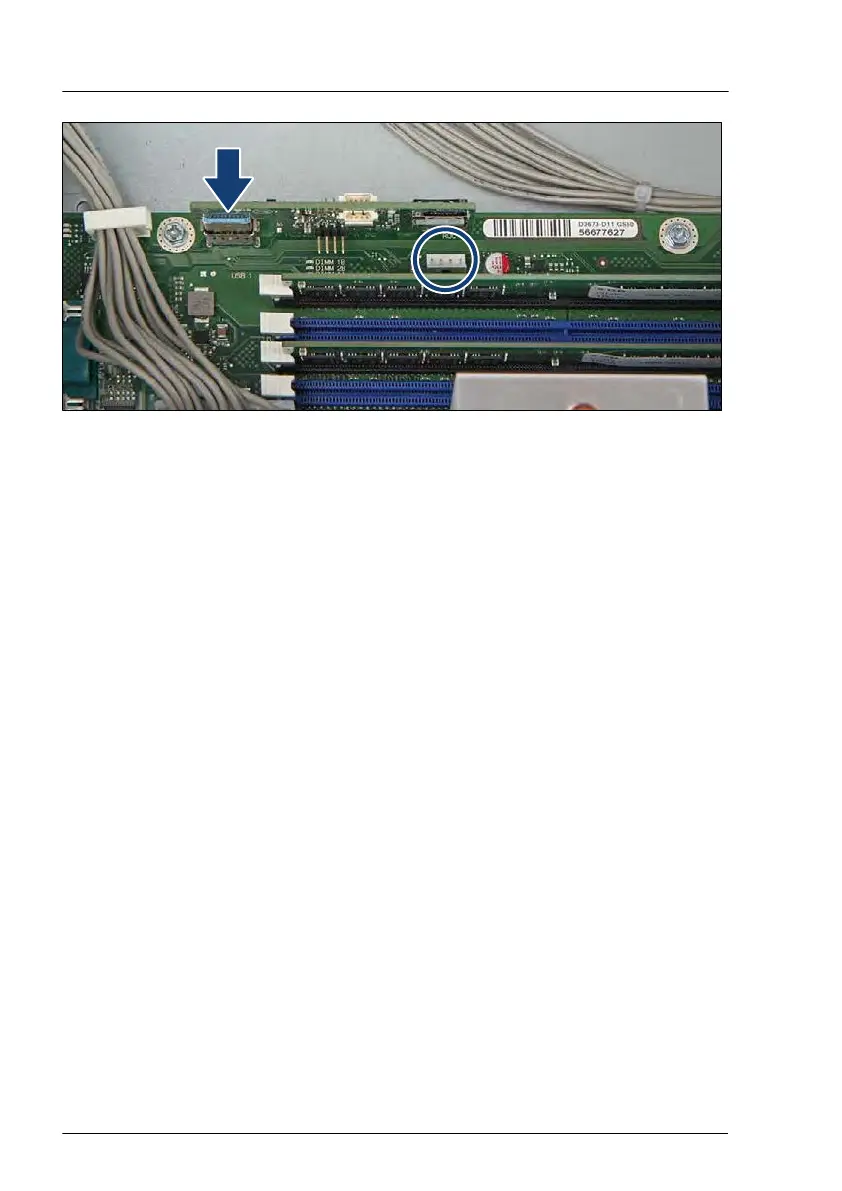
Figure 292: Installing the Dual microSD 64GB Enterprise
▶
Install the Dual microSD 64GB Enterprise into the connector "USB 1" (see
arrow).
▶
Connect the ROC cable to the connector "ROC" (see circle).
Concluding steps
▶
Install the system fan module, see "Installing the system fan module" on
page 85.
▶
"Reassembling" on page 66.
▶
"Connecting the power cord" on page
79.
▶
"Switching on the server" on page 81.
Software configuration
In order to install the ESXi to the Dual microSD 64GB Enterprise, the VMware
ESXi installer CD is required. To obtain the ESXi installer CD by purchasing the
OEM Media Kit, or downloading the ESXi Custom Image ISO file from the
VMware website and burn the image to the CD.
https://www.vmware.com/go/download-vsphere
Install the ESXi to the Dual microSD 64GB Enterprise by following the steps
below:
System board and components
442 Upgrade and Maintenance Manual TX1330 M4



 To Next Page
 Loading...










