Chapter 4 Element Management System (EMS) Element Properties Configuration
© 2011 Harmonic Inc. 106 ProView 7000 v.2.4, Rev. A
4.5.3.1 Multiplex Input Properties
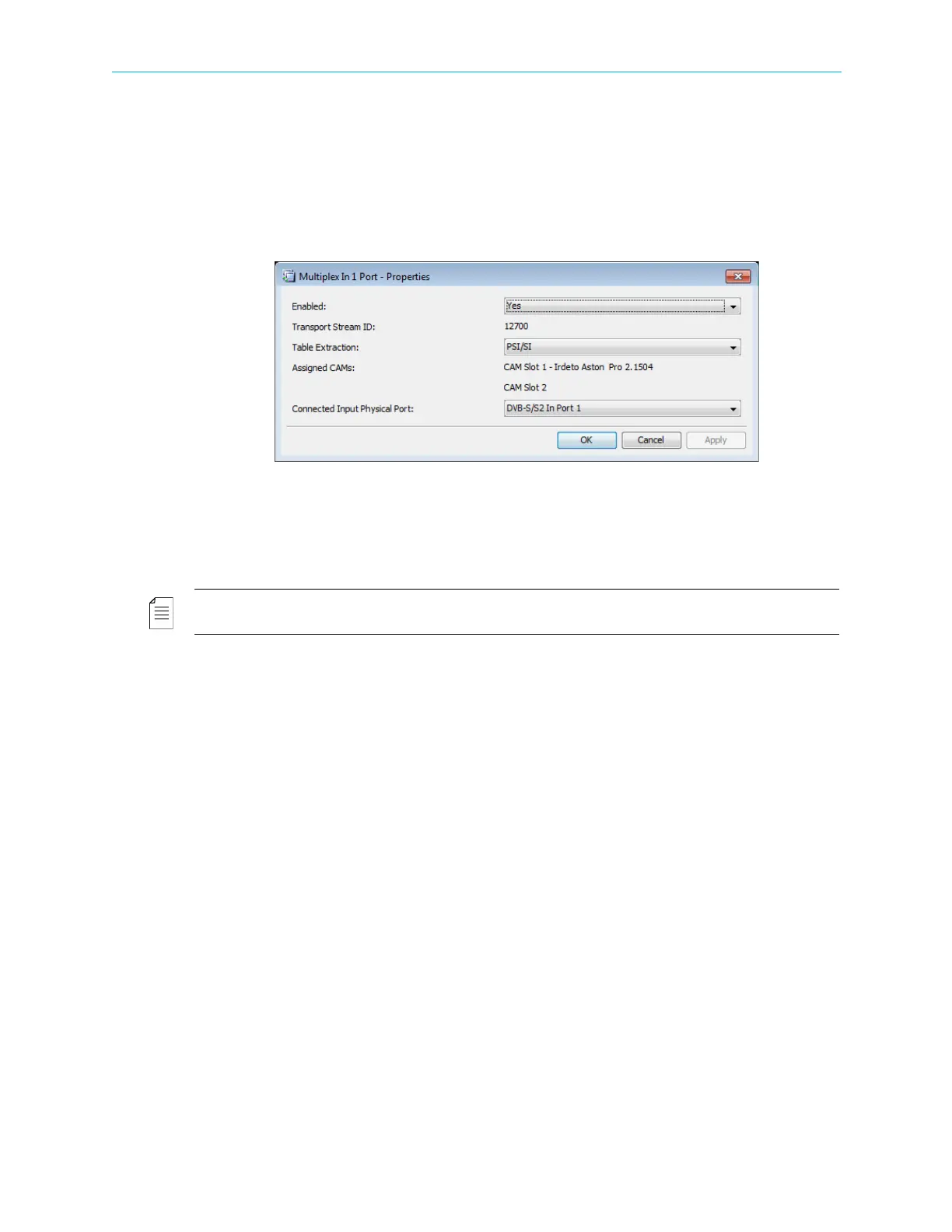
The Multiplex Input Properties dialog displays the current status of input features and
enables setting up the editable ones.
To display the Multiplex Input dialog:
1. Select the Multiplex Input icon in the Multiplex Input box on the Device Explorer tab.
2. Click Properties on the EMS toolbar.
The information provided by the Multiplex Input Properties dialog includes the following:
■ Enabled – Enables (Yes/No) the multiplex input operation.
■ Transport Stream ID – Displays the transport-stream’s ID number.
■ Table Extraction – Select PSI/SI for DVB or PSI for MPEG. The default is PSI/SI.
NOTE: For ATSC systems, set the stream type to MPEG.
■ Assigned CAMs – Displays any CAM slots assigned to the multiplex input.
■ Connected Input Physical Port – Selects the physical input port for the multiplex input.
4.5.3.2 Input Program Properties
The Input Program properties dialog provides basic information on the input program
provided to the input multiplex over the received transport stream.
To display the Input Program properties dialog:
1. Select the required Input Program icon in the Multiplex Input box on the Device Explorer
tab.
2. Click Properties on the EMS toolbar.



 To Next Page