Chapter 4 Element Management System (EMS) Cross Connections
© 2011 Harmonic Inc. 132 ProView 7000 v.2.4, Rev. A
4.6.1 Setting Multiplex Cross Connections
The ProView 7000 device features multiplexing any input stream to different outputs of the
device. The EMS makes it easy to cross connect an input stream, any program in the input
stream or any EMM in the input Conditional Access Tables (CAT). You can cross connect any
program from any input multiplex to any output multiplex as long as there are no programs
from another input multiplex already cross connected to the same output multiplex. You can
cross connect up to four transport streams from the RF and four (4) ASI inputs. You can
connect any physical input to as many multiplex inputs as you want.
Furthermore, the EMS enables multiplexing any input PID, including PIDs in the received
programs, as unreferenced multiplex output PIDs.
4.6.1.1 Transport Stream Cross Connect (Stream Pass Through)
To create a transport stream cross connection:
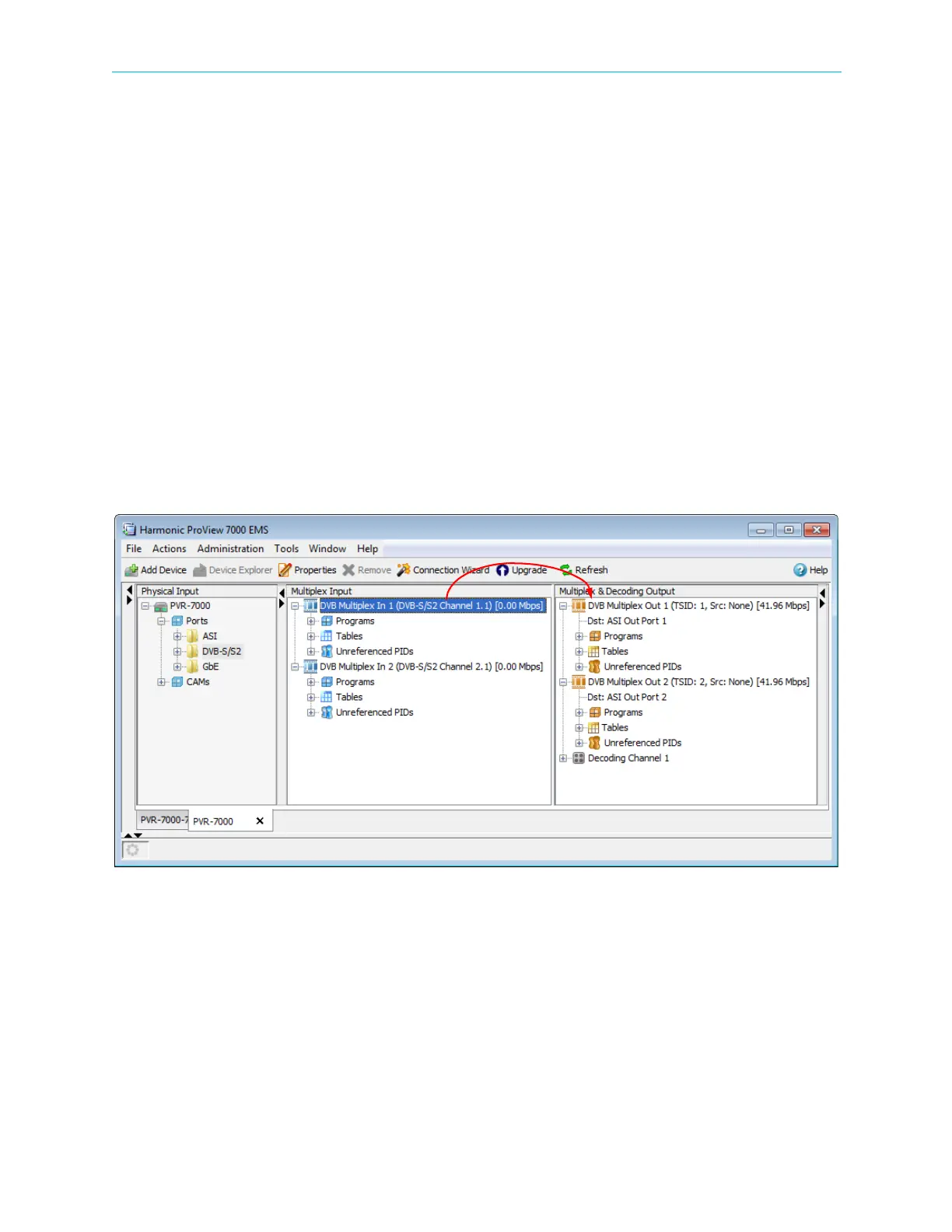
1. Drag a multiplex from the Multiplex Input box and drop it onto a multiplex or the decoder
in the Multiplex & Decoding Output box.
A Cross-Connect editor dialog displays, allowing setting up the parameters for the routed
element.
Figure 4–48: TS Cross Connect
2. Click Create to create the stream cross-connect.



 To Next Page