Chapter 4 Element Management System (EMS) Cross Connections
© 2011 Harmonic Inc. 133 ProView 7000 v.2.4, Rev. A
4.6.1.2 Program Cross Connection
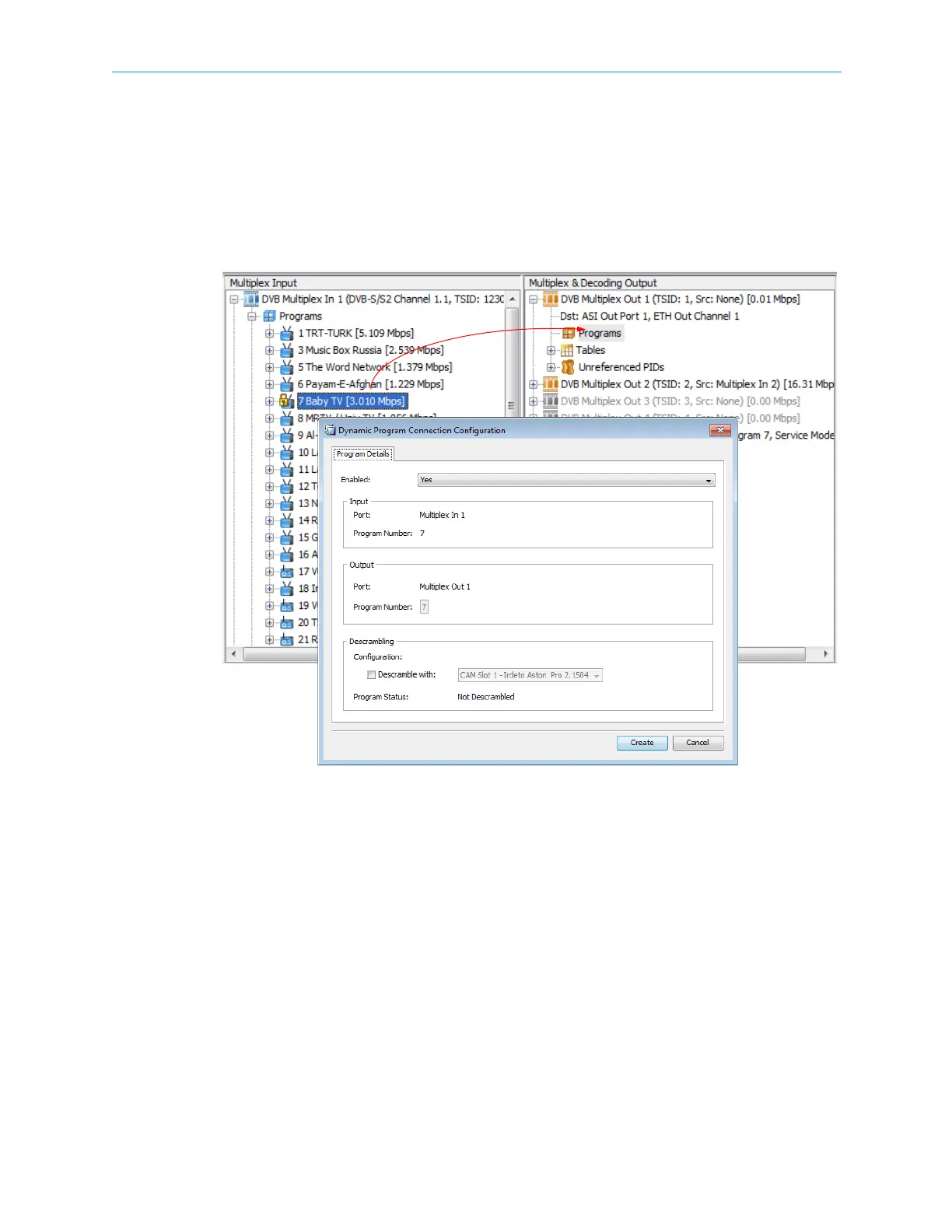
To create a new program cross connection:
1. Drag a program from a multiplex in the Multiplex Input box and drop it onto a multiplex in
the Multiplex & Decoding Output box.
The Dynamic Program Connection Configuration dialog displays enabling you to change
the program details.
2. Set the required parameters:
❑ Enabled – Defines the operational status of the program.
❑ Input – Displays the name of the input multiplex which receives the stream and the
number of the multiplex program.
❑ Output – Displays the name of the output multiplex port where the stream is routed
and the number of the multiplex program routed to the port.
❑ Descrambling – Enables descrambling the program and selects the CAM used for the
descrambling. If no CAM is associated it is indicated here.



 To Next Page