Chapter 4 Element Management System (EMS) Element Properties Configuration
© 2011 Harmonic Inc. 110 ProView 7000 v.2.4, Rev. A
4.5.4 Multiplex & Decoding Output Properties
The Multiplex & Decoding Output box of the Device Explorer tab presents a hierarchical tree-
structure of the multiplex and decoded outputs of the ProView
7000. The Multiplex &
Decoding Output tree features two main branches:
■ The Output Multiplexing main branch, detailed in 4.5.4.1 Multiplex Output Properties, is
divided into Output Programs branch (detailed in 4.5.4.3 Output Multiplex Program
Properties and 4.5.4.4 Output Multiplex Elementary Stream Properties for the elementry
streams in the program), Output Tables branch (detailed in 4.5.4.5 Output Tables
Properties) and Unreferenced Output PIDs branch (detailed in 4.5.4.6 Output Unreferenced
PID Properties), related to the multiplex output. The multiplexing output main branch also
includes pass through streams, routed to the output (detailed in 4.5.4.2 Transport Stream
Port Route Properties dialog).
■ The Output Decoding main branch, detailed in 4.5.4.7 Decoding Channel Properties.
Each branch can be drilled down to display the structure of the branch for monitoring and
configuring the features of each element.
4.5.4.1 Multiplex Output Properties
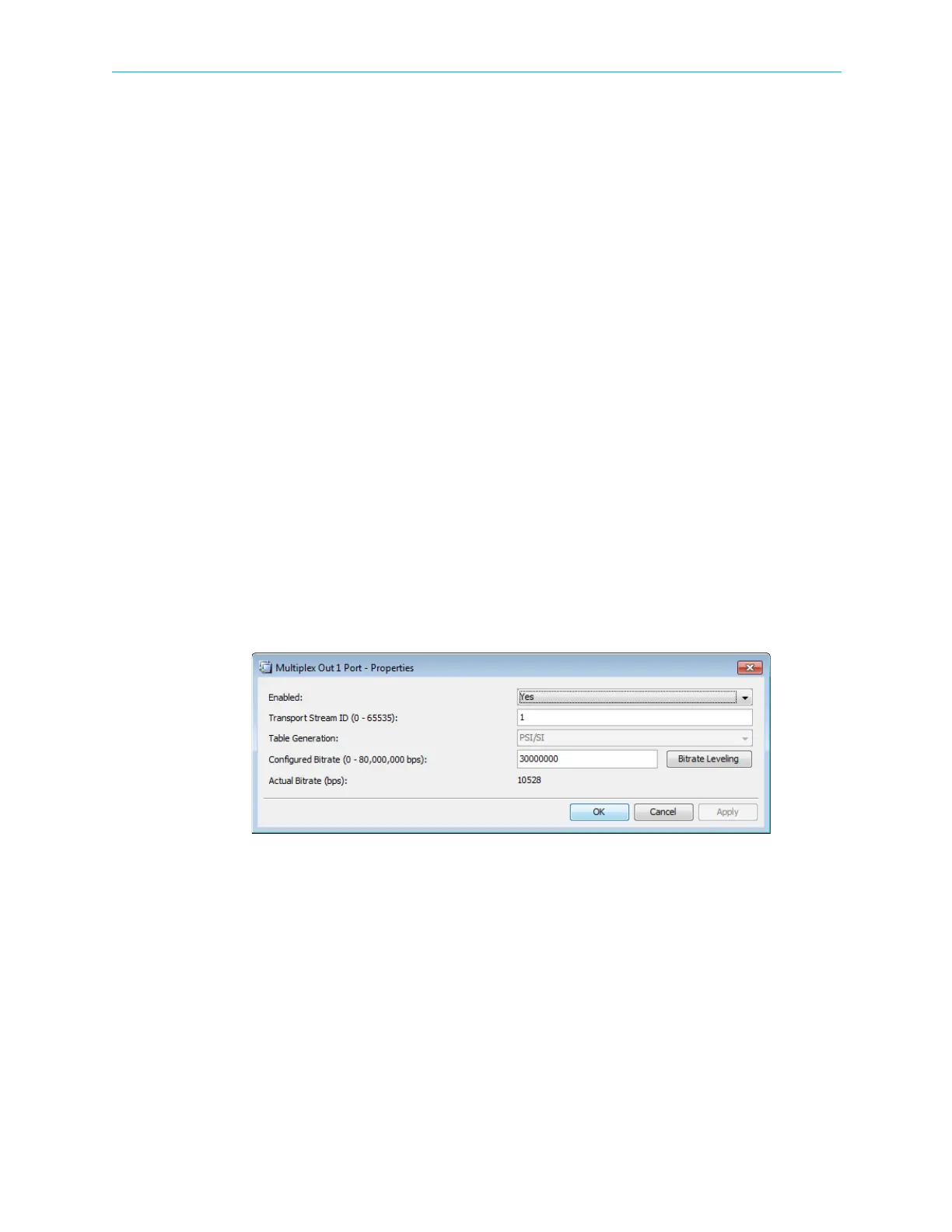
The Multiplex Output Port Properties dialog displays the current status of the multiplex
output stream features and enables setting up the editable ones.
To display the Multiplex Output Stream Properties dialog:
1. Select the Multiplex Output icon from the Multiplex & Decoding Output box on the
Device Explorer tab.
2. Click Properties on the EMS toolbar.
Figure 4–32: Multiplex Out 1 Port - Properties dialog
The information provided by the Multiplex Output Properties dialog includes the following:
■ Enabled – Enables (Yes/No) the multiplex output operation.
■ Transport Stream ID – Displays the transport-stream’s ID number.
■ Table Extraction – Select PSI/SI for DVB or PSI for MPEG. The default is PSI/SI.
■ Configured Bitrate – Displays the calculated bitrate of the output stream (in bps).
■ Actual Bitrate – Displays the actual bitrate of the output stream (in bps), not including
NULL stuffing.



 To Next Page