Chapter 4 Element Management System (EMS) ProView 7000 Device Management
© 2011 Harmonic Inc. 54 ProView 7000 v.2.4, Rev. A
4.3.3.1 Adding a New ProView 7000 Device
To add a ProView 7000 device to the devices managed by the EMS:
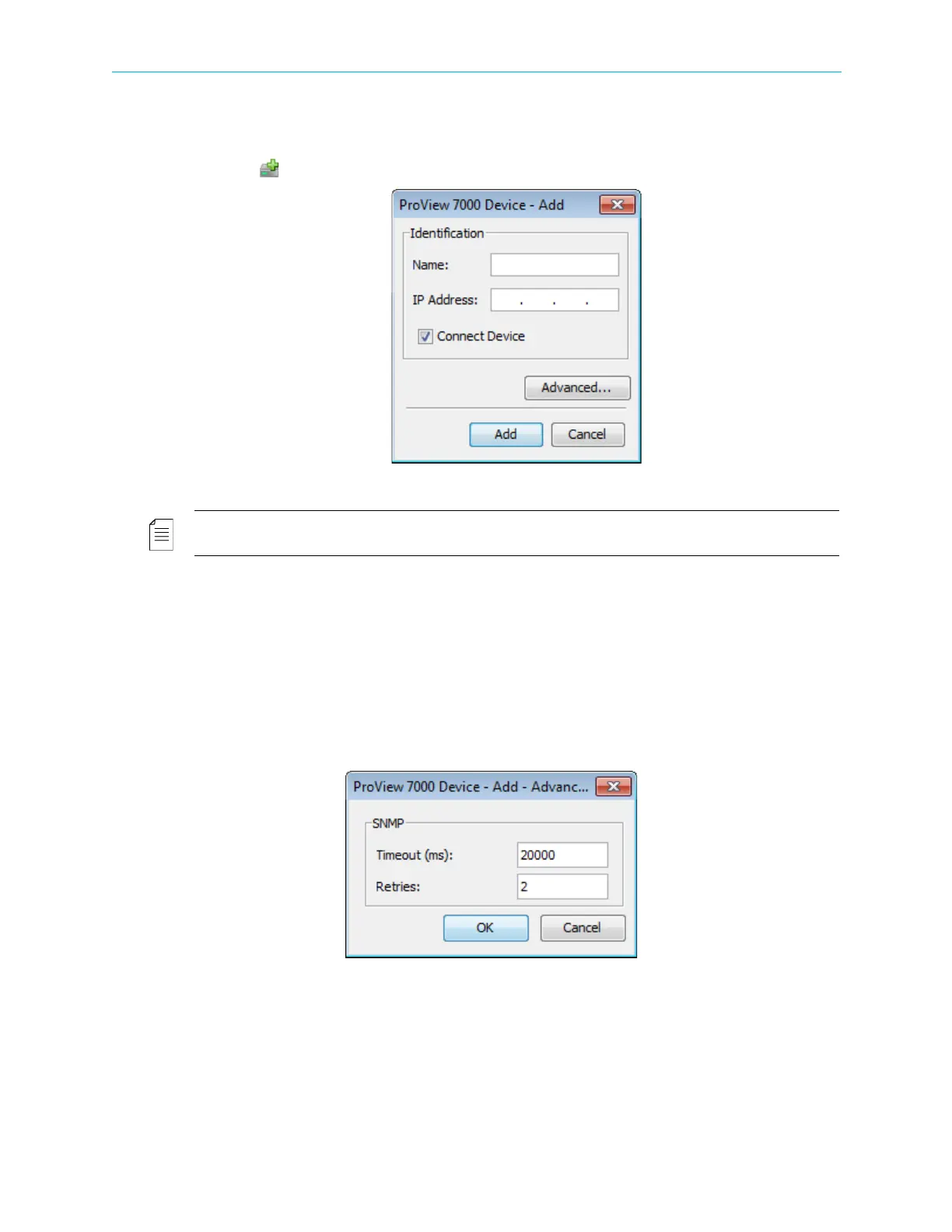
1. Click Add Device on the EMS toolbar.
Figure 4–7: Add Device dialog
NOTE: Adding a new ProView 7000 device can be also done by selecting
Administration > Add Proview 7000… in the ProView 7000 EMS Menu Bar.
2. The EMS displays the Add ProView 7000 Device dialog.
3. Enter a name for the new ProView 7000 device.
4. Enter the IP Address of the new ProView 7000.
5. For automatic connection when launching the EMS, mark the Connect on Start-up
checkbox.
6. For automatic connection when launching the EMS, mark the Connect Device checkbox.
7. For advanced settings (setting up the SNMP parameters) click Advanced… to display the
Advanced Settings dialog.
8. Enter a Timeout value for defining the maximum time period for one connection attempt.
This parameter is set to 20000 (msec) by default.
9. Enter a Retry value for setting the number of connections attempts in case of a
connection failure. This parameter is set to 2 tries by defaults.
10. Click Cancel to drop changes, or OK to save advanced parameters.
The Advanced dialog closes and the EMS returns to the Add ProView 7000 Device dialog.



 To Next Page