Chapter 4 Element Management System (EMS) ProView 7000 Device Management
© 2011 Harmonic Inc. 55 ProView 7000 v.2.4, Rev. A
11. From the Add ProView 7000 Device dialog, click Add to complete adding the device to the
EMS managed devices (or click
Cancel to drop adding a new device).
The EMS indicates adding the new ProView 7000 device by placing the icon device,
with the new device name, in the Device box.
The EMS attempts automatic connection upon adding the device.
4.3.3.2 Connecting a Device
Connecting a ProView 7000 device enables the EMS to monitor and control the device
operation.
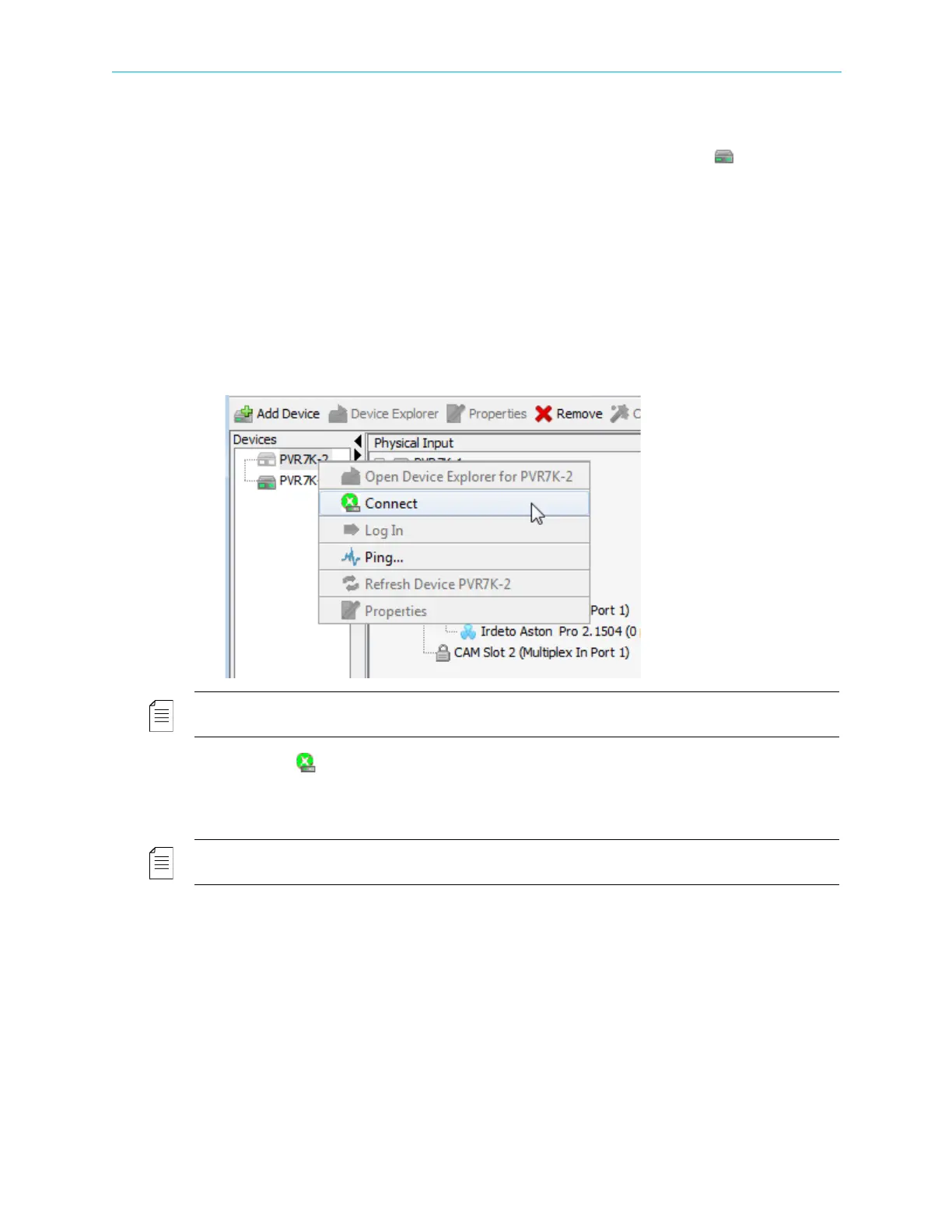
To connect a ProView 7000 device to the EMS:
1. Right-click the icon of the connected ProView 7000 device in the Device box.
A device context menu displays.
NOTE: A disconnected ProView 7000 device is not communicating with the ProView 7000 EMS and is
marked in the device list by a grayed device icon.
2. Select the Connect item in the menu.
The EMS attempts to connect to the ProView 7000.
Once connection is established, the ProView 7000 device icon LEDs are green.
NOTE: If connection could not be established, a pop-up message alerts the user. The ProView 7000
device icon LEDs are red.



 To Next Page