Chapter 4 Element Management System (EMS) Element Properties Configuration
© 2011 Harmonic Inc. 130 ProView 7000 v.2.4, Rev. A
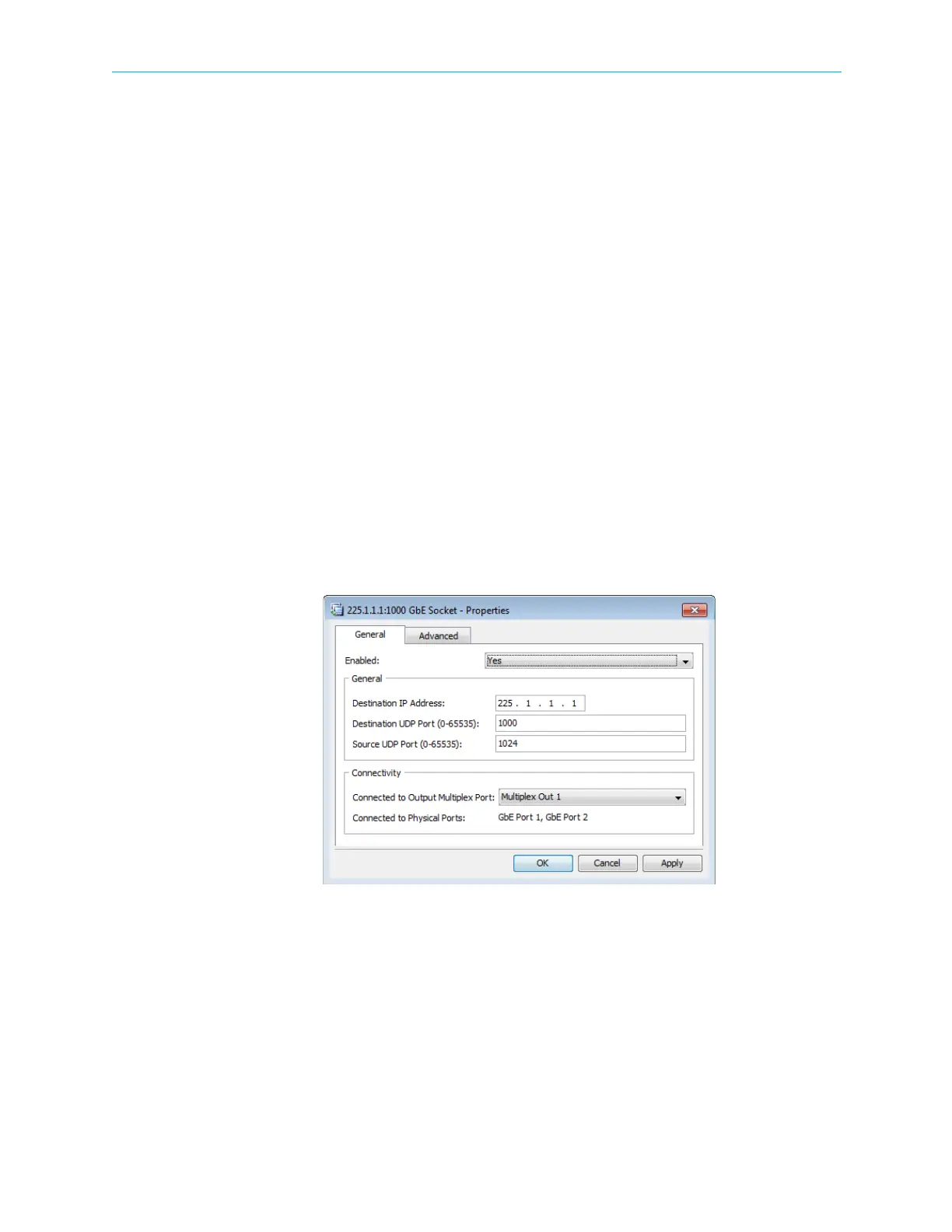
GbE Socket Properties (Output Mode)
Use the GbE Socket Properties dialog to view and configure the selected GbE port. By default
all sockets are associated with both GbE ports. The data on each socket is sent to both output
ports. You cannot associate two sockets with identical destination port and IP addresses to
the same GbE port.
To display the GbE Socket properties:
1. Select the GbE Socket icon in the Physical Output box on the Device Explorer tab.
2. Click Properties on the EMS toolbar.
The GbE Socket Properties dialog comprises of a General and an Advanced tab.
GbE Socket General properties tab:
■ Enabled – You can enable or disable each socket.
■ General parameters box:
❑ Destination IP Address – Only multicast IP addresses are supported. The default is
255.1.1.X, where X is the socket index.
❑ Destination UDP Port – The destination UDP Port range is 0 – 65535. The default is 1000.
❑ Source UDP Port – The source UDP Port range is 0 – 65535. The default is 1024.
■ Connectivity box – Enables you to associate the socket with a multiplex out and displays
the physical GbE ports associated with the socket.
Figure 4–46: GbE Socket Properties (Output mode) dialog- General tab



 To Next Page