Chapter 4 Element Management System (EMS) ProView 7000 EMS Structure
© 2011 Harmonic Inc. 43 ProView 7000 v.2.4, Rev. A
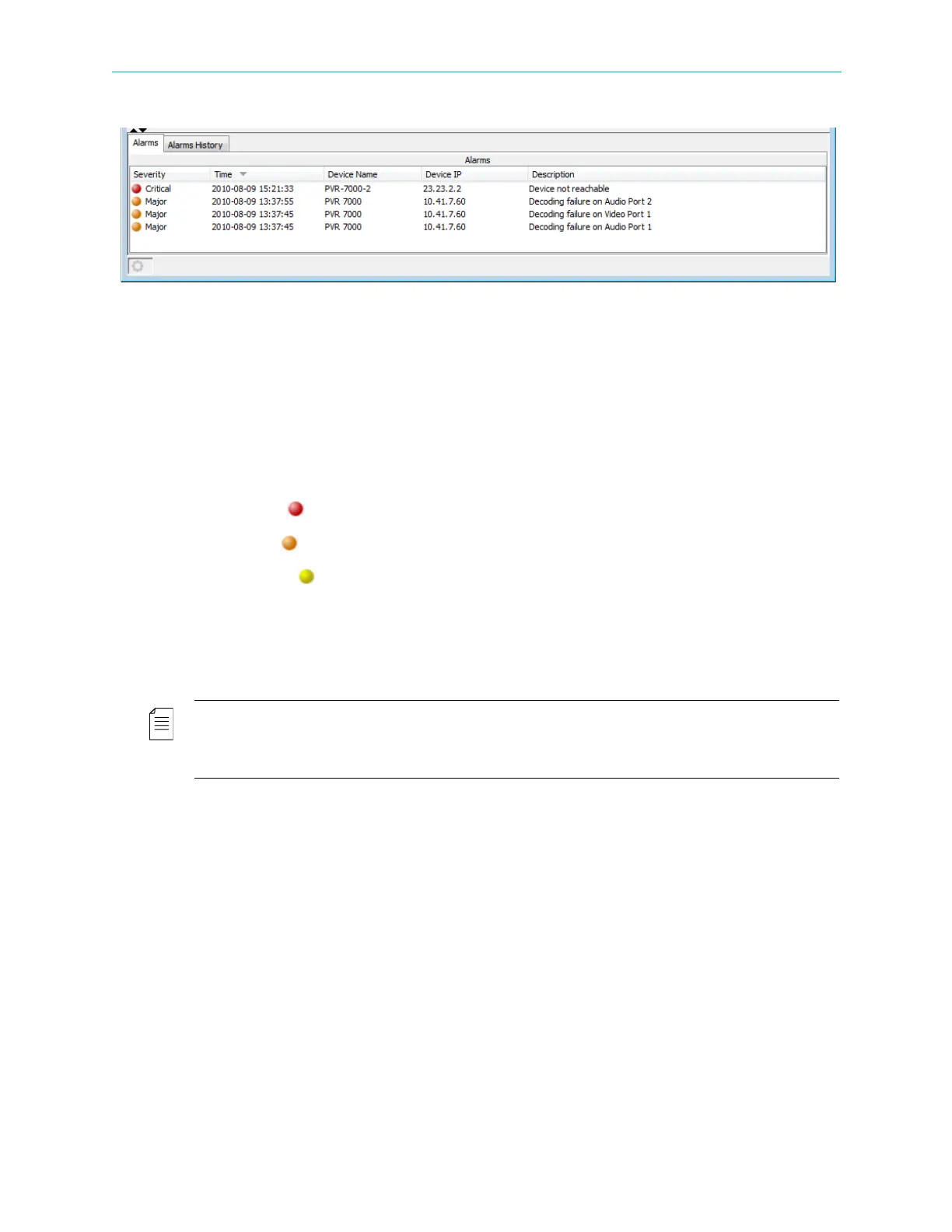
The Alarms tab displays all the alarms received by the EMS from the ProView 7000 devices.
Figure 4–2: Alarm tab
To refresh the alarm list on demand:
1. Right-click any alarm in the list.
2. Select Refresh Alarms.
The information provided for each alarm displayed consists of the following:
■ Alarm Severity – The alarm severity level.
The alarm severity color codes are:
❑ Critical ( red)
❑ Major ( orange)
❑ Warning ( yellow)
■ Time – Alarm generation date and time (yyyy-mm-dd hh:mm:ss format).
■ Device Name and IP – The identification name and IP address of the ProView 7000 device
which have raised the alarm.
■ Description – The alarm identification and description information.
NOTE: Right-click any alarm in the Alarms tab to display a pop-up menu with options for:
■ Refresh: refreshes the alarms or the entire EMS (for details, refer to 4.7 Refreshing the EMS Screen).
■ Properties: displays the alarm detailed information (for details, refer to 4.1.4.1 Alarm Properties).
To display an alarm’s properties:
1. Right-click an alarm in the list.
2. Select Properties.



 To Next Page