406
Hi-Therma Split system - Indoor unit (AHM-044/060/080HCDSAA)
2.2 Hi-Therma Split system - Indoor unit
(AHM-044/060/080HCDSAA)
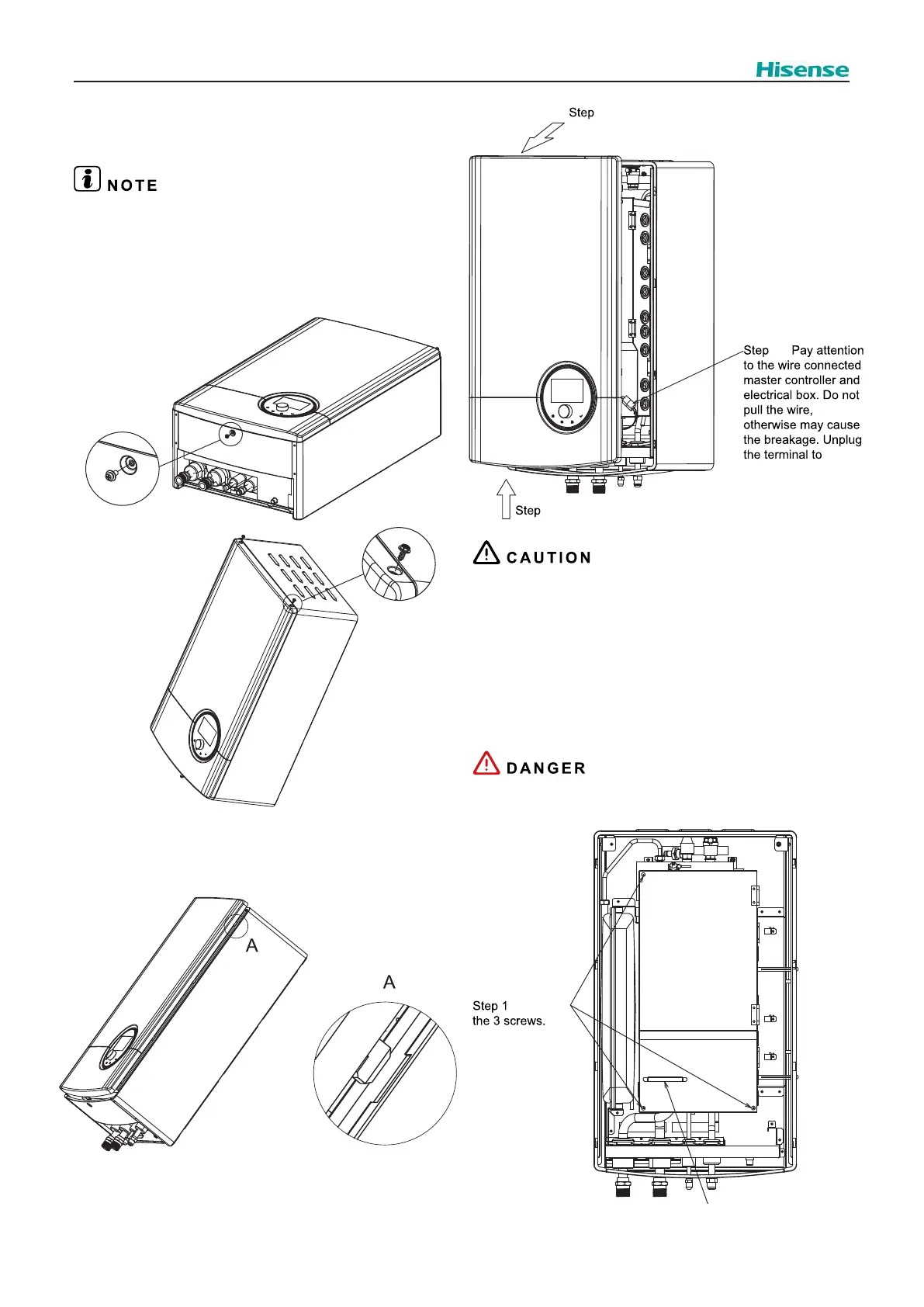
2.2.1 Removing the front panel
The indoor unit front panel needs to be removed for any task inside
the indoor unit.
1. Unscrew 1 screw at the bottom of the indoor unit and 2
screws on the top of unit.
2. Remove the front panel.
1 Push the front panel upward.
2 Push the front panel forward,
disengage the snap, and front
panel can be removed.
3
release the front
panel.
Take care with the LCD display of the master controller while
removing the front panel.
Be careful not to drop the front panel during operation.
Take care when removing front panel, the parts inside the unit
could be hot.
2.2.2 Opening the electrical box
Remove the front panel following “2.2.1 Removing the front
panel”.
Disconnect the unit from the power supply before touching
any of the parts in order to avoid an electric shock.
Unscrew
*Handle on electrical box cover can be
used to hang the master controller.
The snap



 To Next Page