416
Hi-Therma Split system - Indoor unit (AHM-044/060/080HCDSAA)
2.2.7.1
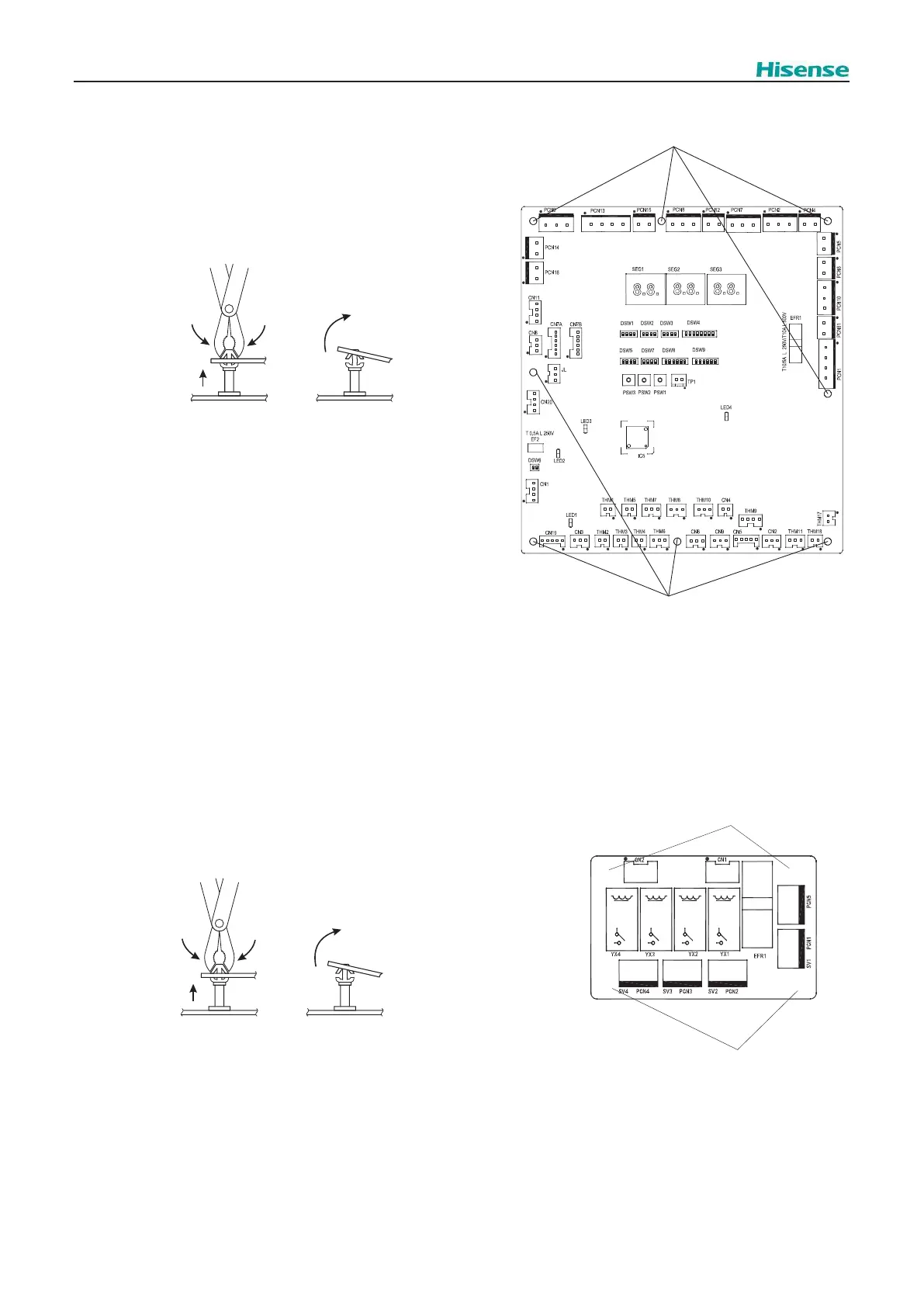
Removing the PCB1
To Remove the PCB1, the following operations should be done:
Remove the front cover, as explained in “2.2.1 Removing the front cover”
1. Remove all the connectors connected to the PCB1.
2.
Plastic holders
Plastic holders
Plastic holders (x8)
3. Remove the PCB1. If necessary, replace the PCB1 with a new
one proceeding in reverse way than disassembling.
3. Remove the PCB3. If necessary, replace the PCB3 with a new
one proceeding in reverse way than disassembling.
2.2.7.2
Removing the PCB3
To Remove the PCB3, the following operations should be done:
Remove the front cover, as explained in “2.2.1 Removing the front cover”
1. Remove all the connectors connected to the PCB3.
2.
Plastic holders (x4)
Plastic holders
Plastic holders
○
○
○
○



 To Next Page