Chapter 5: Console Operation
Mix Bus Sends: The PAN Display
Eclipse User Guide 2.0 167/ 526
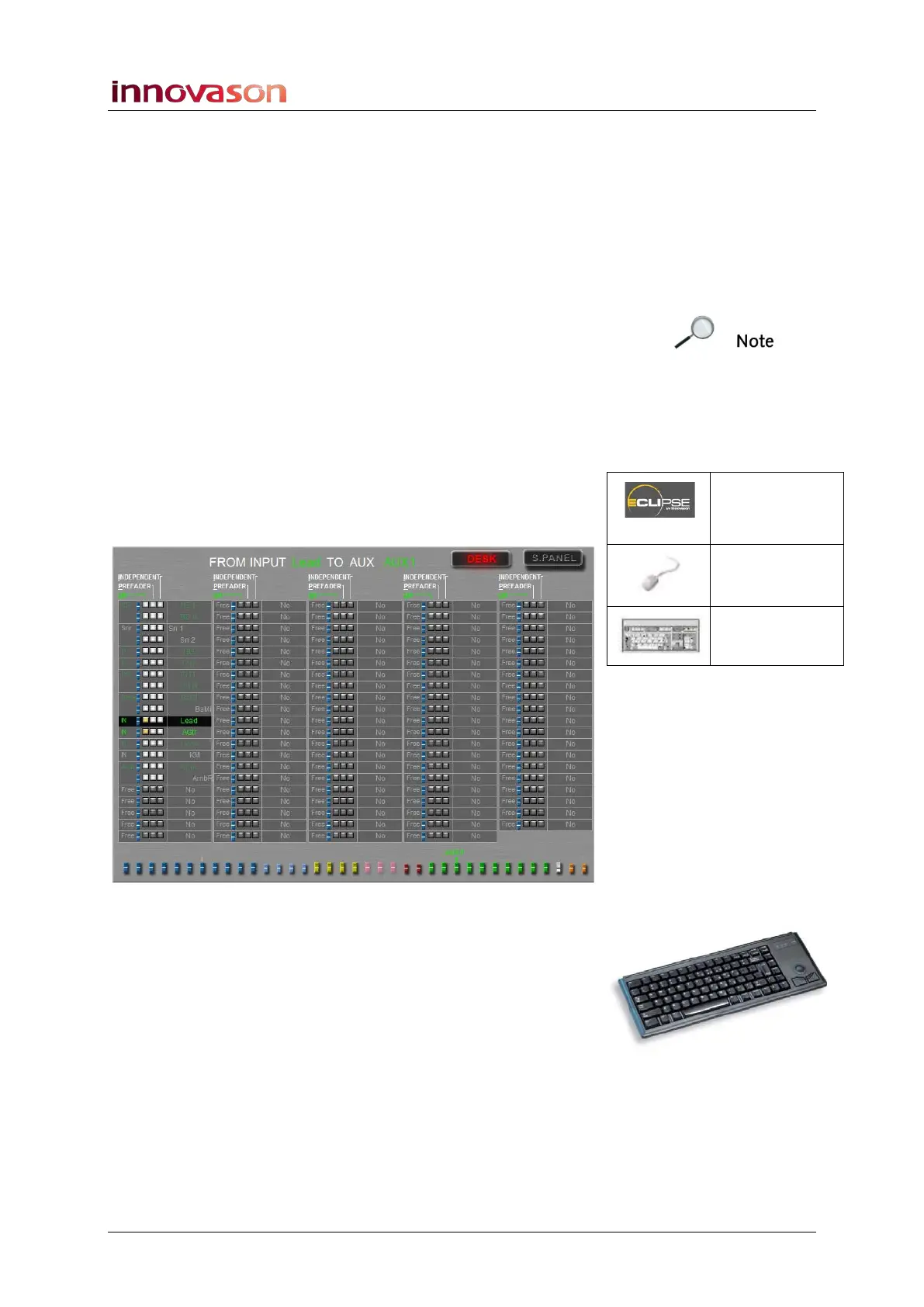
Creating Pre, Post or Independent Sends
Aux sends can be pre-fader, post-fader or independent (post-
fader and independent of channel pan). Group sends can be
post-fader or independent (post-fader and independent of
channel pan).
The send status is set by changing the PREFADER or
INDEPENDENT boxes from the PAN display.
Note that you can also switch Aux sends from dependent to
independent pan using the Fader strip’s rotary control. See
Page 126 for details on this method.
Let’s take an example of routing input channels to an Aux:
1. Press SEL on the output channel – an Aux.
The SEL button and Label on the Aux should be flashing.
2. Open the PAN display by pressing the Pre/Pan button.
The display shows bus assignments and panning to the
selected Aux (e.g. AUX 1) from all 104 input channels:
3. Now using the console keyboard choose your
assignment mode:
• Press [O] to select ON.
• Press [P] to select PREFADER.
• Press [I] to select INDEPENDENT.
Pre/Pan
(UTILITIES)
“GRID ->
Pan”
[F11]



 To Next Page