Chapter 10MDP-621/641/640
MENU operation Operation manual
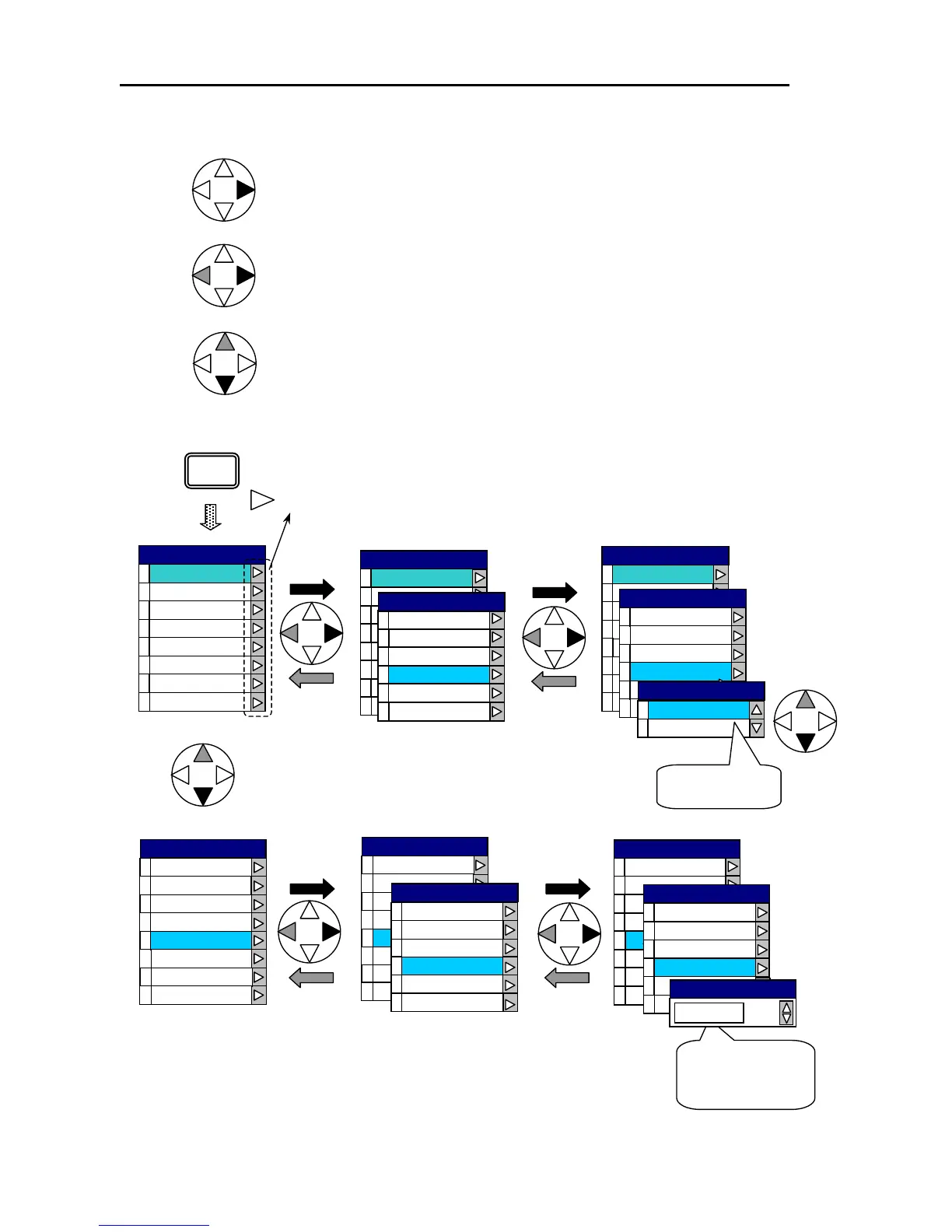
10.1.2 Basic operation of the MENU
Press the right key.
Press the left or right key.
Press the right key: Next MENU window is displayed.
Press the left key: Returns to the previous MENU window.
Press the up or down key.
Press the up key: Moves the line cursor up.
Press the down ke
: Moves the line cursor down.
The arrows open the next menu window.
ABC
ABC
0
1
START
2
3
4
5
AAA
6
7
MENU
ABC
ABC
0
1
START
2
3
4
5
AAA
6
7
START
0
1
2
3
STOP
4
5
STOP
0
1
OFF
ON
Set ON or OFF
ABC
ABC
0
1
START
2
3
4
5
AAA
6
7
0
1
START
2
3
STOP
4
5
0
1
START
ABC
2
3
4
5
AA A
6
7
AAA
0
1
START
2
3
BBB
4
5
BBB
123
Move the rotary
control to adjust
the value.
ABC
0
1
START
2
3
4
5
AAA
6
7
AAA
0
1
START
2
3
BBB
4
5
ABC
0
1
START
2
3
4
5
AAA
6
7
Press the “MENU” key to complete the MENU operation.
10-2 0093161022-06



 To Next Page