Chapter 5 MDP-621/641/640
Basic operation Operation manual
5-10 0093161022-06
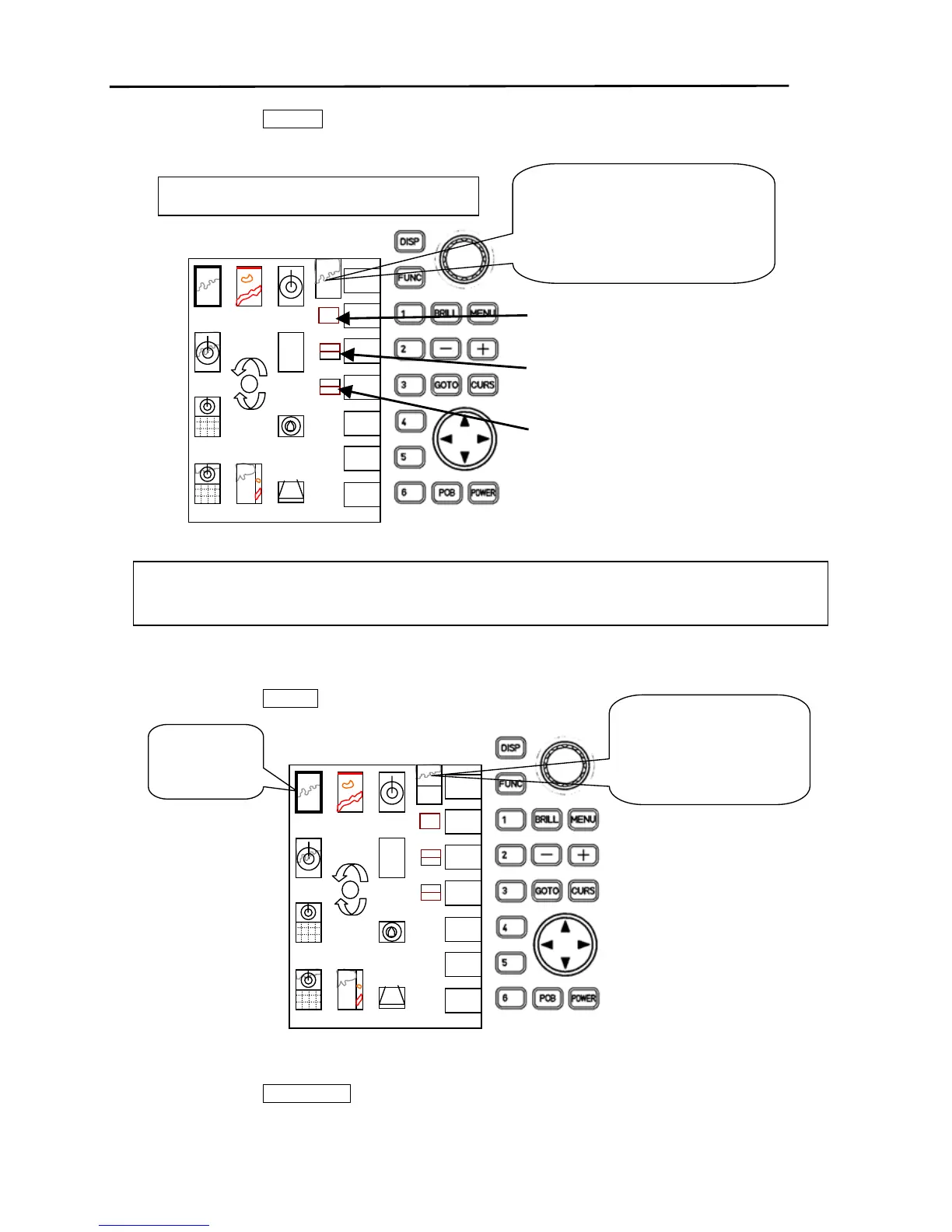
(3)Press soft key “1” ( CREATE ).
The registration screen change mode screen appears.
(4) Using the rotary control, position the cursor over the Plotter icon.
(5)Press soft key “2” ( 1/2 TOP ).
(6) Using the rotary control, position the cursor over the Radar icon.
(7)Press soft key “3” ( 1/2 BOTTOM ).
As an example, we will create a screen with a Plotter in the top half, Radar in the
bottom half of the screen.
This icon registers the designated screen
image to 1/2 of the screen (Bottom).
This icon registers the designated screen
image to 1/2 of the screen (Top).
This icon registers the designated screen
image to the entire screen.
DISP
FULL
ENTER
1/2
RADAR
PLOT
SNDR
OVRLY
NAV
NAV
3D
OV/3D
PL/SD
HIWAY
CMPAS
Registration screen change mode screen
screen
CREATE
The screen created in the screen
mode is displayed.
Initially, the previous screen
(screen to be changed) is
displayed.
(4)
Select the
Plotter icon.
DISP
FULL
ENTER
1/2



 To Next Page