KRONE ISOBUS-Terminal CCI 100
125
Pos: 22.1.33.1 /BA /Info-Center/S chwader/Bedien einheit - Komfort /Swadro 140 0/Grundbild 2/4 Breitenverstellung en/Überschri ft Grundbild „Breit enverstellung en“ @ 9\mod_ 1221028124965 _78.doc @ 13111 2@ 2 @ 1
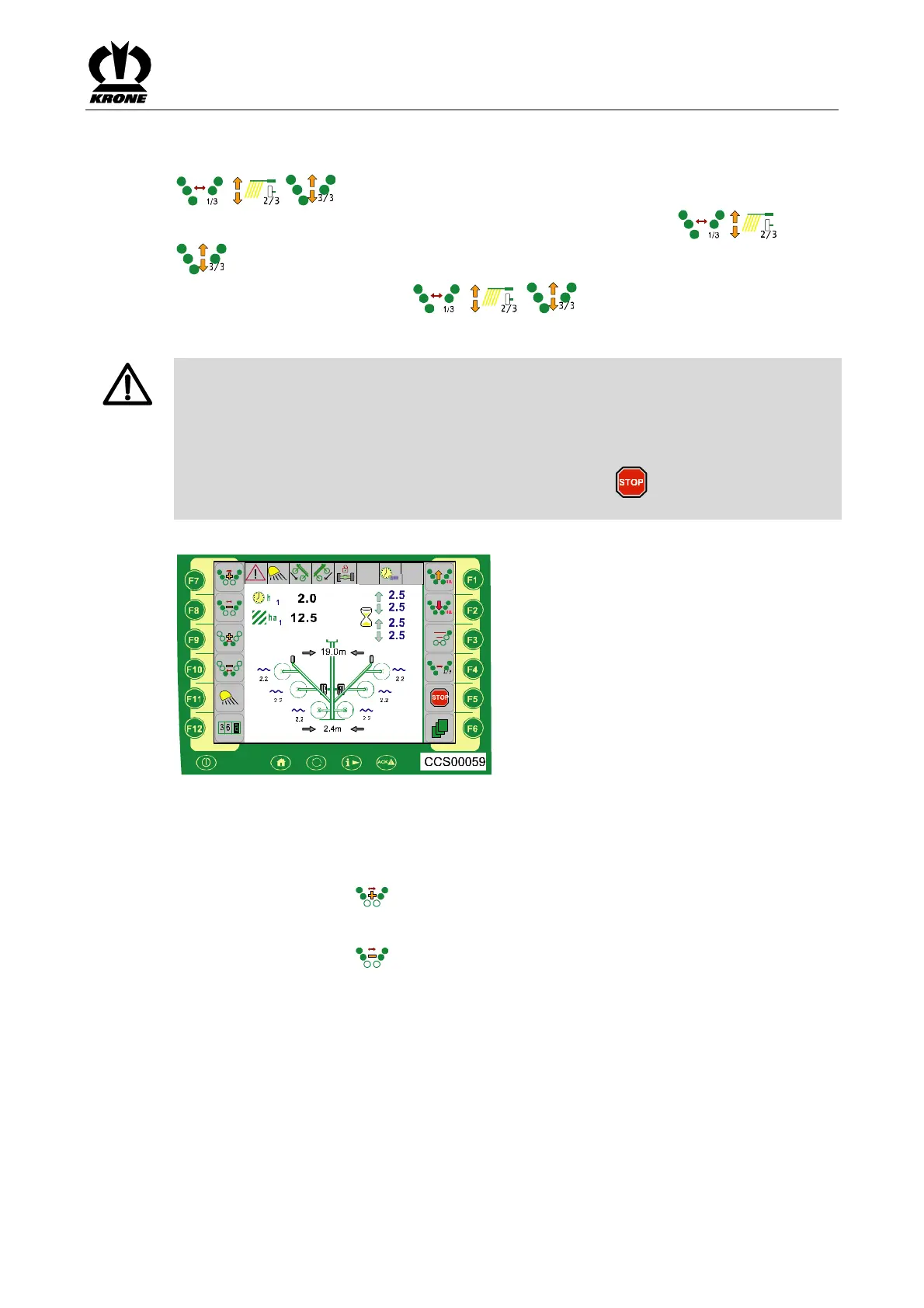
8.4 Basic screen "Width adjustments"
Pos: 22.1.33.2 /BA /Info-Center/CC- ISOBUS-T erminal/CCI-Swa dro/Swadro 20 00/Anzeigenbereic he Display/F1 Aufruf der Gru ndbilder @ 87\mo d_132127706 4622_78.doc @ 751820 @ @ 1
, Calling of "Width adjustment", "Working height" and "Lifting the rotors"
basic screens (the selection is displayed in the terminal via the graphics ( , and
)).
• Press the function keys for ( , , ) to call up the required basic screen
Pos: 22.1.33.3 /Ü berschriften/Üb erschriften 3/ A-E/Arbeitsbreite @ 10\mod_1221 198093573_7 8.doc @ 132335 @ 3 @ 1
8.4.1 Working width
Pos: 22.1.33.4 /BA /Info-Center/CC- ISOBUS-T erminal/CCI-Swa dro/Swadro 14 00/Gefahr Schnellst op @ 56\mo d_129536287 3734_78.doc @ 5 42364 @ @ 1
DANGER! - Before swivelling the machine, ensure that nobody is within the swivel
range.
Effect: Danger to life or serious injuries.
• Instruct persons to leave the danger zone.
• If required, switch off the machine immediately.
• If there is an imminent danger, press the function key for to stop all functions which
are currently being performed.
Pos: 22.1.33.5 /BA /Info-Center/CC- ISOBUS-T erminal/CCI-Swa dro/Swadro 20 00/Grundbild 2 Breitenverstellunge n/Grundbild „Arb eitsbreite / Sc hwadbreite“ Bil d@ 88\mod_132 1354530499_ 78.doc @ 752 558 @ @ 1
Fig. 86
Pos: 22.1.33.6 /BA /Info-Center/CC- ISOBUS-T erminal/CCI-Swa dro/Swadro 20 00/Grundbild 2 Breitenverstellunge n/Arbeitsbreite vorne einstelle n SW 2000 @ 8 8\mod_13213 54469608_78.d oc@ 752530 @ @ 1
Adjust the front working width
To increase the working width:
Press the function key for
To reduce the working width:
Press the function key for
Pos: 22.1.33.7 /BA /-----Seitenu mbruch------ @0\m od_11961753 11226_0.doc @ 4 165 @ @ 1









 To Next Page