KRONE operation terminal Gamma
42
Pos: 16.6.1 /BA/ Info-Center/Sc hwader/Bedie neinheit- Komfort/ SW 2000/Anz eigebereiche im Dis play SW 2000 @ 22\mod_124 0207284458_7 8.doc @ 2355 13 @ 2 @ 1
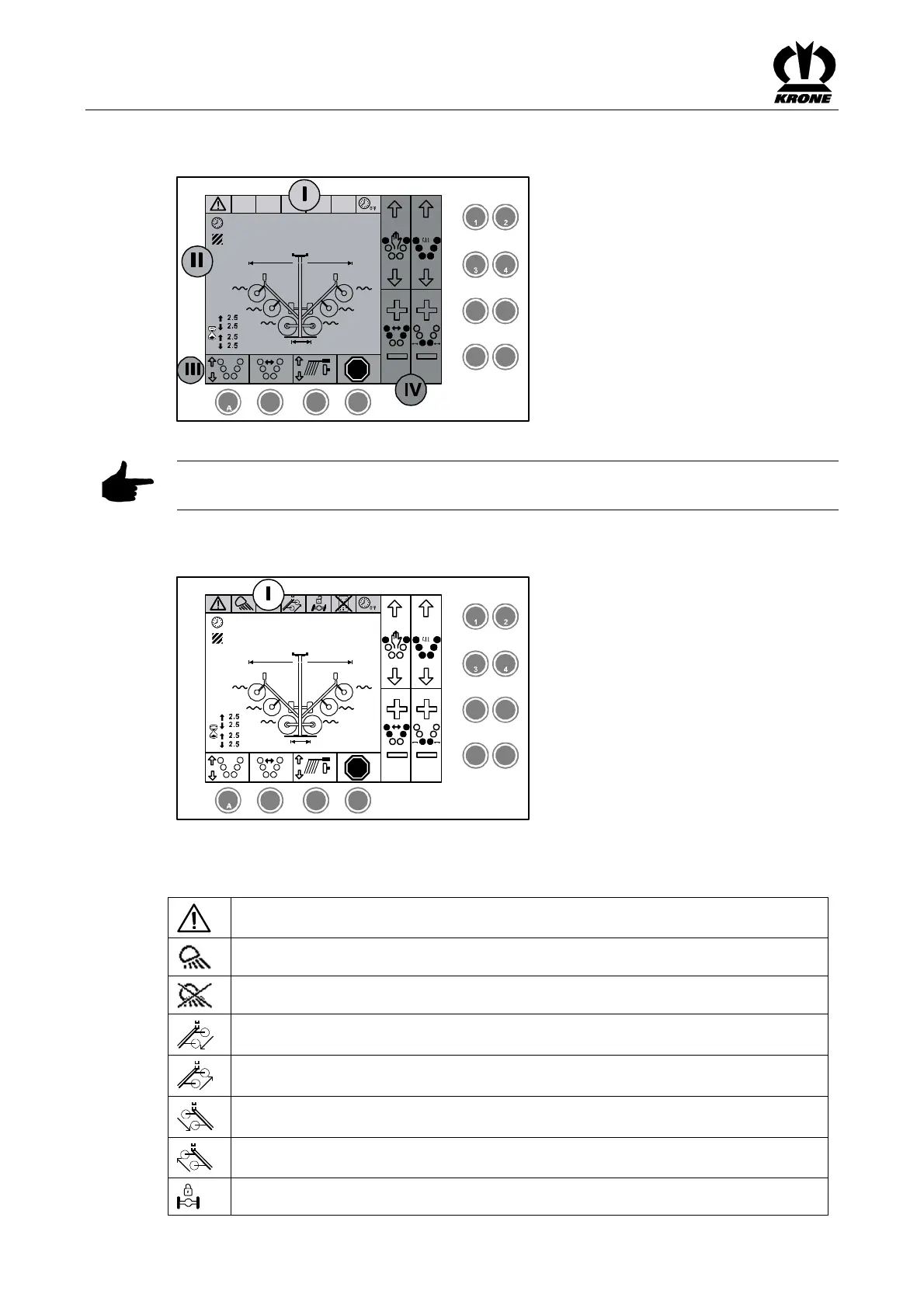
6.5 Display Areas on the Screen
STOP
2.5
12.5
h
ha
2,2 2,2
2,2 2,2
2,2
2
2
5 6
7
8
B C D
SW2000026
M M
M
2,2
1,8m
15,1m
Figure. 19
Pos: 16.6.2 /BA/ Info-Center/Sc hwader/Bedie neinheit- Komfort/ SW 2000/Hinw eis Erläuterung Gru ndbild Breit enverstellungen @2 3\mod_12403 16895944_78.d oc @ 238173 @ @ 1
Note
The display areas are explained using the example of the basic screen for adjusting the width.
Pos: 16.6.3 /BA/ Info-Center/Sc hwader/Bedie neinheit- Komfort/ SW 2000/Statusz eile Bereich (I) SW 2000 @ 61\ mod_129888 8166167_78.doc @ 567768 @ 3@ 1
6.5.1 Status line area (I)
STOP
2.5
12.5
h
ha
2,2 2,2
2,2 2,2
2,2
2
2
5 6
7
8
B C D
SW2000029_1
M M
M
2,2
1,8m
15,1m
Fig. 20
Current states of the machine (depending on how it is equipped) are shown in the status line (I)
of the display:
Alarm message is pending
Working floodlight on
Work lights off
Right-hand parallel offset extended
Right-hand parallel offset retracted
Left-hand parallel offset extended
Left-hand parallel offset retracted
Self steer switched off (inactive)









 To Next Page