KRONE ISOBUS-Terminal CCI 100
136
Pos: 22.5.3 /Übersc hriften/Übersc hriften 2/K-O/M enüebene aufr ufen @ 44\mod _12759770540 46_78.doc @ 394176 @ 3 @ 1
8.7.2 Calling up the menu level
Pos: 22.5.4 /BA/ Info-Center/CC-I SOBUS-Ter minal/CCI-Swadro/S wadro 2000/H auptmenüs/Me nüebene aufruf enBil d @ 88\mo d_132159994 8196_78.doc @ 754706 @ @ 1
F2
F3
F4
F5
F6
F7
F8
F9
F10
F11F11
F12
F1
CCS00055
1
CCS00062
Fig. 95
Pos: 22.5.5 /BA/ Info-Center/CC-I SOBUS-Ter minal/CCI-BiG P ack/Menüebene a ufrufen @ 43\ mod_1275299 708140_78.doc @ 3 90706 @ @ 1
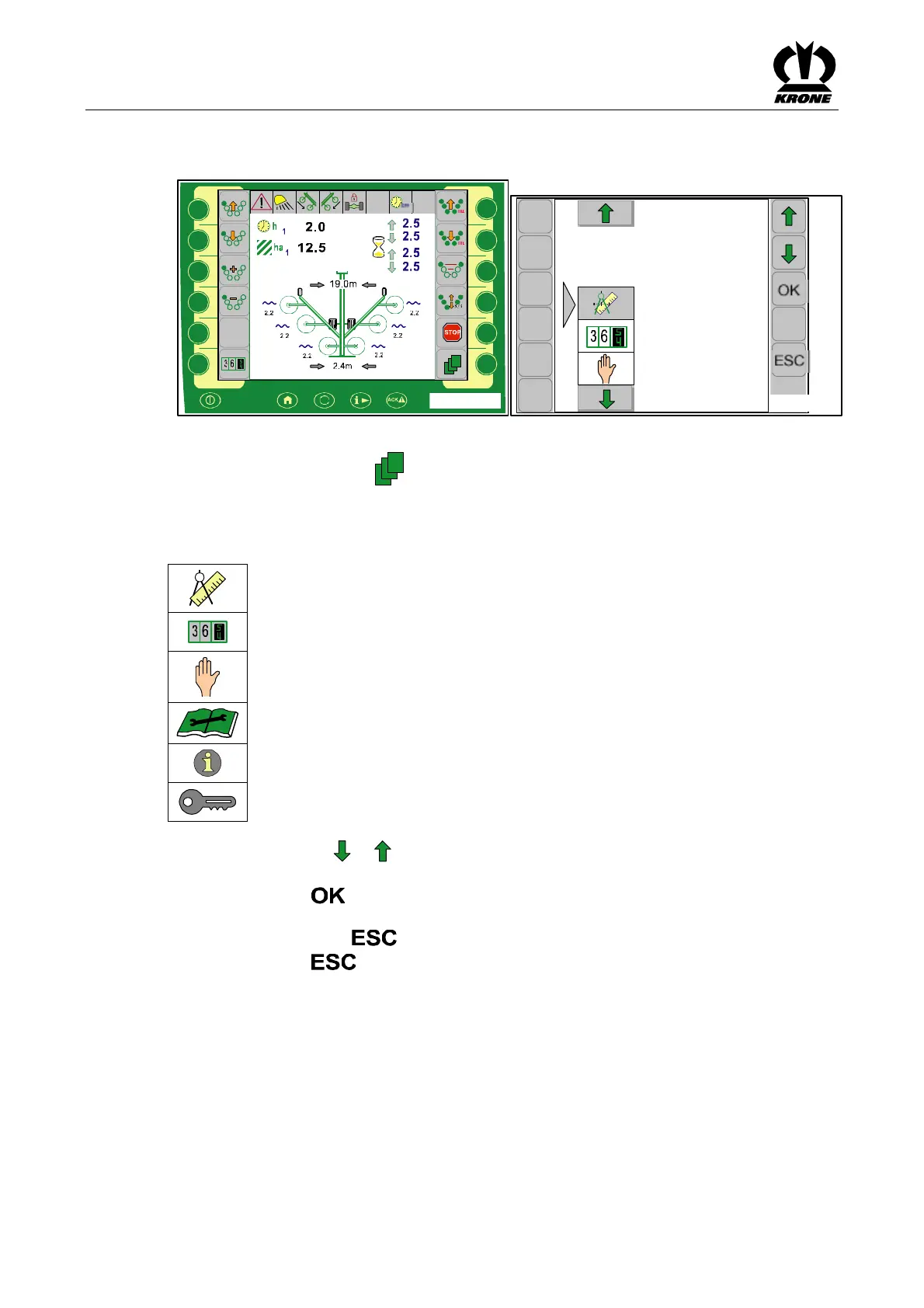
By pressing the function key in the main window you get into the menu level of the
machine.
The menu level is shown in the display.
Pos: 22.5.6 /BA/ Info-Center/CC-I SOBUS-Ter minal/CCI-Swadro/S wadro 2000/H auptmenüs/Me nüebene Über blickH auptmenüs @ 88\mod_13 21614236723 _78.doc @ 75479 6@ @ 1
The menu level is divided into six main menus:
= Main menu 1 "Settings"
= Main menu 2 "Counters"
= Main menu 3 "Manual operation"
= Main menu 4 "Service"
= Main menu 5 "Information"
= Main menu 6 "Technician"
Press the function key or to enter the required main menu. The background of the
selected symbol turns grey.
• Pressing the function key brings up the menu level of the main menu that is
selected.
• Press function key to close the currently displayed menu.
• Pressing the key for a little longer calls up the basic screen.
Pos: 22.5.7 /BA/--- --Seitenumbruc h------ @ 0\ mod_1196175311 226_0.doc @ 4165 @ @ 1









 To Next Page