KRONE operation terminal Gamma
63
Pos: 16.24.10 / BA/Info-Center/Sc hwader/Bedie neinheit - Komf ort/SW 2000/Hau ptmenüs/Haup tmenü 1 Eins ellungen/Menü 1- 2„N ullabgleich Kr eiselhöhe“ (O ption Kreiselhö henanzeige) S W 2000 @ 90\m od_13231698271 56_78.doc @ 769296 @ 3 @ 1
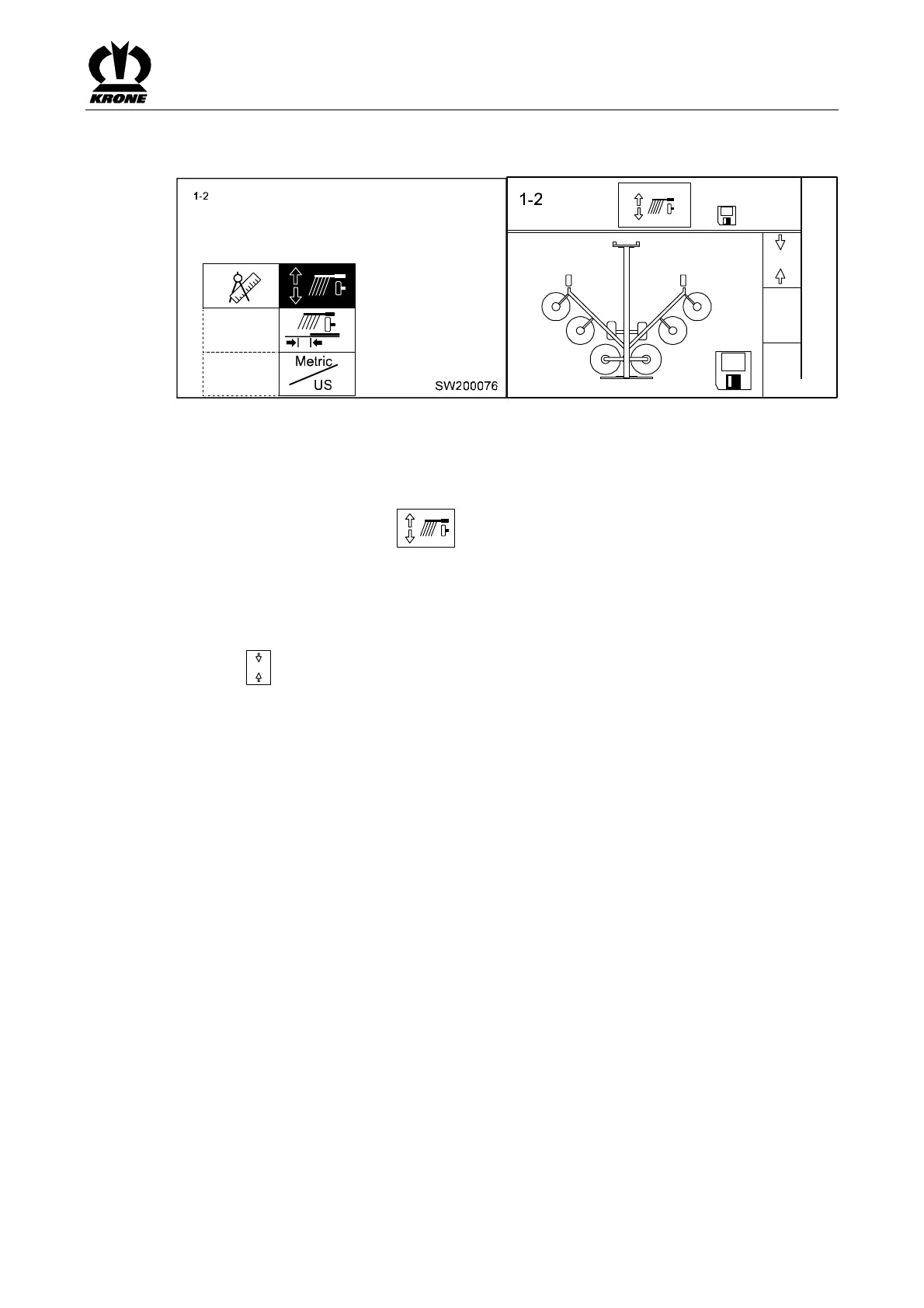
6.11.1 Menu 1-2 "Zero Calibration Rotor Height" (Rotor Height Display Option)
0
1,5
-11,2
-0,5
10,2
2,1 8,4
SW2000040
Fig. 38
Condition for parameters:
• Rotor height display must be initialised (technician setting)
Main menu 1 "Settings" appears:
• You can select menu 1-2 with the rotary potentiometer. The icon is displayed
inversely
• Press the rotary potentiometer
The display shows menu 1-2 "Zero calibration rotor height".
Adjusting procedure:
Press the
0
key to reset the rotor height displays to 0.
Pos: 16.24.11 / BA/-----Seitenu mbruch------ @ 0\ mod_11961753 11226_0.doc @ 4165 @ @ 1









 To Next Page