KRONE operation terminal Gamma
37
Pos: 16.3.6 /Übersc hriften/Übersc hriften 3/P-T/ Spannungs versorgung @ 6\m od_121506176854 0_78.doc @ 98 174 @ 3 @ 1
6.1.1 Electrical power supply
Pos: 16.3.7 /BA/ Sicherheit/Gef ahrenhinweise/Aus fall der Bedie neinheit @ 6\m od_12150619973 06_78.doc @ 98196 @ @ 1
Danger! - Failure of control unit
Effect: Danger to life, injuries or damage to the machine.
Make sure during assembly that the connection cables are not tight and that they do not come
in contact with the tractor wheels.
Pos: 16.3.8 /BA/ Inbetriebnahme/Sc hwader/Ansc hluss elektrisch e Bedienung/A nschluss ele ktrische Bedienung SW 2000 @ 3 6\mod_12607 84954108_78.doc @ 336768 @ @ 1
SW2000006_1
3
1
5
A
4
I
II
6
III
B
3
2
7
Fig. 14
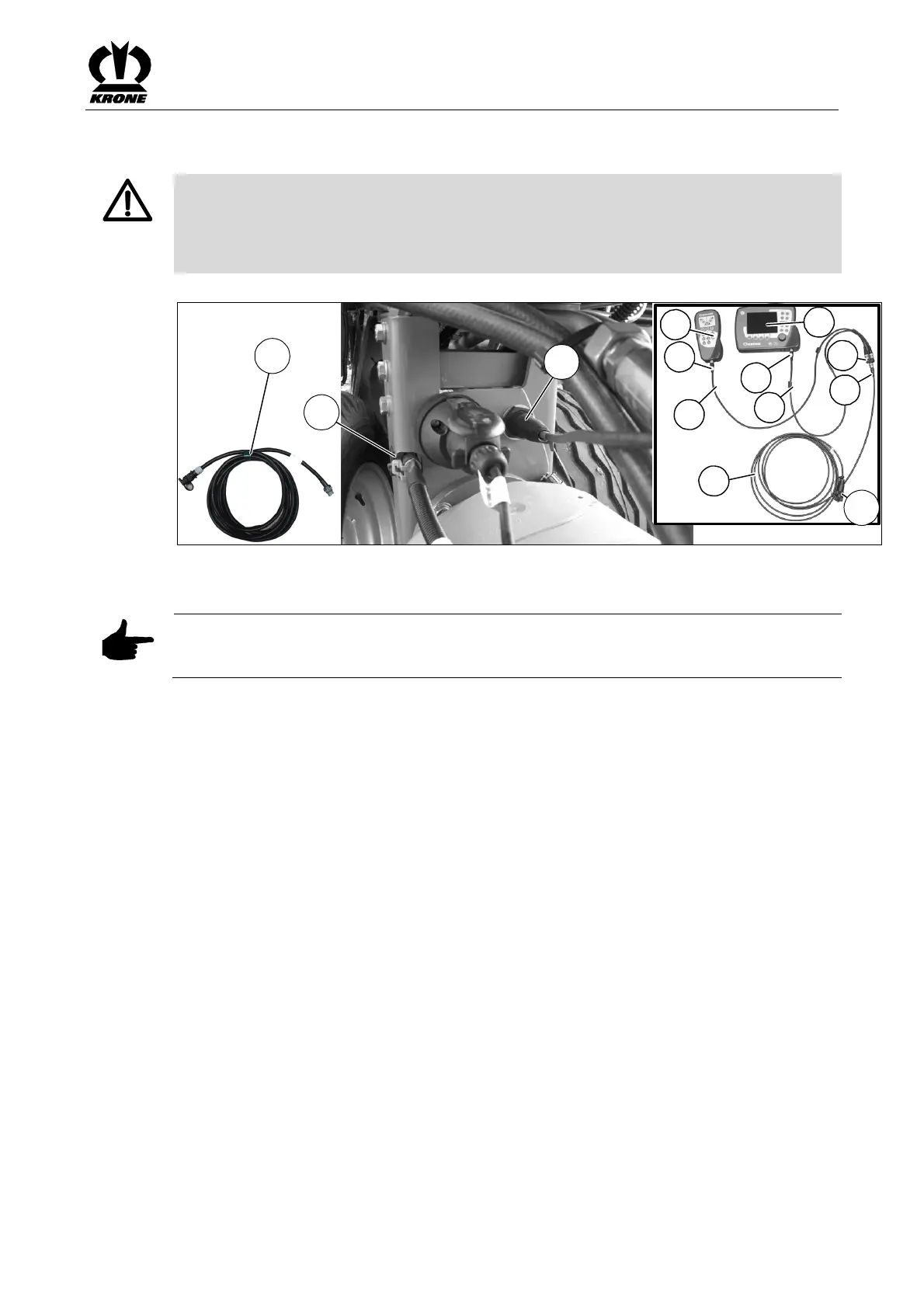
The connection for the electrical controls is provided by the power supply cable (1).
Note
If necessary, the continuous power socket and support for the control unit must be previously
installed on the tractor (see the chapter on starting up "Power Supply").
To do this:
• Connect the power supply cable (2) to the continuous power socket on the tractor and to
the socket (7) (2-pin) on the machine
• Insert the plug of the power supply cable (1) in the appropriate socket (3) of the machine
• Connect the connecting cable (I) of the power supply cable (1) to the distributor (4)
• Connect the connecting cable (II) to the socket (5) of the control unit (A) and to the
distributor (4)
• Connect the connecting cable (III) to the socket (6) of the control unit (B) and to the
distributor (4)
• Position the cable so that it will not come in contact with the wheels
Pos: 16.4.1 /BA/ Info-Center/Lad ewagen/Übersich t @ 0\mod_12 00637601725 _78.doc @ 45 891 @ 2 @ 1









 To Next Page