KRONE operation terminal Gamma
54
Pos: 16.10.1 /B A/Info-Center/Sch wader/Bedi eneinheit - Komfort /Swadro 1400/Gr undbild 2/4 Breit enverstellung en/Überschrift Grundbild „Breite nverstellungen“ @ 9\mod_122 1028124965_78.d oc @ 13111 2 @2 @ 1
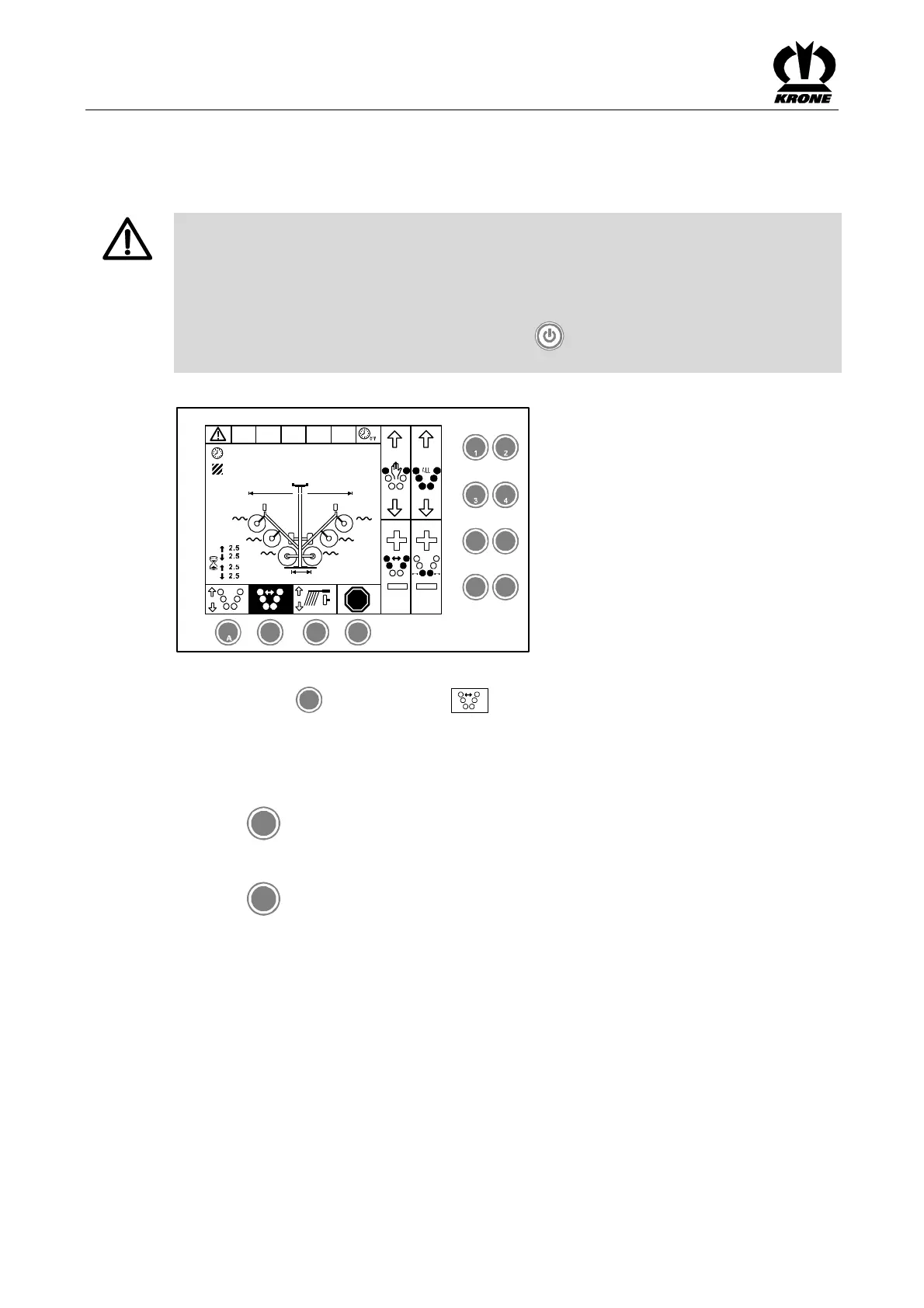
6.8 Basic screen "Width adjustments"
Pos: 16.10.2 /Üb erschriften/Üb erschriften 3/A-E/ Arbeitsbreite @ 10\mod_1221 198093573_78. doc @ 132335 @ 3 @ 1
6.8.1 Working width
Pos: 16.10.3 /B A/Info-Center/Sch wader/Bedi eneinheit - Komfort /Gefahr Schnellst op durch EIN/ AUS Taste @ 3 6\mod_12632 76960200_78.d oc @ 338506 @ @1
DANGER! – Before swivelling the machine, ensure that nobody is within the swivel
range.
Effect: Danger to life or serious injuries.
• Instruct persons to leave the danger zone.
• If required, switch off the machine immediately.
• If there is an imminent danger, press the key (ON/OFF) on the control unit to stop
all functions which are currently being performed.
Pos: 16.10.4 /B A/Info-Center/Sch wader/Bedi eneinheit - Komfort /SW 2000/Gru ndbild 2 Breiten verstellungen/Gr undbild „Arbeits breite / Schwad breite " Bild SW 2 000 @ 23\ mod_1240232410 083_78.doc @ 2 36702 @ @ 1
STOP
2.5
12.5
h
ha
2,2 2,2
2,2 2,2
2,2
2
2
5 6
7
8
B C D
SW2000035
M M
M
2,2
1,8m
15,1m
Fig. 29
Pos: 16.10.5 /B A/Info-Center/Sch wader/Bedi eneinheit - Komfort /SW 2000/Gru ndbild 2 Breiten verstellungen/Durc hT aste B d as Grundbild „Breit enverstellung en“ aufrufen @ 23\mod_1240 232168911_78. doc@ 236672 @ @ 1
Pressing the key
B
under the softkey
M
brings up the basic screen "Width adjustments".
Pos: 16.10.6 /B A/Info-Center/Sch wader/Bedi eneinheit - Komfort /SW 2000/Gru ndbild 2 Breiten verstellungen/Ar beitsbreite vorn e einstellen SW 2000 @ 23\mo d_12402326206 77_78.doc @ 2 36727 @ 3 @ 1
6.8.2 Adjust the front working width
To increase the working width:
Press the
5
key
To reduce the working width:
Press the
7
key
Pos: 16.11 /BA/--- --Seitenumbruc h------ @ 0\mo d_119617531 1226_0.doc @ 41 65 @ @ 1









 To Next Page