KRONE operation terminal Gamma
70
Pos: 16.24.25 / BA/Info-Center/Sc hwader/Bedie neinheit - Komf ort/SW 2000/Hau ptmenüs/Haup tmenü 2 Zähl er/Kundenzähler l öschen SW 200 0@ 23\mod_124 0312708506_ 78.doc @ 237 865 @ @ 1
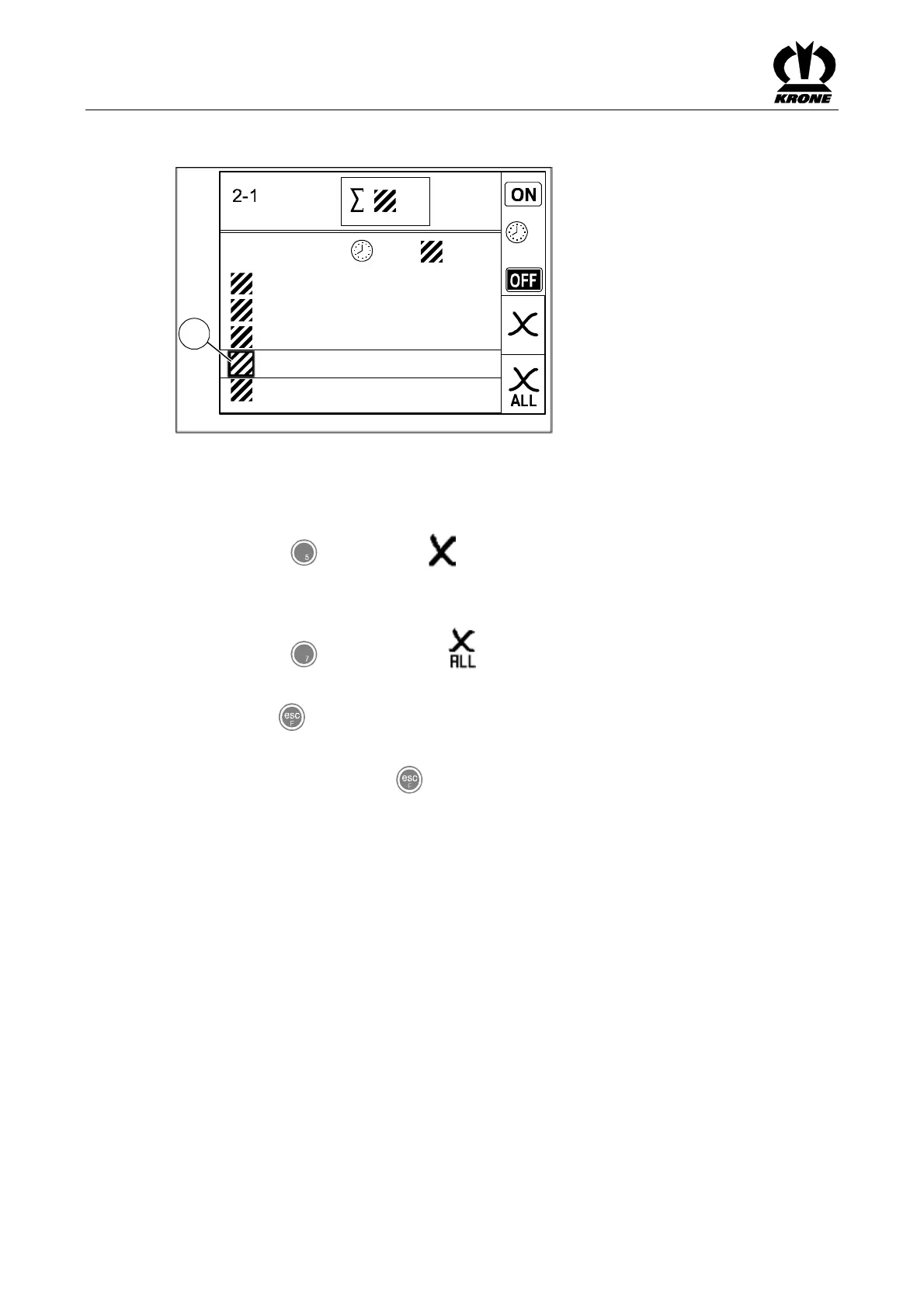
Deleting the customer counter
SW2000042
n
1
2
3
4
5
12,1 126,1
0,3
3,5
402,2
0,8
356,5
423,5
206,8
1023,1
h
A
h
ha
ha
Fig. 45
• Use the rotary potentiometer to place the customer counter to be deleted between the
two crossbars (A).
• Press the key for softkey .
The selected customer counter is set to zero.
Deleting all customer counters
• Press the key for softkey and hold it for about 2 seconds.
All customer counters are set to zero.
• Use the key to close the menu currently displayed.
The display shows menu level 2 "Counters".
• Pressing and holding the key brings up the basic screen.
Pos: 16.24.26 / BA/-----Seitenu mbruch------ @ 0\ mod_11961753 11226_0.doc @ 4165 @ @ 1









 To Next Page