KRONE operation terminal Gamma
73
Pos: 16.24.29.6 / BA/Info-Center/Sc hwader/Be dieneinheit - Ko mfort/Gefahr Sch nellstop durch EIN /AUS Taste @ 36\mod_1263 276960200_7 8.doc @ 338506 @ @ 1
DANGER! – Before swivelling the machine, ensure that nobody is within the swivel
range.
Effect: Danger to life or serious injuries.
• Instruct persons to leave the danger zone.
• If required, switch off the machine immediately.
• If there is an imminent danger, press the key (ON/OFF) on the control unit to stop
all functions which are currently being performed.
Pos: 16.24.29.7 / BA/Info-Center/Sc hwader/Be dieneinheit - Ko mfort/SW 2000/Ha uptmenüs/Ha uptmenü 3 Wart ung / Handbetri eb/Handbetri ebBil d @ 61\mod _1298906732051 _78.doc @ 56 8519 @ @ 1
3
STOP
5 6
7
8
B C D
SW2000049_2
M M
M
Fig. 47
Pos: 16.24.29.8 / BA/Info-Center/Sc hwader/Be dieneinheit - Ko mfort/SW 2000/Ha uptmenüs/Ha uptmenü 3 Wart ung / Handbetri eb/Handbetreib H auptmenü aufr ufen @ 61\m od_12989702062 65_78.doc @ 568803 @ @ 1
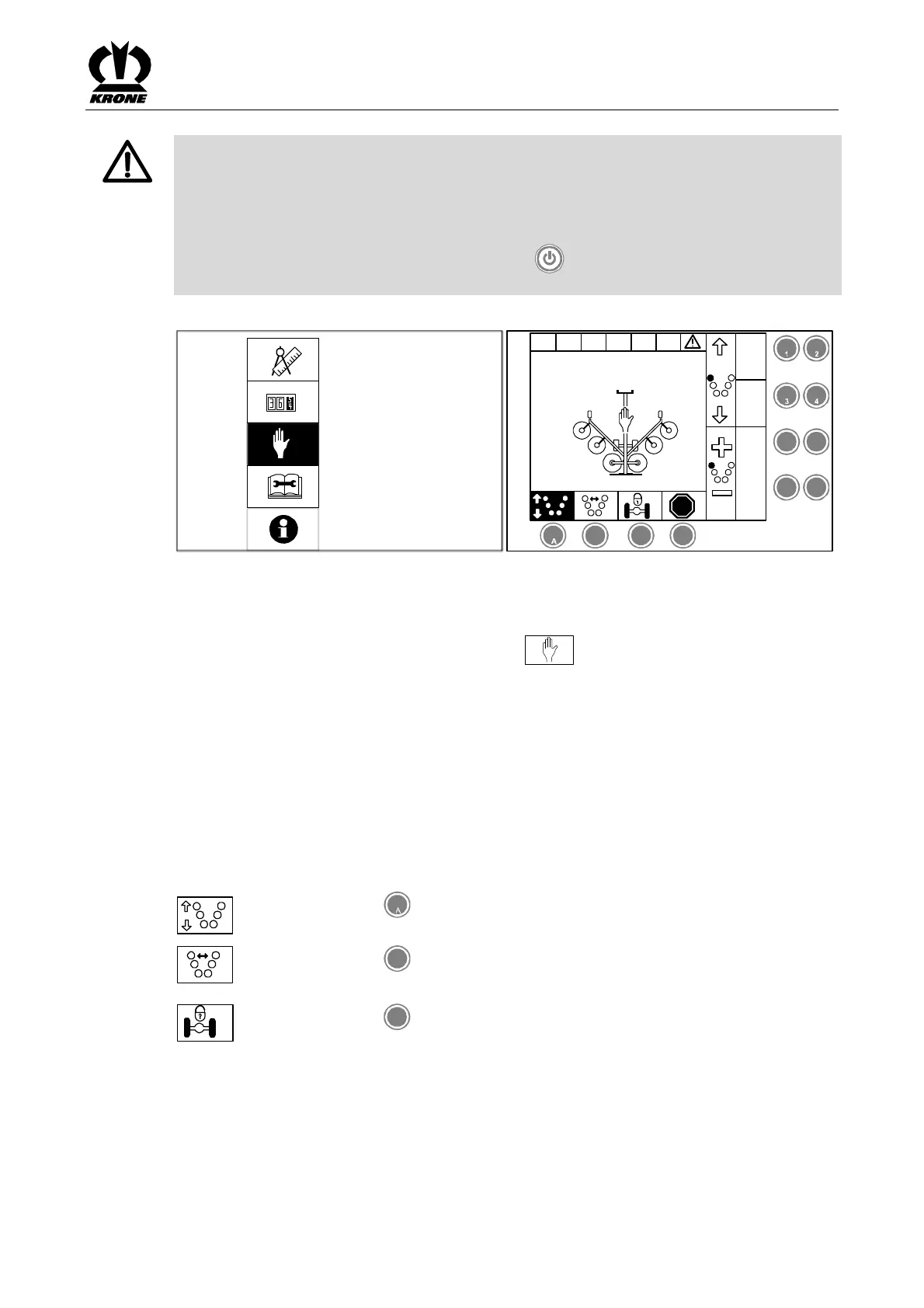
Calling the Menu
Main menu 4 "Service" is called
• Select menu 3 with the rotary potentiometer . The icon is displayed inversely.
• Press the rotary potentiometer.
The display shows menu level 3 "Manual operation".
The "Manual Operation" menu is divided into 3 basic screens
Basic screen 1: Lifting the rotors
Basic screen 2: Width adjustments
Basic screen 3: Guide wheels/self steer
Pos: 16.24.29.9 / BA/Info-Center/Sc hwader/Be dieneinheit - Ko mfort/SW 2000/Ha uptmenüs/Ha uptmenü 3 Wart ung / Handbetri eb/Handbetri ebM enüsteuerung f ür die Seiten 1 bis 3 @ 23\mo d_12403248185 85_78.doc @ 238673 @ @ 1
Menu control for pages 1 to 3
M
Pressing the key under the softkey brings up the basic screen "Lifting
the rotors".
M
Pressing the key
B
under the softkey brings up the basic screen "Width
adjustments".
M
Pressing the key
C
under the softkey brings up the basic screen "Guide
wheels/self steer".
Pos: 16.24.29.1 / BA/-----Seiten umbruch------ @ 0\mod_1196175 311226_0.doc @ 4165 @ @ 1









 To Next Page