Control System 57Service Manual – CS7000
Hidden Menus
The main machine controller supports a “hidden menu” which allows you to match the controller to the
machine, set some user options and perform time saving service tests. There are three main hidden menus
modes; Conguration Display, Conguration Menu and User Options Menu. A unique switch sequence is
used to enter each mode.
Conguration Display
The conguration display mode is a “read only” mode that allows you to check how the main machine
controller thinks the machine is equipped without running the risk of accidentally changing a value. It also
allows you to check historical faults for the main machine controller, steering controller and drive controller.
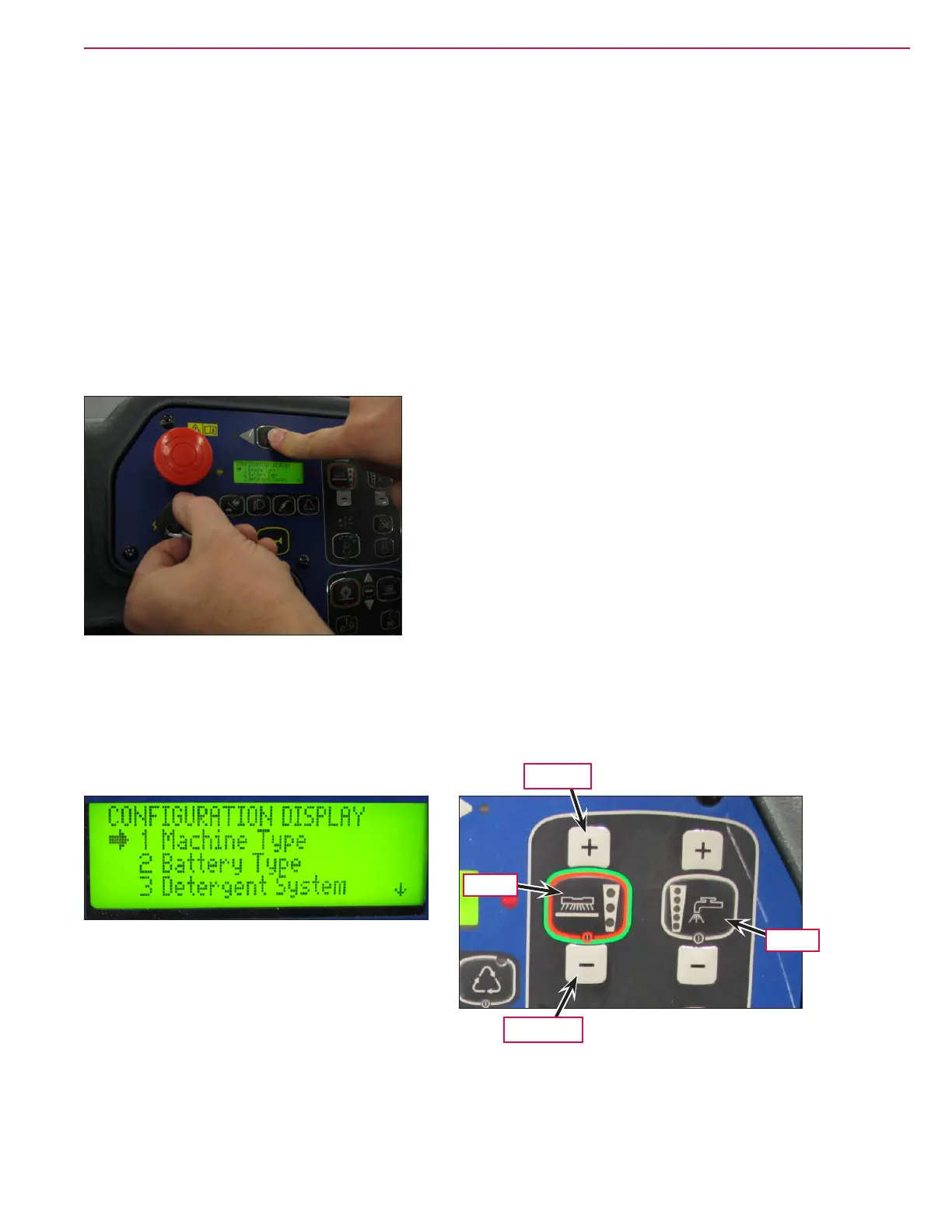
To enter the Conguration Display:
1. While Pressing and holding the hazard asher switch, turn the key on.
2. Continue to hold the switch until the LCD reads “Conguration Display”, and then release the switch.
Once in the conguration display, you can scroll the “arrow cursor” through the menu using the scrub
pressure increase and decrease buttons. To enter a menu selection, press the One-touch scrub switch. To exit
and return to the conguration display mode, press the solution switch. To exit the hidden menu, turn the
key switch off.
Scroll Up
Scroll Down
Enter
Exit


 To Next Page
 Loading...