8.9
Date Code 20150130 Instruction Manual SEL-787 Relay
Front-Panel Operations
Human-Machine Interface
Select the Close Breaker 1 or 2 menu item to assert Relay Word bits CC1
or CC2, which will close the breaker 1 or 2 via the CL1 or CL2 SEL
OGIC
equation (see Figure 4.51). Note that this requires Level 2 access.
Select the
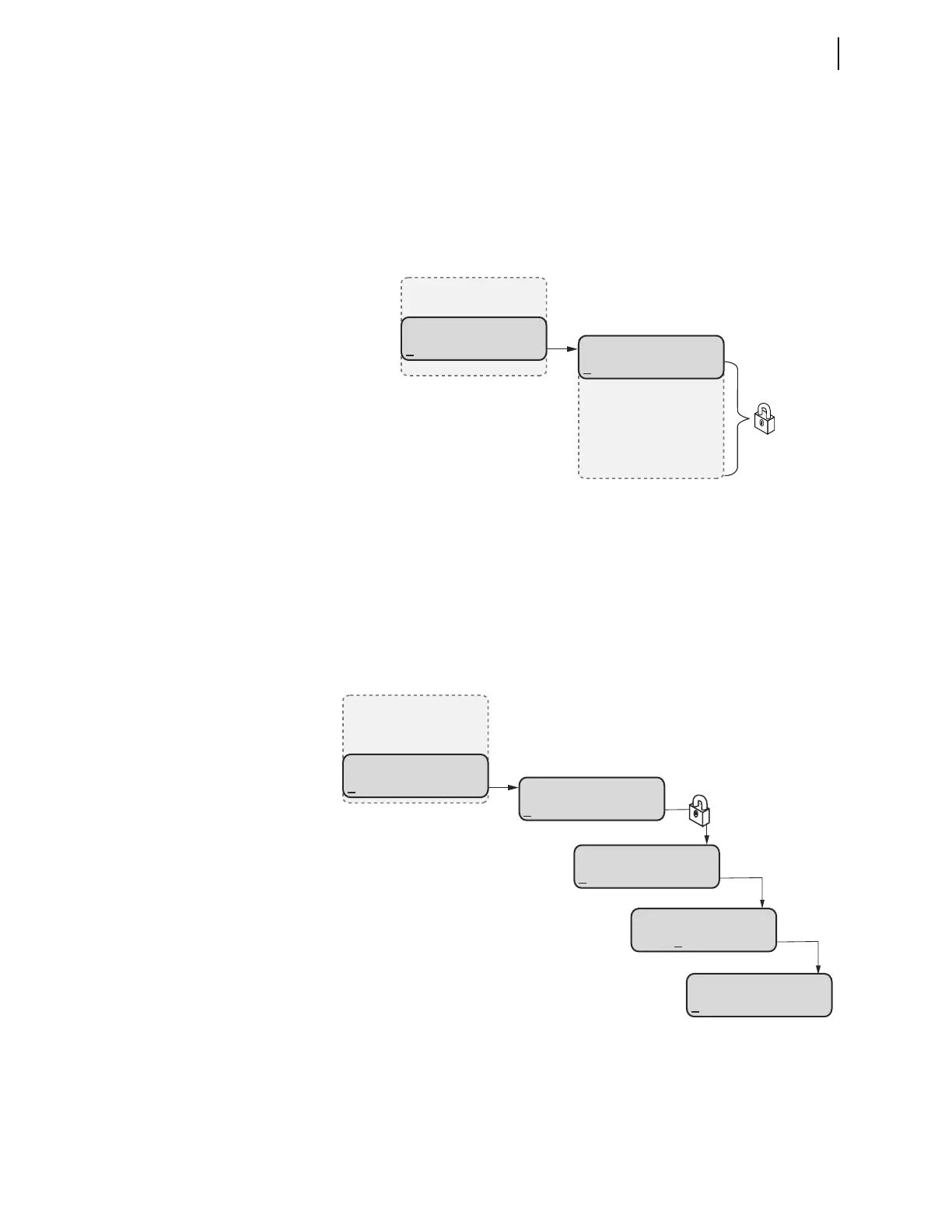
Outputs menu item from the CONTROL menu as shown in
Figure 8.18 to test (pulse) SEL-787 output contacts and associated circuits.
Choose the output contact by navigating through the
OUTPUT menu and test it
by pressing the ENT pushbutton. Note that testing the output contact requires
Level 2 access and reconfirmation.
Figure 8.18 CONTROL Menu and OUTPUTS Submenu
Select the Local Bits menu item from the CONTROL menu for local control
action. Local bits take the place of traditional panel switches, and perform
isolation, open, close, or pulse operations.
With the settings as per the example in Section 4 (see Local Bits on page 4.105
for more information), local bit 1 replaces a supervisory switch. Figure 8.19
shows the screens in closing the supervisory switch. In this operation, local bit
LB01 is deasserted (SUPER SW = OPEN), and changes to asserted (SUPER
SW = CLOSE) as shown in the final screen of Figure 8.19.
Figure 8.19 CONTROL Menu and LOCAL BITS Submenu
CONTROL
Open
Close
Outputs
Local Bits
OUTPUTS
OUT101
OUT102
OUT103
.
.
.
(Outputs Selected)
LOCAL BITS
SUPERV SW = OPEN
SUPERV SW = OPEN
CLOSE
CLOSE
YES No
SUPERV SW = CLOSE
OPEN
CONTROL
Open
Close
Outputs
Local Bits
(Local Bits Selected)
(SUPERV SW Selected)
(CLOSE Selected)
(Yes Selected)



 To Next Page