Chapter 7 — Importing and Exporting Cartridges Importing into a Storage or Cleaning Partition
December 2019 User Guide—Spectra T200, T380, and T680 Libraries
229
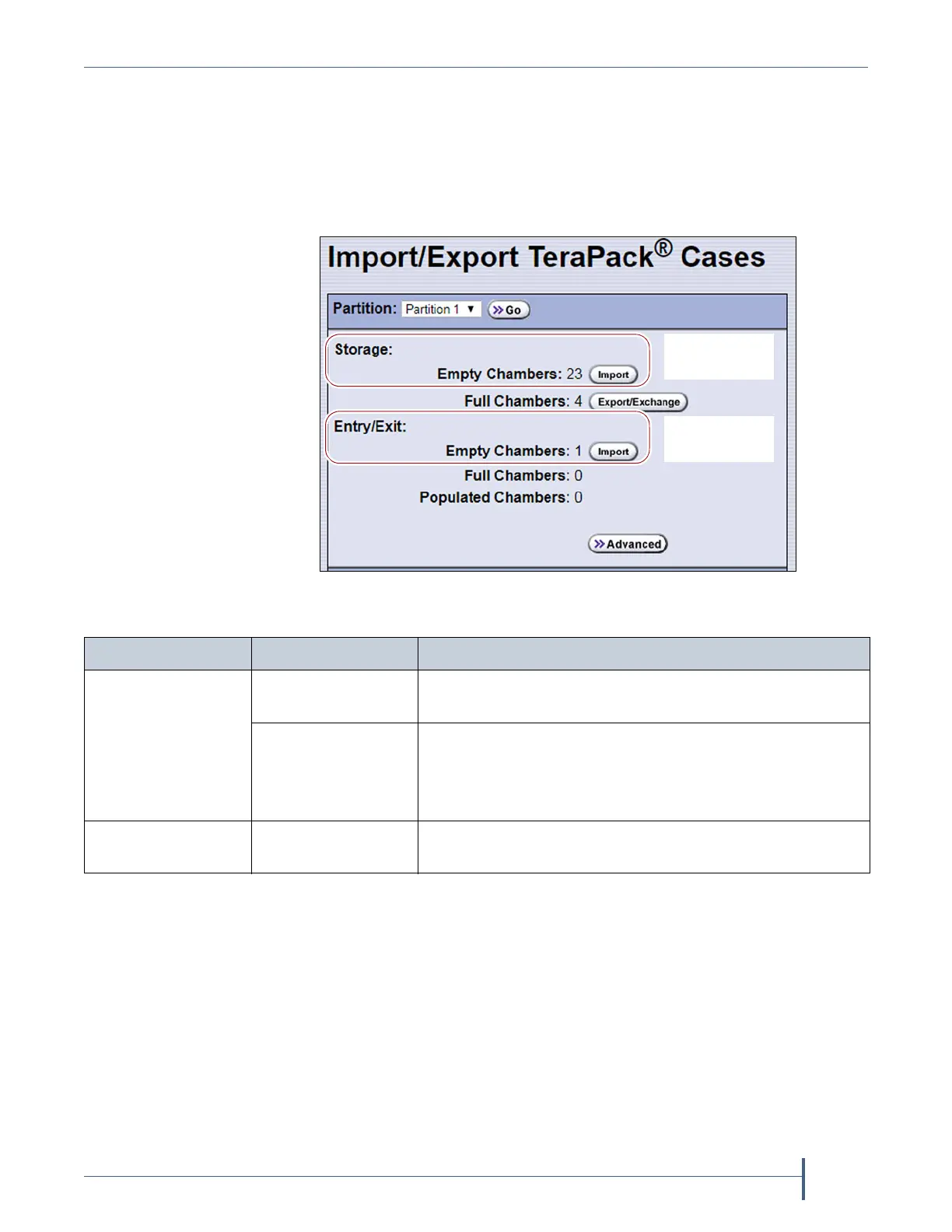
4. Click the appropriate Import button to select the destination (the
storage pool or entry/exit pool for a storage partition or cleaning for a
cleaning partition) for the imported magazines.
Note: If there are no empty chambers in the selected pool, the Import
button is not present. Export one or more magazines to make
space for the new magazines.
5. The TAP door opens and a Feedback Required screen displays
instructing you to place a TeraPack in the TAP.
a. Insert a magazine into the tray on the open TAP, making sure that it
is oriented with the textured surface on each side toward the
outside of the library, as shown in Figure 137.
Figure 136 Click Import for the desired destination (storage
partition shown).
Import into the
Entry/Exit pool
Import into the
Storage pool
For a... Select Import for.... If you want to import...
Storage partition Storage: Empty
Chambers
Magazines into the storage pool.
Entry/Exit: Empty
Chambers
Magazines into the entry/exit pool.
Note: Importing into the entry/exit pool is the
recommended method (see Import and Export Overview
on page 222).
Cleaning partition Cleaning: Empty
Chambers
Maintenance magazines into the cleaning partition.



 To Next Page