CHAPTER 9: Security Policy Examples
212 Vcontroller
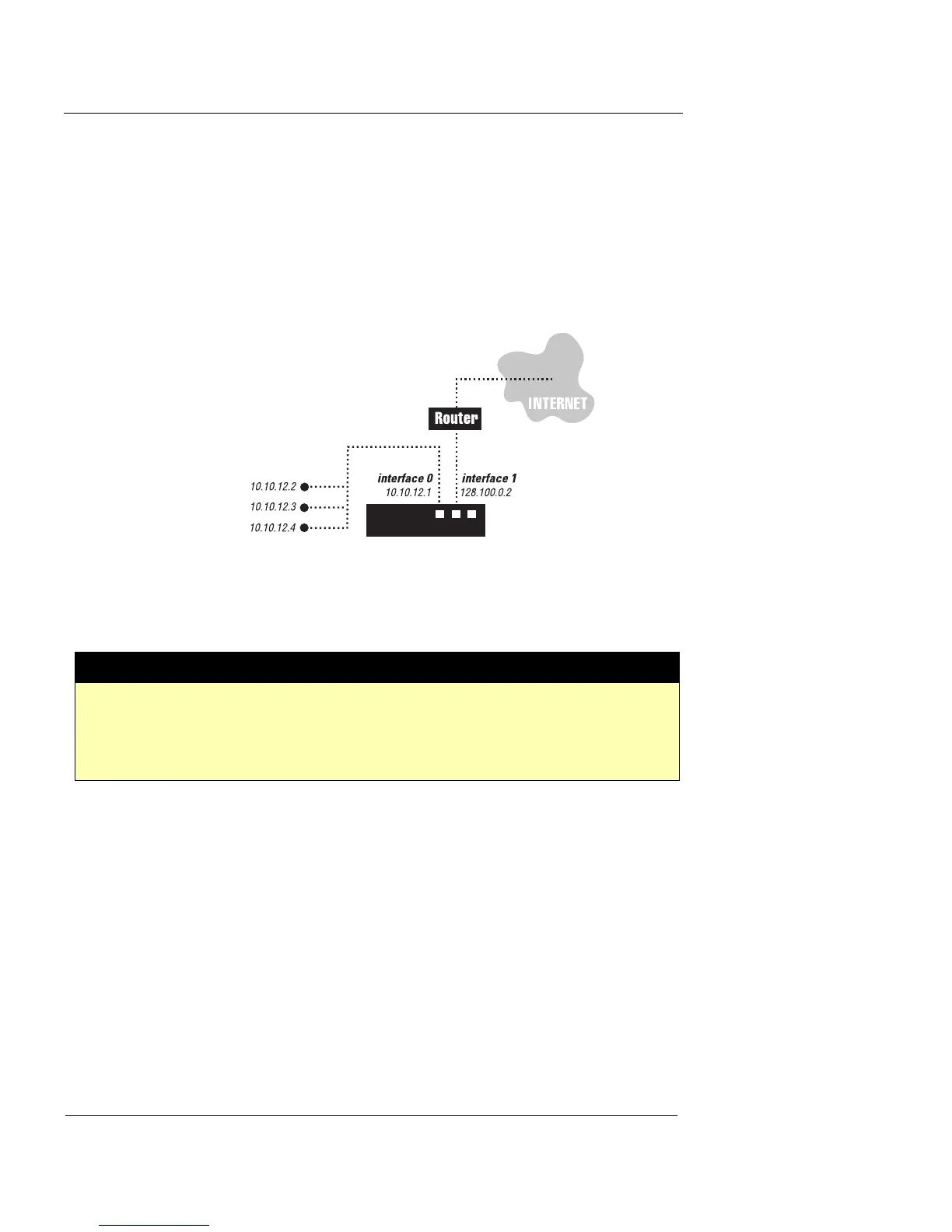
The following illustration shows the internal, private net-
work (with private IP addresses assigned to the three com-
puters) as connected to the Private interface of the Firebox
Vclass appliance. This interface has its own IP address, and
the Public interface (through which all communications
with the external networks are routed) has a separate IP
address.
You can meet Westchester’s requirements by doing the fol-
lowing:
1 Create two firewall policies with these parameters:
2 Have all the users in the private network reconfigure
their computers’ default gateway to the IP address of
the Private interface on the Firebox Vclass appliance.
Note that Dynamic NAT is applicable only to firewall poli-
cies for outgoing traffic.
Example 2: Restricting Internet access
Stillbrook Corporation has a branch office similar to that in
example 1: it has a limited number of public IP addresses.
# Name Src Dst Srvc Intrfc Action NAT/LB
1 Allow_
Private
ANY ANY ANY 0 Pass DYNAMIC_NAT
2 Deny_
Public
ANY ANY ANY 1 Block













 To Next Page