CHAPTER 9: Security Policy Examples
216 Vcontroller
Example 4: Allowing communication
between branch offices
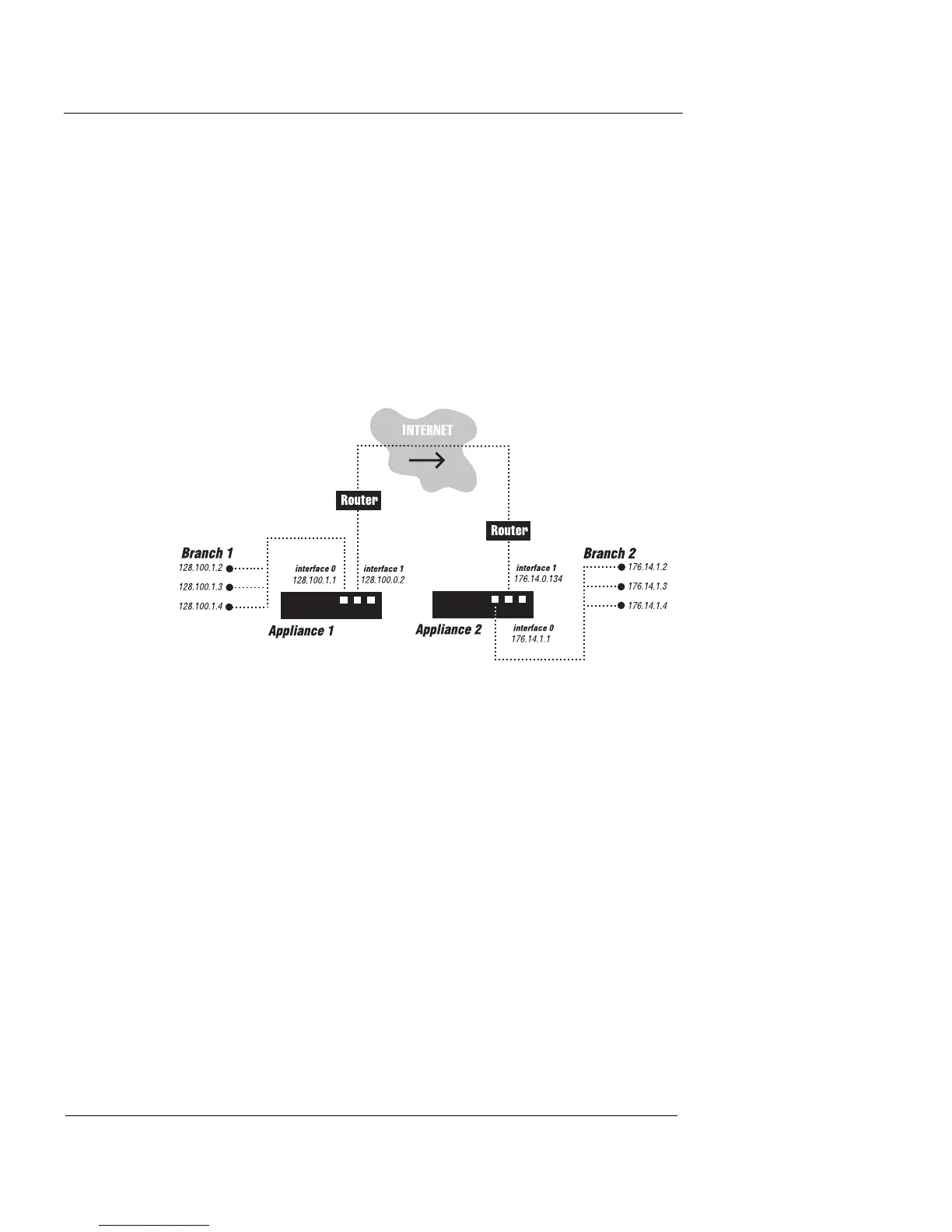
Appleby Incorporated has two branch offices, each with a
separate Firebox Vclass appliance. These branch offices
need separate sets of firewall policies to enable all users in
the offices to communicate with the other branch office.
To achieve such control over inter-branch traffic, you must
create policies on both Firebox Vclass appliances. The fol-
lowing figure illustrates this situation.
A separate policy must be created on each Firebox Vclass
appliance so that the users in the private net of the first
branch office can access the computers in the private net-
work of the second branch office. The policy on Firebox
Vclass appliance 1 specifies the traffic coming in from the
private interface, while the policy on Firebox Vclass appli-
ance 2 specifies the traffic coming in from the public inter-
face. Also note that the source, destination, and service
have to be exactly the same in both policies.
1 Configure all computers in Branch 1 to use the Private
interface of Firebox Vclass appliance 1 as the default
gateway.
2 Configure all computers in Branch 2 to use the Private
interface of Firebox Vclass appliance 2 as the default
gateway.













 To Next Page