Customizing HA System Parameters
Firebox Vclass User Guide 433
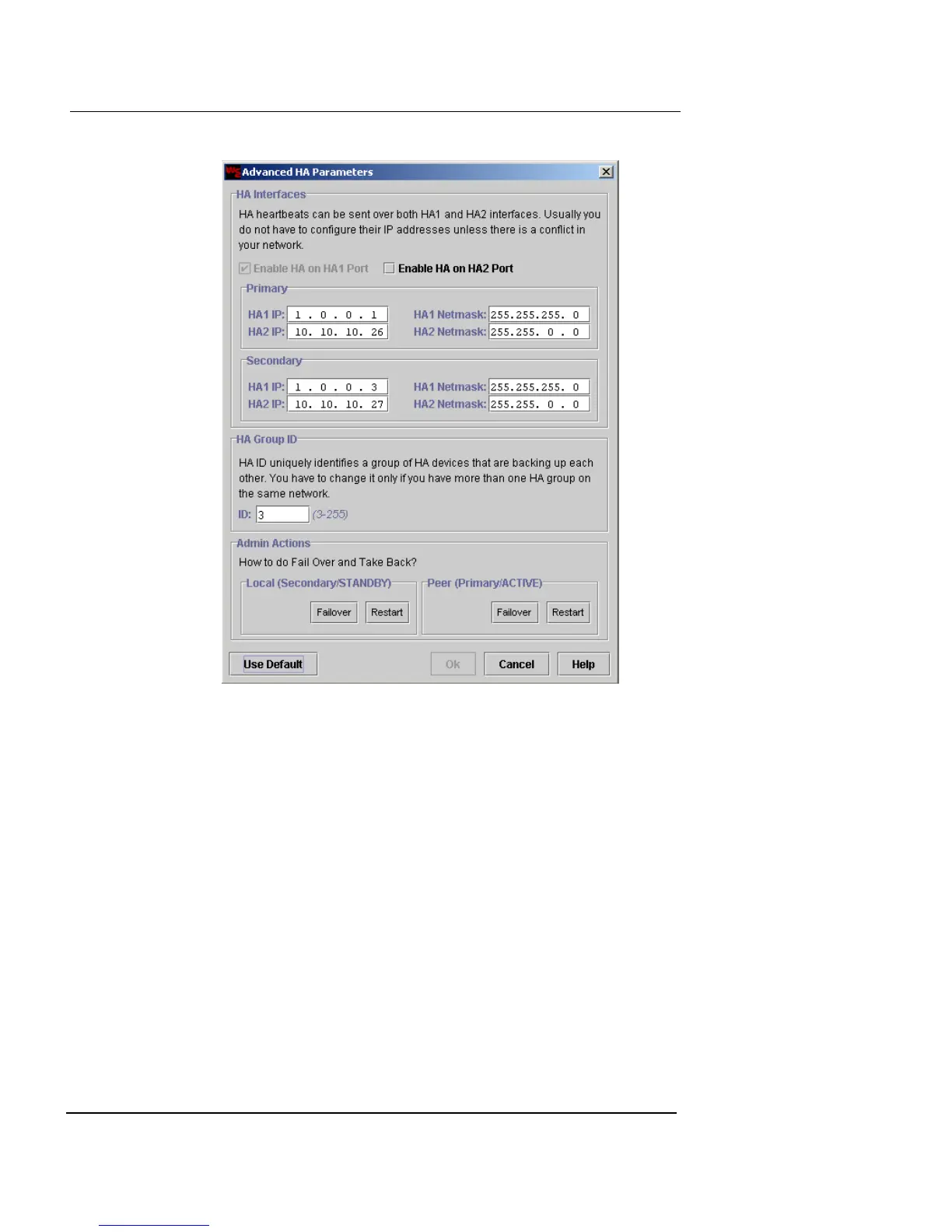
2 To activate monitoring through the HA ports, select the
Enable HA on HA1 Port checkbox. You can also
optionally select the Enable HA on HA2 Port
checkbox.
Note that if HA is enabled on the HA2 interface, that interface
cannot be used for management access. If you already configured
the HA2 interface for management access in the Interface tab of
the System Configuration dialog box, reopen that dialog box and
undo those entries.
Note that even if HA is enabled on the HA2 Port, the HA1 ports
must still be connected.
3 If specific IP addresses have been assigned to the HA
ports, type the IP addresses and netmasks in each of
the two HA Interface fields–primary and standby.
Otherwise the default addresses are adequate.
You can enter different IP addresses so these ports can be
accessed through your local area network.






 To Next Page