207
6.1 Setup
1.
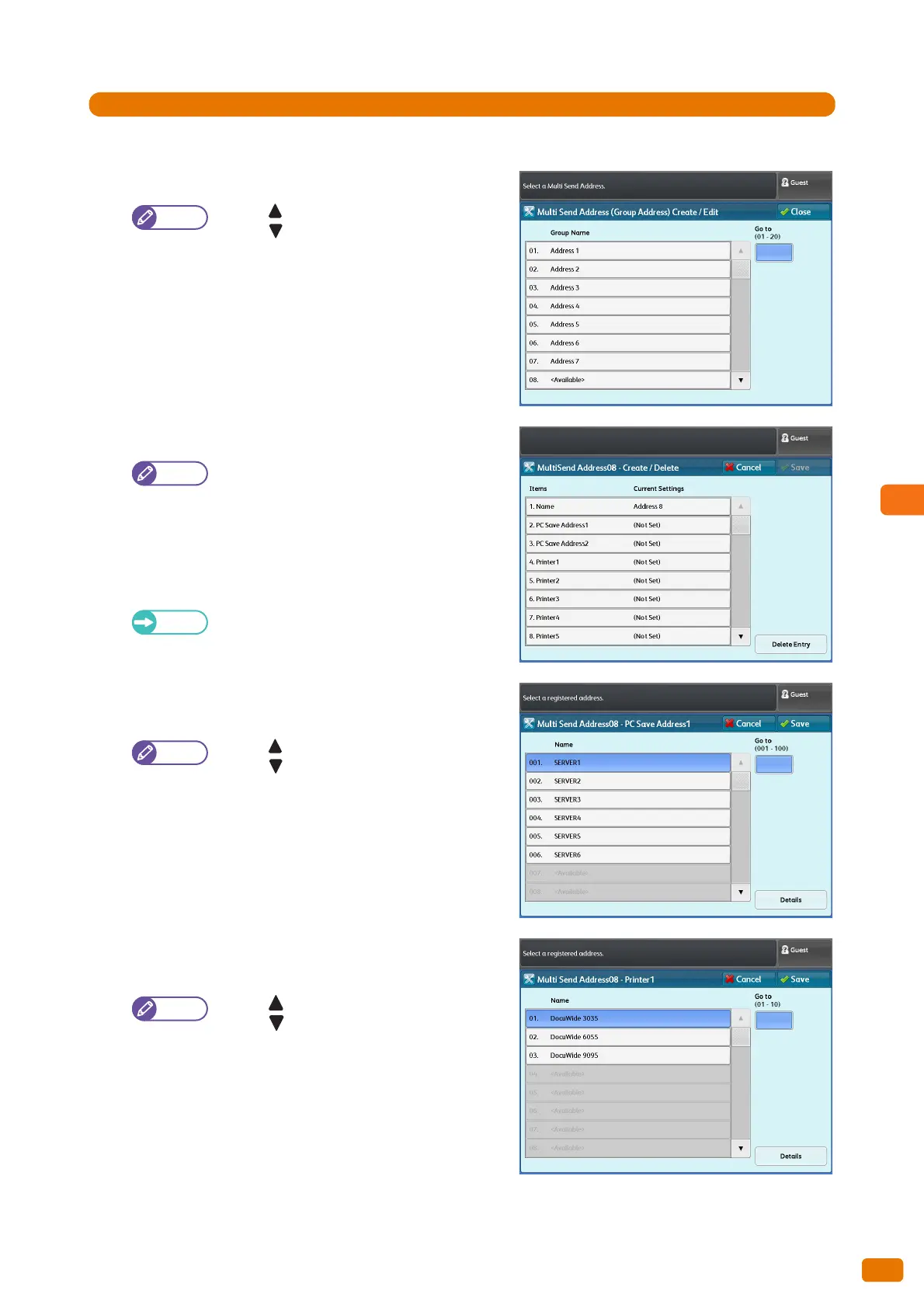
Press [Multi Send Address (Group Address)].
2.
Select the group number that you want to register.
Press [ ] to display the previous screen, and
press [ ] to display the next screen.
If you want to display a specific group at the
top, enter that number in [Go to].
3.
Select and set the desired items.
The group name (Name), up to two servers (PC
Save Address), up to five printers, and one local
printer (this machine) can be registered to a
group.
Name
Enter the group name using up to 36 characters.
For information on how to enter characters,
refer to "Text Entry" (p. 44).
PC Save Addresses 1, 2
Select a server.
Press [ ] to display the previous screen, and
press [ ] to display the next screen.
If you want to display a specific server number
at the top, enter that number in [Go to].
To display information on a registered server,
select the server, and press [Details].
Multiple instances of a server cannot be
registered to a group.
Printers 1 to 5
Select a printer.
Press [ ] to display the previous screen, and
press [ ] to display the next screen.
If you want to display a specific printer number
at the top, enter that number in [Go to].
To display information on a registered printer,
select the printer, and press [Details].
Multiple instances of a printer cannot be
registered to a group.


 To Next Page
 Loading...