9.3 Common Service Settings
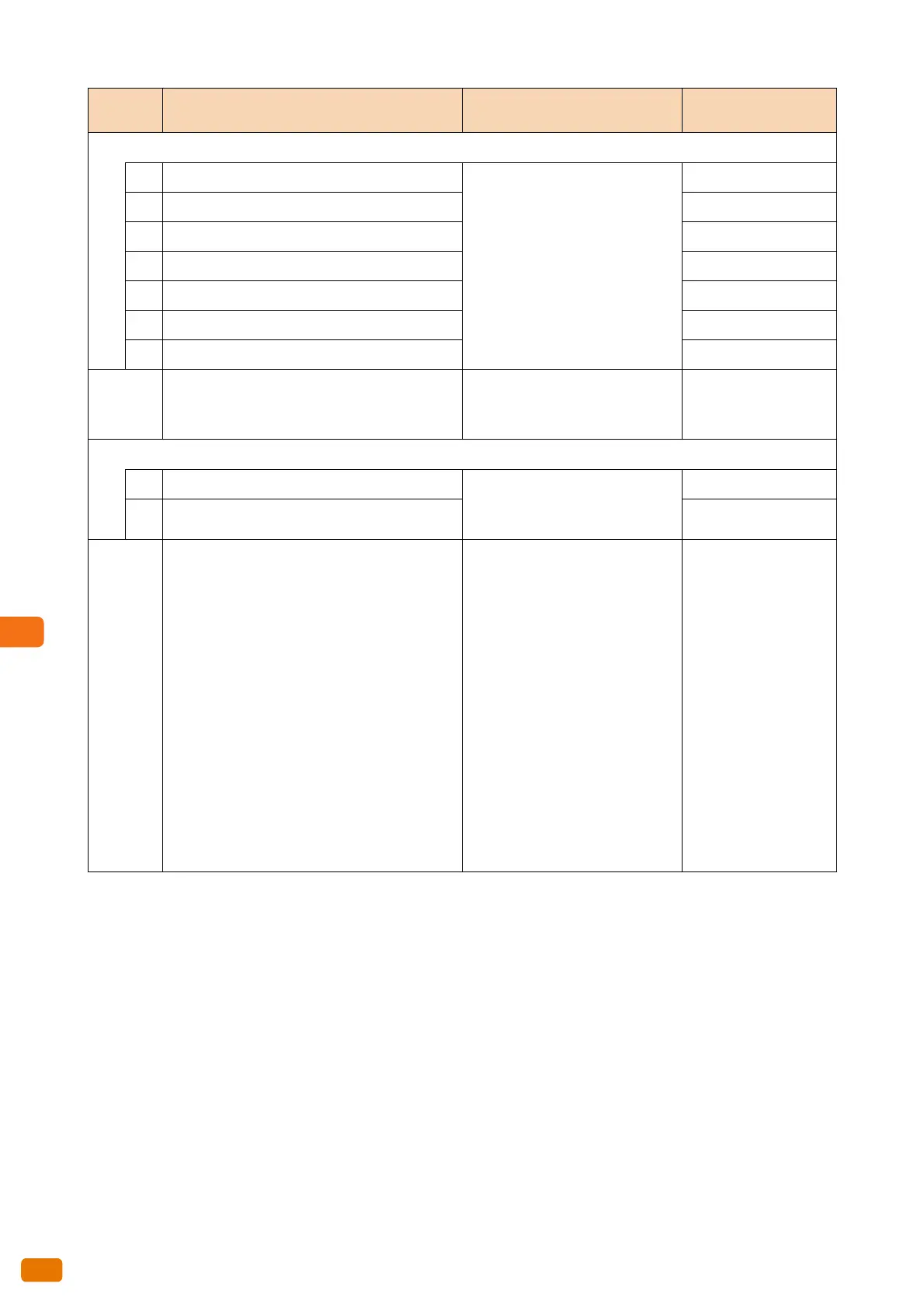
300
Sets whether to enhance lines for each of the Original Types.
53 Text & Line 0: Do not enhance lines
1: Enhance lines
0: Do not enhance lines
54 Photo & Text 0: Do not enhance lines
55 Printed Original 0: Do not enhance lines
56 Photograph 0: Do not enhance lines
57 Blueprint 0: Do not enhance lines
58 Transparent 0: Do not enhance lines
59 Uneven-Toned Background 0: Do not enhance lines
65
Adjusts the achromatic level the machine
detects for scan.
0-254 (The lower the value, the
lower intensity color the machine
distinguishes.)
5
Sets whether to reduce unwanted streaks.
66 Other than full color 0: Disabled
1. Less
2: More
0: Disabled
67 Color 0: Disabled
70
Defines the Special A Series sizes. 1: Standard Portrait
880 x 1240 mm, 620 x 880 mm,
440 x 620 mm, 310 x 440 mm
Standard Landscape
880 x 620 mm, 620 x 440 mm, 440
x 310 mm, 310 x 220 mm
2: Standard Portrait
880 x 1230 mm,
860 x 1210 mm, 625 x 880 mm,
620 x 871 mm, 440 x 625 mm, 435
x 620 mm
Standard Landscape
880 x 625 mm, 860 x 610 mm, 625
x 440 mm, 620 x 435 mm, 440 x
312 mm, 435 x 310 mm
1
Item
Number
Description New Value Factory Default


 To Next Page
 Loading...