July, 2007
4-53
WorkCentre 5020
REP 8.2.1
Repairs and Adjustments
Initial Issue
REP 8.2.1 HVPS (SCC)
Parts List on PL 8.2
Removal
WARNING
To avoid personal injury or electrical shock, ensure that the machine is completely off
before disassembling or adjusting. Turn OFF the power and unplug the machine.
1. Remove the Rear Cover (REP 9.2.1).
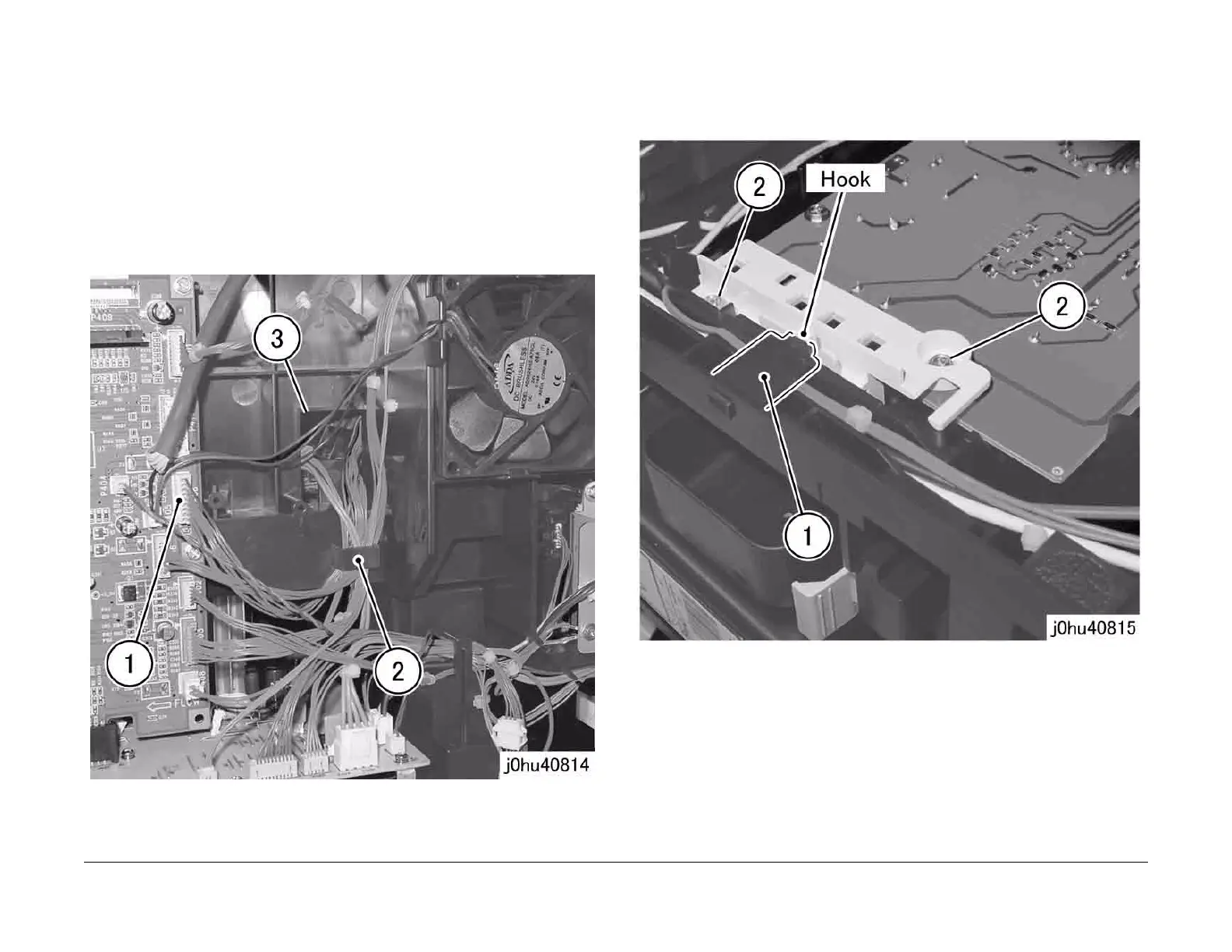
2. Disconnect the AIOC PWB connector (Figure 1).
1 Disconnect P/J 406.
2 Remove the wire harness from the clamp.
3 Slide the Connector Housing that was removed in step 1 through the square hole.
Figure 1
3. Open the Front Cover.
4. Remove the Output Tray (REP 9.1.1).
NOTE: When removing the HVPS, use a Stubby Driver (499T00353).
5. Remove the Tapping Screws that secure the Contact Block (Figure 2).
1 Release the hook to remove the Harness Block.
2 Remove the Tapping Screws (2).
Figure 2



 To Next Page
 Loading...







