Chapter 1 Before Use
HA-8190V 1-20
1.4.3 Attaching the Sampler
Prepare: Sampler, Phillips screwdriver, stubby screwdriver (No.6200-1) and double open end wrench (10-13)
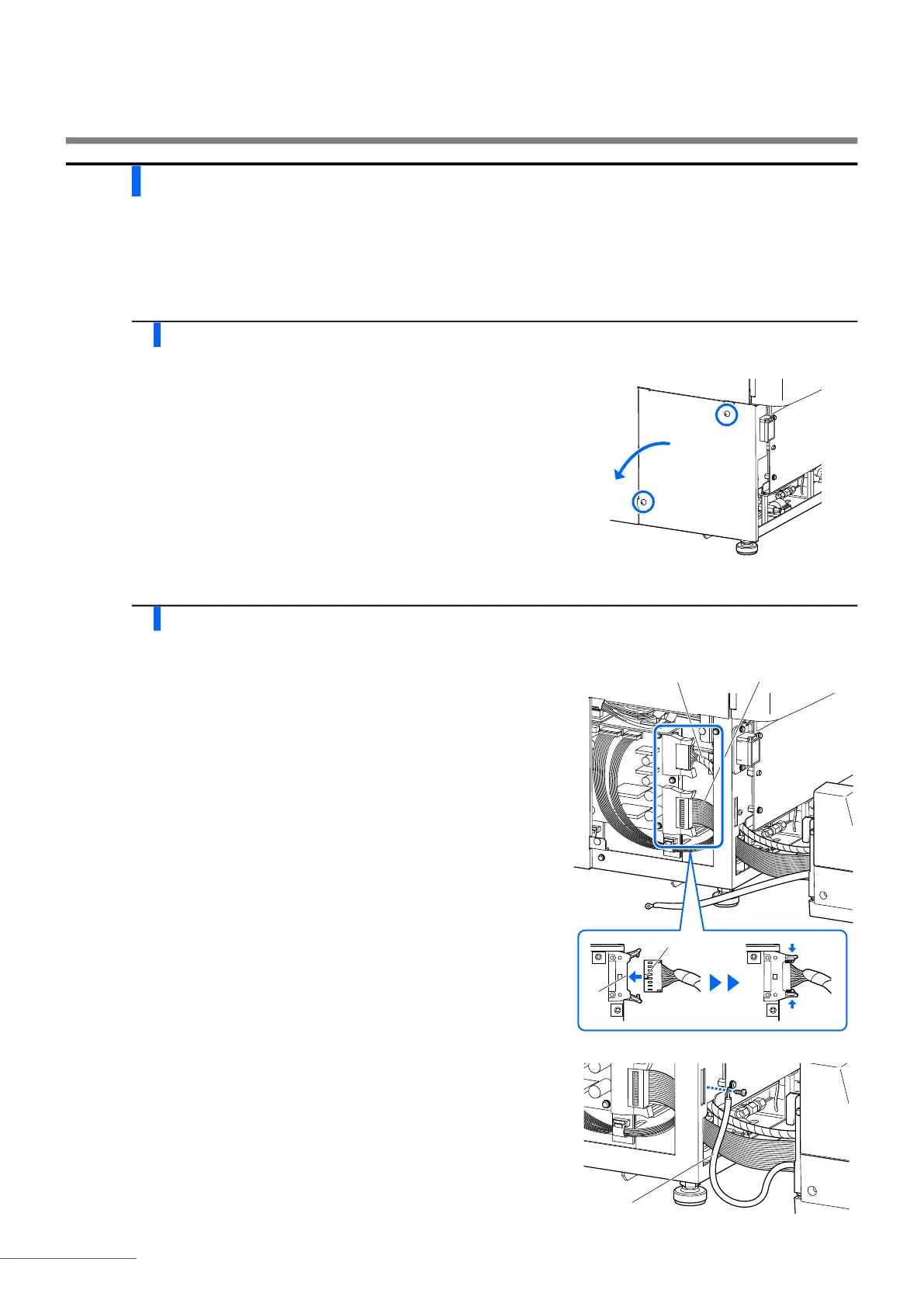
1 Remove the wiring box cover.
a Loosen the two screws on the left side panel of the main body
using the stubby screwdriver and remove the wiring box cover.
2 Connect the sampler cables to the main body.
a Place the sampler in front of the main body.
b Feed the two sampler cables through the slot on the main body.
c Connect the two sampler connectors to the matching connectors
on the main body.
• Match the projection (b) of the sampler connector to the recess
(a) of the main body connector, and insert the sampler connector
into the main body connector.
• Check that the top and bottom levers are closed and locked.
d Remove the earth fixing screw with the Phillips screwdriver.
e Fit the earth fixing screw through the eye of the sampler’s earth
line and attach the screw to its original position.
Cable of bundled wires
a
b
Flat cable
Earth line








 To Next Page