HA-8190V 1-35
1.5 Starting Up
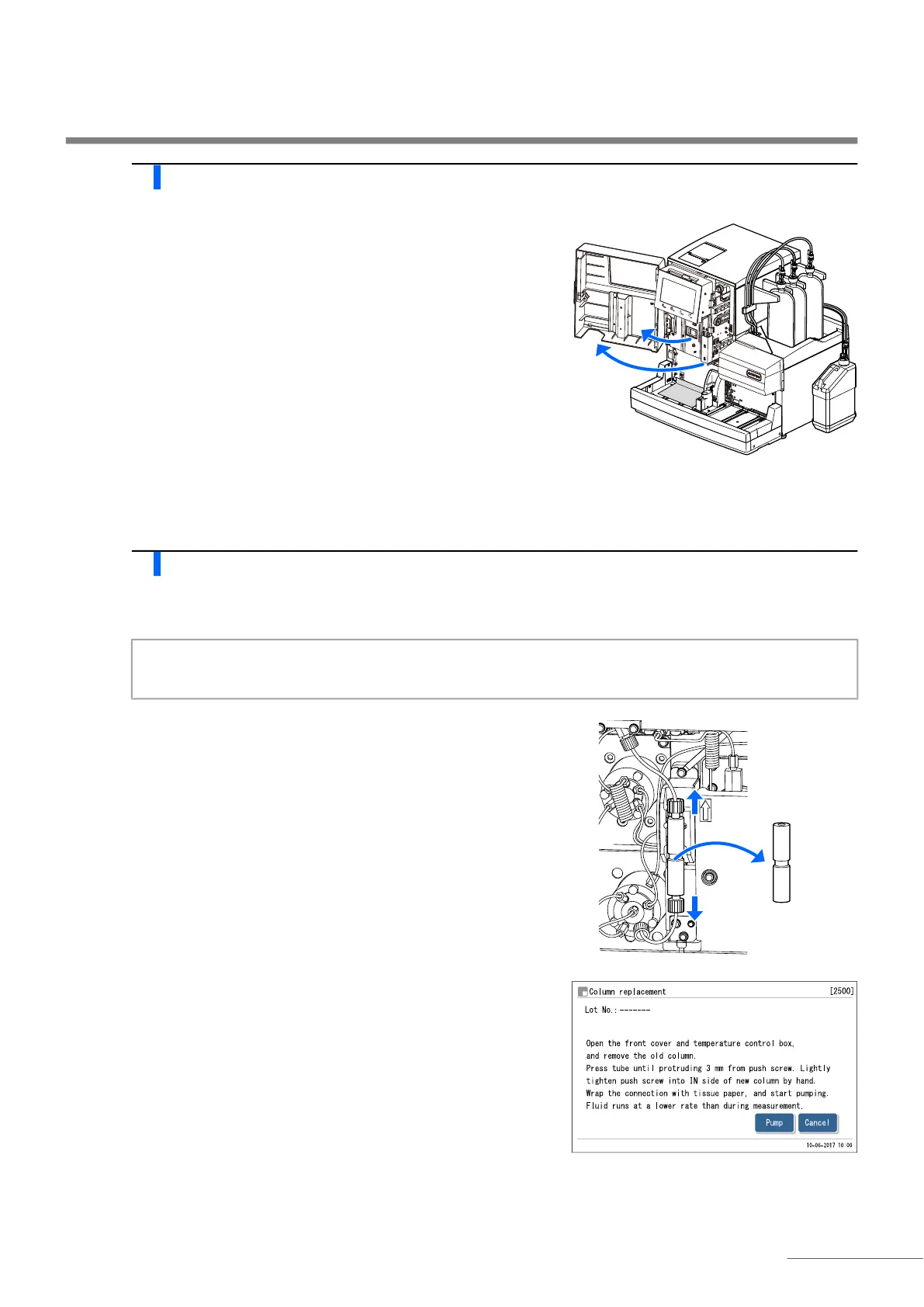
3 Open the temperature control box cover.
a Open the front cover.
• The mechanical sections will power off.
b Open the temperature control box cover.
• Push the handle to the left, then pull it to the front to open the box.
c Lay tissue paper below the temperature control box.
• The tissue paper blots up any liquids that leak while installing the
column.
4 Install the column.
a Check that pumping has stopped.
b Remove the dummy column.
• Follow the same procedure used to detach the column. See step 4
in “4.2.4. Replacing the Column” on page 4-13.
c Install the column by following the instructions on the screen.
• See steps 5 to 10 in “4.2.4. Replacing the Column” on page 4-13.
REFERENCE:
The message “W-062 Front or maintenance cover is open.”
appears if the front cover is opened before performing step 2.
Be sure to perform step 2 first.
NOTE:
Removing the dummy column while pumping is underway may cause fluid to splatter.
REFERENCE:
Keep the dummy column in the accessory case. This dummy
column should be reused if the instrument is not to be used for
extended periods of time.








 To Next Page