0ALJ-03E
Specifying Previously Used Destinations (Fax)
You can select a destination from among the past three destinations. When you specify a previously used
destination, the machine also sets the same fax settings such as density you used the last time you sent
documents to that destination.
IMPORTANT
When <Restrict Resending from Log> is set to <On>, you cannot use this feature. Disabling Use of Previously Used
Destinations
Turning OFF the machine or setting <Restrict New Destinations> to <On> deletes the past destinations, and disables this
feature.
Limiting Available Destinations
The destinations in Manual Sending are not available for this feature.
Making a Call before Sending Faxes (Manual Sending)
NOTE
When you specify a destination using this feature, any destinations that you have already specified are deleted.
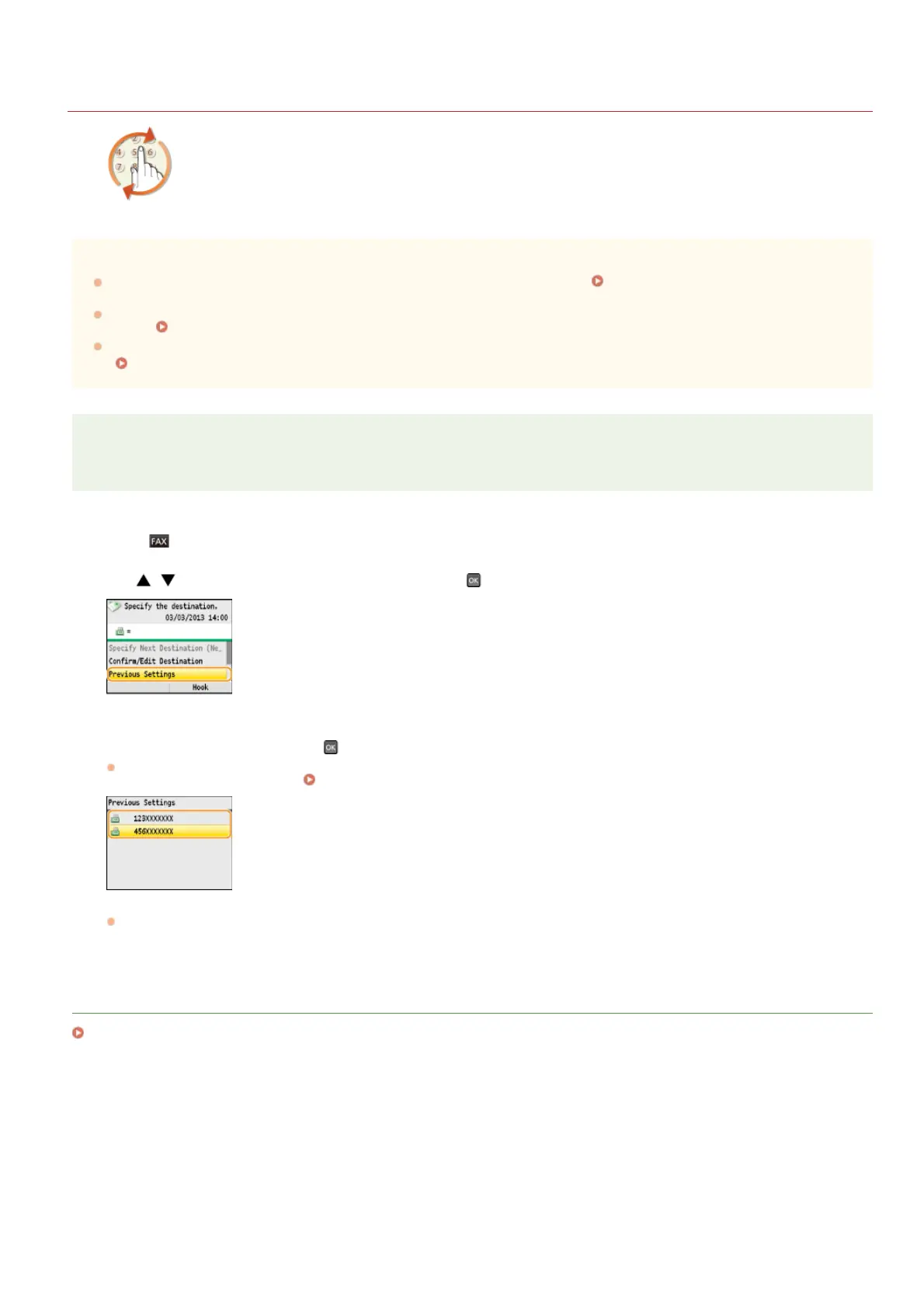
Press .
Use / to select <Previous Settings>, and press .
Select a destination, and press .
For Sequential Broadcast, the screen displays only the first destination you specified, but the fax will be sent to all the
destinations that you specified.
Sending Faxes to Multiple Destinations Simultaneously (Sequential Broadcast)
The selected destination and its fax settings are specified.
LINKS
Sending Faxes
1
2
3
㻝㻠㻥㻌㻛㻌㻢㻣㻢











 To Next Page